The Secret to Effective Professional Services Resource Management

Effective resource management blog graphic

Resource management is like a well-choreographed dance for digital services shops and agencies. It’s the weekly hustle where leaders juggle and allocate people’s time to projects—and yes, we know it can feel like a tactical headache, but it’s incredibly important to get right (or close to right!).  

Resource management and resource planning for professional services businesses don’t need to be stressful. With a fresh perspective and a different approach, it can be a fun, strategic process that can help take your business to the next level. Yup, we said fun.

No more guessing games or last-minute scrambles. With our tips below, you’ll gain control over resource management and resource planning and be better equipped to lead your team with finesse and confidence.

Table of Contents

How a Reactive State Impacts Resource Management

Picture this: a surprise spike in demand hits you out of nowhere. Maybe it’s an urgent request from an existing client or a new client in crisis mode needing your help. It could even be a last-minute new business pitch that one of your key team members is pulled in on. 

These unexpected spikes in demand can catch teams off guard, and they can definitely mess with resourcing plans, often leaving leaders to navigate what feels like an always-on scramble. In other words, being in a constant reactive state with resource management can be a real game-changer—and not in a good way. 

If you’re constantly making decisions on the fly and relying on the same go-to people to handle new work, it can quickly spiral into a resourcing nightmare. Teams are always playing catch-up, leaders are putting out fires, and everyone is struggling to keep up with the ever-changing demands. It can lead to overburdened team members, missed deadlines, and even burnout. 

Operating in a reactive state also prevents leaders from having a clear strategic vision when it comes to capacity planning and resource allocation. It hampers the ability to plan ahead, anticipate potential challenges, and make informed decisions based on data and insights. 

How can you avoid this? First, know that trying to cram all resourcing decisions into just one or two weeks is too short-sighted. It’s a “robbing Peter to pay Paul” situation just to survive the week. This type of approach will most certainly erode confidence in the organization’s future. There’s a better way to tackle resource management. It requires taking a strategic, long-term approach, looking beyond the week at hand, and planning for the future. This is how you can break free from the vicious resourcing cycle and start to build confidence in your organization.

The Solution Starts with Services Resource Planning

It only takes a small shift in your approach to resource management – leveling it up to services resource planning – to gain more confidence, better forecasting, and improved performance.

To ensure we’re on the same page, here’s what we mean when we talk about resource planning vs. resource management – and how both are slightly different from resource forecasting: 

  • Resource forecasting (also called capacity planning) involves leaders predicting where they should invest in resources to meet changing needs and future goals (i.e., new services, market expansion, company growth), using current workloads and sales pipeline data to inform their predictions.
  • Resource planning involves leveraging the forecast to develop an actionable plan, assigning specific people and resources to specific projects. 
  • Resource management is the process of monitoring the progress of projects against resources, ensuring everything is on time and on budget + making real-time adjustments as needed. 

Now, here’s how we recommend evolving your resourcing strategy: keep your weekly resource management meetings, but instead of only planning 1-2 weeks ahead, try allocating hours 6-8 weeks out based on the information you have on hand (the forecasted data won’t be all-encompassing, but it’s a great starting point). 

Resource management blog graphic

We know planning 6-8 weeks out might feel intimidating, but it doesn’t require a big lift to start experiencing the benefits—and the business outcomes will be notable. Again, these elongated plans do not need to be super precise. They need to be directionally correct using larger increments for allocation (i.e., 25% of a role). You’ll then refine and add more precision to the resource plans closer to each week. These directionally-correct plans will give you a CONSISTENT sense of what’s to come, which is likely more than you have today. And of course, over time, your ability to improve precision further out will get better and easier. 

Ultimately, this approach will help you move from tactical resource management to effective resource planning. Plus, with an integrated resource planning, capacity planning, and active forecasting solution like Parallax, you can easily create a future-forward view that helps optimize resources and enables smarter, faster decision making.

We have a lot more to share about resource planning tips and tricks—download our free guide on Strategic Forecasting Through Better Resource Planning to learn more.

Simplify Resource Planning With Parallax

Still unsure about what it takes to improve your resource planning approach? Not sure you have the right tools to make it happen?

We’re here to make your life easier. The Parallax platform is a powerful force multiplier for the valuable tools you already use, allowing you to say goodbye to clunky, homegrown spreadsheets that just patch the gaps between different functions in your services business.

With Parallax, services companies get reliable data and actionable insights all in one place. Our resourcing and planning engine curates critical resourcing and forecasting data, providing you with a shared source of truth on how your business is performing. This means leaders can make smart, data-driven resourcing decisions that are future-forward and based on data rather than gut instinct.

Resource management blog graphic

No more guesswork. No more spreadsheets. No more outdated information. 

Parallax empowers services companies to elevate their resource and capacity planning game and unlock the full potential of their data for better business performance. ✨When you’re ready to shift your perspective on resourcing being a complicated puzzle to a well-thought-out strategy that sets you up for sustainable success, let’s connect.

Parallax secures $12M in Series B Funding led by Baird Capital

Parallax, a leading provider of predictive forecasting and capacity planning software, announced today the successful completion of its Series B funding round. The funding round was led by Baird Capital, a global private equity and venture capital firm specializing in technology innovation. Parallax plans to utilize the new capital to further accelerate product development, expand its market presence, and strengthen its position as a pioneer in the digital services space.

Series B Funding Graphic

The Series B funding round generated a total investment of $12M from a combination of existing and new investors, demonstrating a strong vote of confidence in Parallax’s growth potential. In addition to Baird Capital, other notable participants include Rally Ventures and Grotech . The successful completion of this round brings Parallax’s total funding to date to $24.5M, positioning the company for an exciting future.


“We’re excited to partner with Baird Capital, to accelerate our vision to revolutionize resource planning and forecasting in the professional services industry with our predictive analytics platform. This investment will further refine our user-centered product and fast track the expansion of AI and prescriptive analytics built into our platform. As we chart our course for the next three years, we’re more committed than ever to our mission: transforming businesses by unlocking the potential of people. We are grateful for Baird Capital’s confidence in our vision,” said Tom O’Neill, CEO and co-founder of Parallax.

“Through our own investments in professional services businesses across the Baird Capital portfolio, we’ve witnessed firsthand the importance of effective resource management and its impact on workforce utilization and profitability,” said Jim Pavlik, Partner with Baird Capital’s Venture team and newly appointed Board member at Parallax. “We’ve been extremely impressed with Parallax’s cloud-based platform and its ability to optimize resource planning and forecasting for its clients and are very excited to partner with the Parallax team and support their continued investments in growing the business.”

The Series B funding will primarily be utilized to fuel Parallax’s product innovation initiatives, expand its teams, and further scale its operations to meet the growing demand for its solutions. In addition, the company plans to invest in sales and marketing efforts to broaden its market reach and strengthen customer relationships.

About Parallax

Parallax is a strategic, predictive capacity and resource planning solution built for digital service organizations. Centered around the most critical agency operational pillars – capacity planning, resource management, project financials, and operations intelligence – Parallax helps maximize efficiency of resources, ensure utilization goals are met, and track and improve project margin.

About Baird Capital

Baird Capital manages two investment platforms: Global Private Equity and U.S. Venture Capital and makes investments in B2B technology & services-focused companies around the world. Having invested in 339 companies over its history, Baird Capital provides operational support to its portfolio companies through teams on the ground in the United States, Europe and Asia. Baird Capital is the direct private investment arm of Robert W. Baird & Co.

For media inquiries, please contact:

Josh Werner, VP of Marketing

612-518-6272

josh.werner@getparallax.com

For more information about Baird Capital, visit:

www.bairdcapital.com

Best Financial Reporting Software for Digital Agencies

Financial reporting software blog graphic

Financial reporting is everyone’s favorite topic, right? ….right? 

Financial reporting can feel overwhelming for some agency leaders and team members, so we’re here to help. We break down why financial reporting tools are important and how they’re used. There’s also a list of financial reporting software tools to consider for your agency below.  Don’t worry: we detail how the Parallax platform fits into the financial reporting equation, too. Let’s dive in!

Table of Contents

What Is Financial Reporting Software?

In the simplest terms, financial reporting software is a tool that enables digital agency leaders to track, manage, and analyze their financial data. It’s meant to help agencies monitor their financial health and performance, make informed business decisions, and plan for the future. 

It’s typically used by agency owners, finance teams, and other key decision-makers to gain insights into their financial data and make strategic decisions. When implemented and leveraged properly, financial reporting software helps to streamline financial processes, reduce errors, and gain deeper insights into financial performance, enabling leaders to make better business decisions.

Financial Reporting Software Use Cases

There are a variety of different use cases for financial reporting software for digital agencies, including analyzing profitability by client or project, tracking employee productivity, forecasting cash flow, and generating financial statements and reports for stakeholders. 

Here’s what we usually see these solutions leveraged for:

  • Budgeting and Forecasting: Financial reporting software can help digital agencies create budgets and financial forecasts. This can be done by analyzing historical data and predicting future trends, which can help leaders plan their resources and investments. It can also help identify potential cash flow problems before they occur, allowing leaders to take proactive measures to address them.
  • Client Billing and Invoicing: Digital agencies often work with multiple clients, and financial reporting software can streamline the billing and invoicing process. This includes generating invoices based on agreed-upon billing rates, tracking time and expenses against projects, and reconciling payments received against outstanding invoices.
  • Performance Tracking and Reporting: Leaders need to track various performance metrics to understand the effectiveness of their marketing campaigns and to optimize strategies as needed. Financial reporting software can be used to measure key performance indicators (KPIs) such as revenue, profit margins, client acquisition costs, and project profitability. This information can then be used to make informed decisions about resource allocation, client acquisition, and marketing strategies.

Why Digital Agencies Need Financial Reporting Tools

Financial reporting tools help digital agencies improve financial control, make better business decisions, and stay compliant with regulatory requirements. Here’s how: 

  • Financial Control: Financial reporting software helps digital shops and agencies maintain better control over their financial data, track expenses, and monitor revenue. These tools can provide insights into the profitability of individual projects, identify cost savings opportunities, and improve cash flow management.
  • Business Decision-Making: Financial reporting tools provide leaders with the data they need to make informed business decisions. By tracking KPIs such as revenue growth, profit margins, and customer acquisition costs, leaders can make more strategic decisions around staffing, pricing, and resource allocation. 
  • Compliance: Agencies need to comply with various regulatory and tax requirements, and financial reporting tools can help automate many of these processes. By streamlining compliance tasks such as tax reporting, invoicing, and payroll, agencies can save time and reduce the risk of errors.

How Parallax Fits Into the Financial Reporting Equation

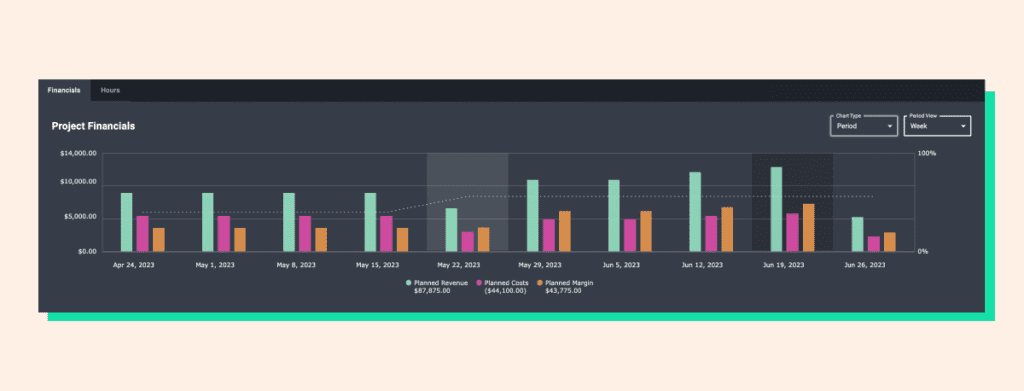
Is Parallax a financial reporting software solution? Nope! It’s an integrated resource planning, capacity planning, and active forecasting tool that gives project managers and leadership a real-time view into project financial performance and projections (think: sold vs. actuals and project margin). Parallax integrates with other valuable tools like CRMs and project management and time-tracking solutions, allowing performance and forecasting data to be exported and used alongside financial reporting systems to help provide strategic insights for optimizing performance today and planning for tomorrow.

Drilling down to the project level, Parallax monitors revenue and margin against set plans and provides real-time insights to help teams understand performance in real-time. It also supports multiple billing models (i.e., time and materials, fixed fee, or retainer) and tracks team performance and costs throughout a project to reduce surprises and overages. 

On the resourcing and capacity planning front, Parallax makes managing a team across several different projects easier by tracking hours and costs with consistency. In addition, it connects data between sales and resource teams to help sales attach directionally accurate resource plans to deals as early as possible to avoid any resourcing (or financial!) hiccups. 

Ultimately, by making real-time performance and forecasting data available alongside financial reporting software insights, the Parallax platform arms digital agency leaders with the information they need to make smart decisions and to keep their people focused on doing their best work.

5 Key Features of Financial Reporting Software

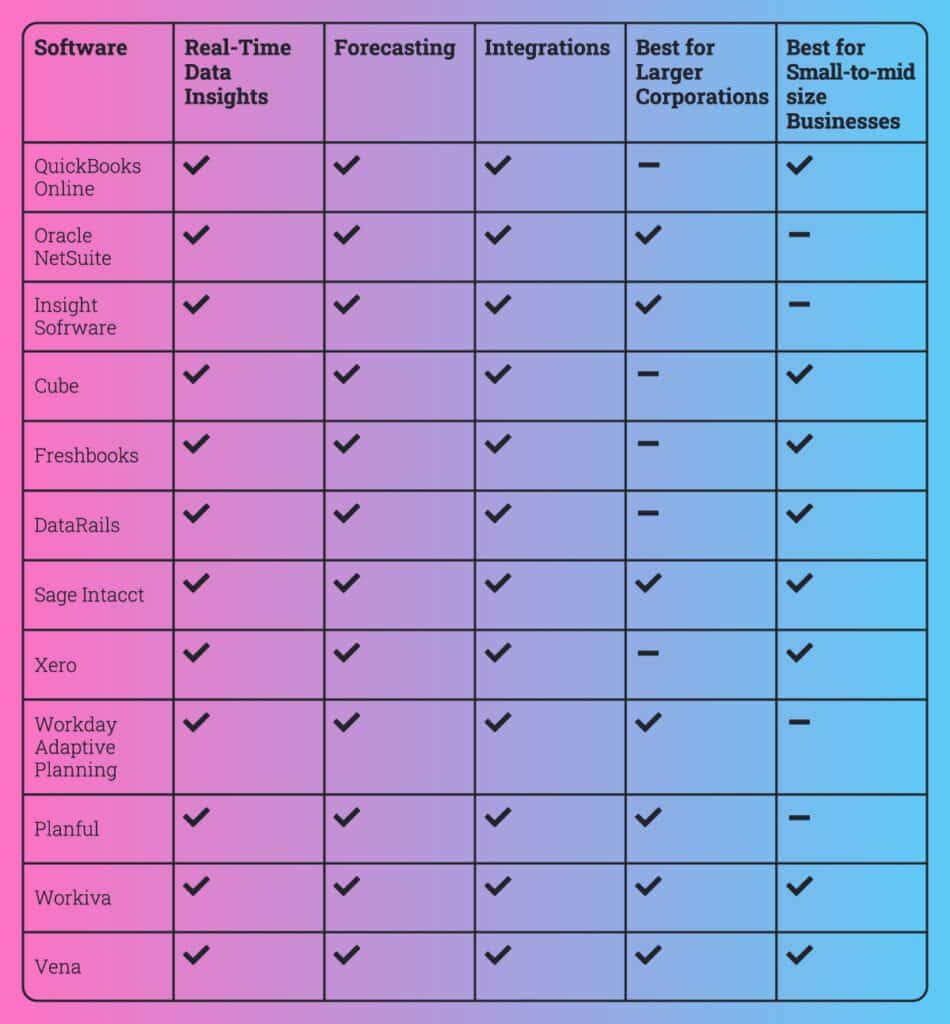
#1. Real-Time Data Insights 

Digital agency leaders need financial insights (income and expense tracking, invoice and payment tracking, tax reporting, etc.) from their financial reporting software to make informed business decisions promptly. These insights give them a clear understanding of their company’s financial performance at any given time and help them identify potential issues before they become significant problems. 

#2. Forecasting

Without financial forecasting capabilities, leaders would have a limited understanding of their business’s future financial performances. With forecasting capabilities, they’re able to see beyond the current financial period and plan for long-term success. Look for financial reporting software that helps to identify potential opportunities and risks that may affect the business and shows where and how leaders could make adjustments to their operations based on the forecasted financial outcomes.

#3. Integrations 

When financial reporting software integrates with other important solutions and tools, agencies experience streamlined operations and greater efficiencies across the business. Take integrations with project management (PM) tools, for example: when financial reporting software connects with PM tools, team leaders and project managers can more easily track project expenses, manage budgets, and track the profitability of each project. There’s also key benefits of integrating financial reporting software with payment processing solutions, CRM systems, payroll systems, inventory management tools, and more. 

#4. Best for Larger Corporations 

For larger corporations, financial reporting software solutions typically offer more advanced features such as multi-entity management, multi-currency support, and more in-depth reporting capabilities. These organizations often have more complex financial needs and require software that can handle the volume of data and transactions they generate. They also typically have larger budgets to invest in more expensive software solutions. 

#5. Best for Small-to-midsize Businesses 

Small-to-midsize businesses may not require the same level of complexity and features as larger corporations. They usually have simpler financial reporting needs and tend to require more affordable software solutions. They also may not have the same resources and technical expertise to manage more complex software solutions, so the team may benefit from software solutions that offer more user-friendly interfaces and ease of use.

Best Financial Reporting Software for Digital Agencies

There are a lot of tools on the market to consider and demo to understand which solution may work best for your unique needs. Here’s a starter list to consider:

Financial reporting software infographic

#1. QuickBooks Online

QuickBooks Online is a robust financial reporting and accounting software solution that offers automation, customization, and integrations that can help digital agency leaders manage their finances more effectively. One standout feature of QuickBooks Online is its ability to automate many financial tasks, such as invoicing, payment processing, and expense tracking. Another unique feature is its customizable reporting capabilities. Users can create custom reports that provide insights into key financial metrics, such as revenue, profit, and cash flow. 

#2. Oracle NetSuite

Oracle NetSuite is a cloud-based financial management system that provides end-to-end accounting and financial management capabilities. It offers features such as real-time financial reporting, order and billing management, revenue recognition, and inventory management as well as customizable dashboards and reporting tools. Its multi-currency and multi-language capabilities make it ideal for global operations. Additionally, NetSuite offers robust integration capabilities, allowing for seamless integration with third-party applications and systems. 

#3. Insight Software

Insight Software is a financial reporting and business intelligence solution designed for midsize to large businesses that need robust financial reporting and analysis capabilities. It offers features such as real-time data integration from multiple sources, customized dashboards, and ad-hoc reporting capabilities, and it provides financial consolidation, budgeting, forecasting, and planning tools to help businesses make informed financial decisions. It offers a user-friendly interface and intuitive reporting tools to help users quickly analyze and visualize their data. 

#4. Cube

Cube offers features such as customizable dashboards, ad-hoc reporting, and drill-down capabilities to help users quickly analyze their data. Cube provides forecasting and budgeting tools to help businesses make informed financial decisions, and it integrates with other financial and accounting software, such as QuickBooks, Sage, and Xero, to consolidate financial data and streamline reporting processes. It’s designed for small to medium-sized businesses that need real-time financial insights to make data-driven decisions. 

#5. Freshbooks 

Freshbooks is a cloud-based accounting and invoicing software designed for small businesses and freelancers. It offers a user-friendly interface and easy-to-use features such as time tracking, project management, and automatic billing. One of its unique features is the ability to accept online payments directly from invoices. Freshbooks also offers a variety of customizable templates for invoices, estimates, and proposals. Its mobile app allows users to track expenses and manage invoices on-the-go. Additionally, Freshbooks integrates with a variety of third-party apps such as PayPal, Stripe, and G Suite to streamline business processes. 

#6. DataRails 

DataRails is a financial reporting solution that is designed to automate spreadsheet management and enhance data accuracy. Its unique feature is the ability to provide a unified view of financial data from multiple sources, including ERP systems, CRMs, and other financial applications. The software also uses machine learning to identify patterns and errors in financial data, improving the accuracy of financial reporting. With DataRails, users can easily collaborate on spreadsheets in real-time, track changes, and manage access permissions. The solution provides users with a dashboard that displays key metrics and KPIs, and allows users to drill down into financial data to gain insights.

#7. Sage Intacct

Sage Intacct is designed to streamline accounting processes and enable businesses to make better financial decisions. Its unique features include advanced automation, multi-entity consolidation, real-time dashboards, and built-in compliance tools. It offers comprehensive financial management tools such as accounts payable and receivable, general ledger, and cash management. Sage Intacct integrates with other business systems to provide a complete financial management solution, and its flexible platform can scale to meet the needs of growing businesses, making it a popular choice for mid-sized companies.

#8. Xero

Xero helps small-to-medium-sized businesses manage their finances with ease. Its unique features include automatic bank feeds, easy invoicing and payment processing, expense tracking, and financial reporting. Xero allows users to create custom reports and dashboards, and offers an ecosystem of third-party apps and integrations for added functionality. Its mobile app provides real-time access to financial data, and its multi-currency support makes it ideal for businesses operating internationally. 

#9. Workday Adaptive Planning

Workday Adaptive Planning enables businesses to create financial forecasts and models. With its intuitive interface and flexible modeling capabilities, it allows users to build custom models, set financial goals and budgets, and track progress against those goals. It also offers advanced analytics and scenario planning tools that allow businesses to anticipate changes in the market and plan accordingly. Additionally, the software integrates with a wide range of ERP systems and other applications, making it easy to share data and streamline workflows. 

#10. Planful 

Planful is a cloud-based financial planning and analysis (FP&A) platform that provides various features such as budgeting, forecasting, reporting, consolidations, and analytics. With Planful, companies can create and manage complex financial models, visualize their data, and generate insightful reports. Its automation capabilities can help reduce the manual workload and increase accuracy in financial planning and analysis. Planful’s open API allows integration with various systems, including ERPs, CRMs, and HR systems, to provide a complete view of the organization’s performance.

#11. Workiva 

Workiva provides a single platform to manage and automate reporting processes. It enables users to seamlessly collaborate on reports with colleagues, reviewers, and auditors in real-time, and its real-time data monitoring capabilities allow users to track changes, flag issues, and drill down into details, providing a comprehensive view of financial performance. Users can also integrate with external data sources, such as ERP systems and other financial applications, to automate data input and streamline reporting processes. Additionally, Workiva provides various compliance and regulatory features that ensure data accuracy, consistency, and completeness, making it an ideal solution for companies of all sizes, particularly those with complex financial reporting needs.

#12. Vena

Vena is designed to help businesses automate budgeting, planning, and forecasting processes. Its unique features include the ability to automate complex financial processes such as consolidation, data validation, and currency translation. It also offers a centralized data repository that allows users to easily manage and access financial data from multiple sources. Overall, Vena is an ideal solution for businesses looking to streamline their financial processes, improve their forecasting accuracy, and gain valuable insights into their financial performance.

Connect with Parallax

Interested in learning how Parallax works alongside financial reporting solutions? We’re more than happy to talk through any questions you have. So, when you’re ready to chat, we’re ready to chat.

Best Resource Capacity Planning Software for Digital Agencies

Resource capacity planning software blog graphic

As digital services continue to evolve, digital agencies face increasing pressure to deliver high-quality work while meeting tight deadlines and maintaining profitability. Resource management and capacity planning are crucial aspects of achieving these goals, and they play a significant role in determining the success or failure of digital agencies.

Resource management involves managing people, equipment, and other resources to achieve specific goals, whereas capacity planning is the process of estimating the resources needed to meet future demand. 
We dive in deeper on these critical best practices, along with the tools needed to help streamline everything. Just keep scrolling.

Table of Contents

What Is Capacity Planning Software?

In digital services, capacity planning is crucial to ensure that companies have enough resources to handle future projects and avoid overloading their employees, equipment, and systems. It also helps to inform what and who the agency should invest in. Think of it as supply and demand. 

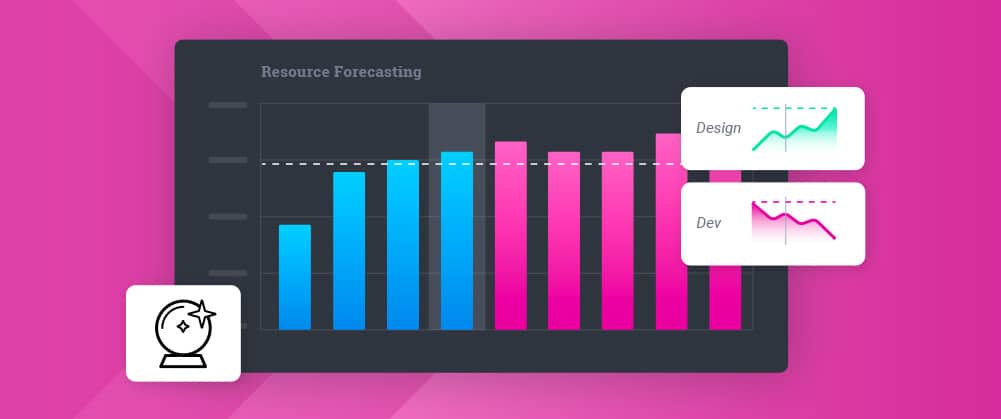
Capacity planning software helps with this process. It’s an essential digital tool that allows digital agencies to forecast their resource requirements and optimize their resource allocation. This type of software provides insights into future resource needs and helps to allocate resources to the most critical projects. It can also help to identify potential capacity bottlenecks and reallocate resources to resolve them.

Keep in mind, if you’re attempting to forecast where your business is heading (and which resources you’ll need to support it) by using homegrown or legacy technology, you’ll inevitably run into issues. These solutions are slow moving and often don’t provide the integrated,  forward-looking view needed to strategically plan for what’s to come. There are other solutions today designed to enable future-looking forecasting and proactive resource and capacity planning. These solutions – like the Parallax platform – provide a clearer picture of the here and now to help efficiently allocate resources AND serve up insights about what lies ahead so you can plan accordingly.

3 Reasons Why Capacity Planning Tools Are Important for Digital Agencies

Capacity planning tools are essential for digital agencies for several reasons. With the right tool in your toolbox, you’ll be able to:

Improve Resource Allocation

Capacity planning tools enable digital agencies to allocate resources effectively and efficiently, ensuring that each resource is assigned to the most critical projects. This way, resources are not wasted, and projects are completed on time.

Increase Efficiency

With capacity planning software, digital agencies can optimize their resource utilization, ensuring that each resource is utilized to its fullest potential. This leads to increased efficiency, reduced downtime, and increased profitability.

Better Manage Projects

Capacity planning software helps digital agencies manage their projects better by providing insights into future resource needs. This way, they can plan and execute projects more effectively, resulting in better project outcomes and higher client satisfaction.

3 Features to Look for in Capacity Planning Software

When selecting capacity planning software, digital agencies should look for the following features:

Real-time Data Visualization

Capacity planning software should provide real-time data visualization to enable digital agencies to make data-driven decisions quickly.

Automatic Resource Allocation

Capacity planning software should have automatic resource allocation features to ensure that resources are allocated optimally and efficiently.

“What-if” Scenario Planning

Capacity planning software should provide the ability to create “what-if” scenarios to enable digital agencies to simulate different scenarios and make informed decisions based on the results.

8 Best Capacity Planning Tools for Digital Agencies

Finding the capacity planning software that’s best for your business is ultimately up to you—but if we can make your search any easier, we’re happy to help. Here’s a list of powerful tools that support smoother, streamlined capacity planning:

Parallax

Parallax is a strategic resourcing planning and forecasting solution that works with best-in-class tools to serve up an accurate view into operational health. It provides predictive and proactive tools that enable strategic, forward-looking decision-making, allowing leaders to focus on the growth, health, and happiness of the business and its people. Rather than your sales pipeline data being locked in the CRM, Parallax makes it easy to share key data points across Sales, Operations, and Delivery teams so that everyone has the necessary context for effective resource management and capacity planning.

ClickUp

ClickUp is a project management tool that offers robust capacity planning and resource utilization capabilities. It helps answer various questions around your capacity management process, helping to determine available capacity with its Workload View feature that helps you plan and visualize your team’s capacity by tracking metrics such as hours, tasks, and points.

Kantata

Formerly Mavenlink and Kimble, Kantata centralizes operations and tools into one core solution to help services organizations optimize their resource planning and decision making.

Runn

Runn software has a variety of tools that allow you to manage resources efficiently, including its resource utilization report that shows which resources are in demand as well as its people planner that tracks resource allocations, including vacation time, in a calendar view. Runn also offers a capacity planning dashboard that shows the capacity of the entire organization against current workloads to help with real-time understanding and future planning.

Saviom

Saviom is a capacity planning solution that has a suite of applications, including project portfolio management, workforce planning software, and professional service automation. It helps solve complexities around capacity planning by making it easier to forecast profitability and productivity, integrating with other applications, and providing real-time business intelligence analytics.

Wrike

Wrike streamlines the internal project management and collaboration processes across teams. The platform focuses on the accomplishment of tasks rather than entire projects, offering workflow customization for companies to make processes more company- or industry-specific. It provides visibility into individual workloads to allow for better capacity planning—in Wrike’s workload view tool, for example, resource managers can check short- and long-term availability of individual team members.

monday.com

monday.com is a comprehensive platform that’s designed to help teams manage their entire workflow within a single digital workspace. It’s a project management software that helps to increase transparency and visibility within day-to-day operations, automates repetitive tasks, enhances team collaboration, and creates visibility in workflows. The solution helps you understand capacity requirements with its pre-made templates that account for all the different factors you need to track and manage to understand capacity.

Resource Guru

Resource Guru is a scalable solution that helps you manage resource complexities with automated functionalities. The solution allows you to more effectively manage your team’s time with features such as calendar integrations with Google Calendar and Microsoft Outlook, giving you greater visibility into schedules. It also lets you filter by skill sets, so you can create your dream team for each project.

Which Resource Capacity Planning Software Is Right for You?

Choosing the right capacity planning software depends on several factors, including your business needs, the size of your organization, and the type of projects you handle. While the eight capacity planning tools mentioned in this article are among the best in the market, it’s essential to evaluate each software’s features and functionality to determine which one is best suited for your digital agency.

If you are weighing a full PSA platform rather than a scheduler, our comparison of the best PSA software for resource management covers Kantata, BigTime, NetSuite SuiteProjects Pro, Teamwork and Parallax, with every vendor fact checked in October 2026.

While capacity planning can feel complex, remember that capacity planning software is an essential tool for digital agencies to use to optimize their resource allocation and forecasting. By providing insights into future resource needs, these tools enable digital agencies to allocate resources effectively, increase efficiency, and improve project management. If you’re selecting capacity planning software, it’s crucial to consider features such as real-time data visualization, automatic resource allocation, and “what-if” scenarios to make informed decisions based on the results. 

And, as always, we’re here to help! The team at Parallax loves solving capacity and resourcing problems so that your business can stay competitive – and so you can focus on what truly matters: your people and the health of your business. We’re ready to chat when you are.

Agency Revenue Operations: The Key to Improved Confidence and Stress Reduction

Agency revenue operations, blog header

If you’ve been in the digital and development agency world for a while, you’ve likely experienced the struggles associated with growing – or even just sustaining – revenue. It often feels like you’re on a rollercoaster ride, where the business either has too much work and not enough people – or not enough work and too many people. This very easily happens when leaders lack reliable data and foresight into where the business is heading. You’re not alone in this struggle—we’re here to help you get off that ride. 

Taking control over your revenue operations (or RevOps) with a few best practices is a sure way to start improving overall operational confidence because, when it’s done right, you gain the forward-looking insights you need to make smart decisions for the good of your people and your business. 

We know RevOps can feel complicated, so we’re covering the ins and outs of it to help get you started…let’s dive in.

Implementing Straightforward Revenue Operations

Successful revenue operations require alignment across all major business functions in order to not just sustain revenue but drive it forward. While there are various ways to go about revenue operations, we’ve seen our clients gain control of performance and their ability to generate revenue by leveraging a few (relatively) straightforward steps. 

First, plan to hit and adjust your revenue goals. This may feel obvious, but far too many organizations aren’t actually planning their revenue. Here are a few recommendations we have when building out your plan:

  • First, know there’s a difference between sales bookings and revenue: sales bookings refer to the value of orders or contracts that a company receives from customers, whereas revenue is the actual amount of money that a company earns from those orders or contracts after they are fulfilled, and payment is received. In other words, sales bookings represent potential revenue, while revenue represents actual earnings. We recommend estimating revenue (monthly and quarterly) for both existing work AND potential new business.
  • Coordinate across business functions to understand the intricacies of your funnel. What actually goes into winning new business? What needs to happen to retain customers or grow accounts? Everyone should be on the same page about the answers to these questions, as winning a new project or account doesn’t come without a cost (literally). It takes time and resources to develop outbound sales and marketing materials to catch the eye of prospects; it takes time and resources to conduct industry and competitive research and develop a stand-out proposal; it may even require travel to the prospect’s city in order to seal the deal. Account for everything that goes into securing and growing revenue. 
  • Update actuals in your forecast and revenue plans every month. You can’t set it and forget it—treat it as a living, breathing plan that needs attention and care. This view signals when you need to course correct to hit your targets.

Second, review your pipeline every week. Yes, we said every week. Here’s how to go about it and what to look for:

  • Review, shape, and prioritize new business opportunities. Do new deal opportunities allow you to hit your revenue targets? It’s imperative for Leadership, Sales, and Delivery teams to be on the same page for which opportunities are best for the business, which can be supported with existing resources, and which will require new or more resources.
  • Use your weekly meeting to update account- and project-level revenue forecasts. Update close dates, start dates, and any mismatched deal values between the CRM and your strategic resourcing planning and forecasting tool (i.e., Parallax). Is everything running on time and within budget? Are any projects going off the rails, and if so, how does that impact revenue in the near- and long-term?

    This step is key to avoiding things like revenue leakage – or, the loss of potential revenue that a company could have earned but did not. This usually happens due to errors or inefficiencies in the company’s processes (think: underbilling, over-discounting, uncollected fees, incorrect pricing) OR through intentional actions such as fraud or non-compliance with contracts or regulations. In either case, revenue leakage results in reduced profitability for the company and should be avoided at all costs.
  • Forecast renewal expansion revenue at least once a month. What’s the health status of existing projects and accounts? What’s in danger, and where is there room for growth? Don’t forget to take time every month to identify and assess key factors that may impact renewal and expansion rates, such as customer satisfaction, market conditions, and the competitive landscape.

Barriers to Revenue Operations

So, what’s standing in the way of confidence when it comes to revenue operations? Historically, agencies have built processes around the project lifecycle—everything has a beginning and an end; projects weren’t necessarily treated as something that could grow, expand, and become more valuable over time. But that’s all a thing of the past. 

Digital agencies and development firms are different today. In most cases, leaders aren’t seeking out one-and-done projects and accounts. More than ever, leaders are looking for a balanced portfolio that includes clients and work that can grow and expand as their organization’s services and skills do. It’s a “let’s grow old together” mentality that creates strong relationships, fosters new opportunities, and lets both parties succeed and scale. 

But to get there – to grow not only in services and skills but also in revenue – agencies need predictive and proactive tools that enable strategic, forward-looking decision-making. Only then can they start to overcome the various challenges today that tend to put a dent in operations (and revenue) and stress out leaders. 
What are the challenges associated with planning and forecasting revenue, exactly? It all comes back to having limited operational visibility. Without the right tools, we regularly see organizations struggle with:

  • Having a lack of data (or the right type of data) to track long-term revenue trends, make informed forecasts, or even understand the shifting landscape for customers, competitors, and markets
  • Inconsistent processes for revenue tracking and resource planning and forecasting – this tends to worsen when key stakeholders have difficulty aligning on business strategy
  • Outdated technology that creates limited ability to track and measure the effectiveness of forecasting methods and approaches

The biggest challenge, however, is trying to be too precise. Precision inevitably becomes a barrier to doing anything consistently because, well…it’s just too difficult and time consuming to try and estimate everything that will happen 10 weeks from now (even five weeks from now) down to the exact dollar or minute. So, we’re begging you: don’t let precision get in the way of the work. Know that adjustments will need to be made as you go—it’s all part of the process.

Benefits of Confident Revenue Operations

If you’re new to measuring the various factors related to revenue operations, we strongly advise keeping it simple to start. We outline various operational best practices for you here when you’re ready, but let’s focus on the sales pipeline and dive a little deeper into the importance of reviewing it every week. 

First, know that it’s quite common for leaders to overreact to the situation at hand. If they’re too busy with existing work, they might stop focusing on securing new work. If there’s not enough in the pipeline, they might stop putting effort into resource planning. It’s a constant back-and-forth that catches everyone off guard.

But we know this to be true: reviewing the sales pipeline regularly helps to confirm what work you think will happen and when, providing the business with an up-to-date view that can  inform more accurate revenue and capacity forecasting. Then, after conducting a variance analysis (i.e., what was planned vs. what actually happened), leaders gain a better understanding of agency performance, so they can proactively take action if needed—and teams can respond accordingly when there’s a predicted shortfall in incoming work as well. 

Altogether, by responding to dips in the sales pipeline, rather than dips in workload, leaders are better poised to stabilize, even grow, revenue. 

Other benefits agencies experience when they start to prioritize RevOps best practices:

  • Collaborative workflow: Leveraging a strategic resourcing planning and forecasting tool like Parallax helps create a collaborative workflow between business-critical applications to ensure reliable, real-time financial data is available for your RevOps conversations. Plus, Parallax has a team of experts ready to guide you in establishing the operational cadence that works best for your business, ensuring you have a hold on RevOps and don’t experience any surprises. 
  • Shared perspective: The right tool will also provide a shared, future-looking perspective across your agency so that you don’t experience the pitfalls of misaligned perspectives such as a dip in revenue – not to mention internal frustration, stress, and tension. Instead, you always have a pulse on what lies ahead and where and when you need to course correct to ensure you can hit your revenue targets.
  • Confident decision-making: RevOps can be stressful for leaders when they don’t have the right insights to guide their decision-making process—but when you review and assess your forecasts and pipeline every week in just a few steps, uncertainty will be replaced with confidence. Leaders will know when to amp up new business efforts, for example, and when to hire and who to hire.

Ready to Revamp Your Revenue Operations?

RevOps best practices are all about combating the peaks and valleys tied to revenue that impact confidence and increase stress for leaders, who are attempting to sustain and grow their businesses. 

Start by implementing a straightforward revenue operations and planning process – execute it weekly – and you’ll start to see those fears, uncertainties, and doubts dissipate. 
Questions about revenue operations or other operational best practices? These are some of our favorite topics to discuss! We’re ready to connect when you are.

Best PSA Software Platforms for Resource Management

For resource management, the best PSA software shows you capacity, revenue and margin in one forward view, reads the tools your team already uses, and is live in weeks rather than quarters. Parallax is built for that job in agencies and consultancies. Kantata, BigTime, NetSuite SuiteProjects Pro and Teamwork cover resourcing too, each with a different trade-off, and we compare all five below.

Updated October 2026. We checked every vendor fact on this page on the vendor’s own website that month. This is Parallax’s own list, so read our entry the way you would read any vendor’s.

Best PSA software platforms blog header

What does PSA software do for resource management?

Professional services automation (PSA) software runs the business side of a services firm: project budgets, time, expenses, invoicing, resourcing and reporting. Some platforms do all of it in one place. Others connect to the tools that already do those jobs. For resource management the software has two questions to answer. Who is working on what next month? And what does that mean for revenue and margin?

There are two kinds. All-in-one platforms such as Kantata, BigTime and NetSuite SuiteProjects Pro ask you to move delivery, time and billing into them. A planning layer such as Parallax runs beside the CRM and time tracking you already have and adds the forecast. Neither is wrong. What decides it is how much change your team can absorb this year, and who owns the forecast once the software is in.

Which PSA software is best for resource management?

For resource management, the five platforms most shortlists include are Parallax, Kantata PSA, BigTime, NetSuite SuiteProjects Pro and Teamwork.com, compared below on what each vendor publishes as of October 2026. Prices and claims come from the vendor’s own website on the day we checked. Where a vendor publishes no number, the table says so instead of guessing.

PlatformWhat the vendor calls itBuilt forPricing, as of October 2026Time to go live, vendor’s own claimWorks beside your tools or replaces them
ParallaxResourcing and forecasting software for professional services firmsAgencies, consultancies and other services firmsScales by resources managed, from 15 to 1,500 or more (pricing page)Live in less than 30 daysReads the CRM and time tracking tools you already run
Kantata PSAProfessional services automation platformMid-market and enterprise services firms: software, consulting, agencies, IT servicesCustom plans, no published prices (pricing page)Not publishedOne platform for forecasting, delivery, resourcing and financials; a Salesforce edition is offered
BigTimeProfessional services software, “more than a time tracker and less than an ERP”Accounting, architecture, consulting, engineering and IT services firmsEssentials from $20 per user per month; other tiers by demo (pricing page)47 days on average from contract to go-liveAll-in-one, in a PSA edition and an Enterprise PSA edition
NetSuite SuiteProjects Pro (formerly OpenAir)Professional services automation solutionProject-based services organizations, most often ones already running NetSuiteAnnual license by platform, modules and users, plus a one-time implementation fee; sold as an add-on moduleNot publishedPart of the NetSuite suite with financials, CRM and HR
Teamwork.comAI-powered professional services automationAgencies, consultancies, IT services and accounting firmsFree up to 5 users; Basics $9.99 and Accelerate $24.99 per user per month billed yearly; Optimize and Enterprise by quote (pricing page)Not published; 14-day trialProject management and PSA in one product

Parallax

Parallax is resourcing and forecasting software for professional services firms. It reads the CRM and time tracking tools you already run, then puts sold work and open pipeline in one view of capacity, revenue and margin. Leaders see the risk weeks ahead, in time to move people or change the plan. Firms are live in less than 30 days, and pricing scales by the number of resources managed, from 15 to 1,500 or more.

One AI tool ships today, Fix My Project. It reads a single project and reports estimate at completion against the sold budget, current and projected margin, team utilization four weeks ahead, and unassigned roles, then suggests what to do about each. We built Parallax for agencies and consultancies, which is also where this article’s opinions come from.

Kantata PSA

Kantata, the company formed from Mavenlink and Kimble, calls its product a professional services automation platform and aims it at mid-market and enterprise services firms: software, management consulting, agencies and IT services. It comes two ways, Kantata PSA and Kantata on Salesforce. The site lists an AI Expertise Engine, an agent built on it, and predictive forecasting. Pricing is custom, built around “your company size, goals, and the way your team works”, and the site publishes no implementation timeline. An earlier version of this article said Kantata implementations run a year or more. We could not find that on Kantata’s site. It is gone. If you landed here looking for Mavenlink alternatives, we keep a separate post on that.

BigTime

Projector PSA, which the earlier version of this article covered, now lives inside BigTime. BigTime sells two editions: BigTime PSA for “growing, single-entity firms” and BigTime Enterprise PSA for firms “operating at greater complexity”. Its own line is “more than a time tracker and less than an ERP”. Target industries are accounting, architecture, consulting, engineering and IT services. The Essentials plan starts at $20 per user per month, with the other tiers priced by demo. BigTime publishes a 47-day average from contract to go-live and says teams adopt it within 30 to 90 days. Of the five here, it is the one that most wants to be your finance system too.

NetSuite SuiteProjects Pro (formerly OpenAir)

OpenAir is now sold as NetSuite SuiteProjects Pro; the old OpenAir address lands on the SuiteProjects Pro sign-in page. NetSuite describes SuiteProjects and SuiteProjects Pro as PSA solutions that bring together what “a project-based services organization needs”: project accounting and management, resourcing, timesheets, expenses, budgets and reporting. It is an add-on module to NetSuite. You pay an annual license for the platform, the modules and the users, plus a one-time implementation fee, and the site publishes no timeline for that implementation. It is the right fit when you already run NetSuite for finance, or plan to.

Teamwork.com

Teamwork.com now calls itself AI-powered professional services automation, a shift from the project management tool the earlier version of this article described. It is aimed at agencies, consultancies, IT services and accounting firms. Resource planning starts on the Accelerate plan, which costs $24.99 per user per month billed yearly with a five-user minimum. That tier brings workload and live capacity planning. Scheduling by role or skill and profitability reporting sit on the Optimize plan, which is quoted. A free plan covers up to five users, paid plans carry a 14-day trial, and the site publishes no implementation timeline. If your team already lives in Teamwork for tasks, the resourcing add-on is the shortest path. If it does not, you are buying a project tool to get a planning view. Know which you are.

“If a client signs in three weeks, can we even staff it?”

A PSA answers this question when it reads the open pipeline next to the sold work, so a deal that closes in three weeks shows on the team’s calendar before it is signed. A prospect asked us that exact question on a sales conversation this year. It is the whole job. Your project management tool cannot answer it, because the deal is not a project yet. Your CRM cannot answer it either, because it holds the deal and has never heard of the people. The answer lives between the two systems. Hence the spreadsheet. In 25 of the 35 sales conversations we reviewed this spring, that is exactly where planning lived.

Any PSA on your shortlist faces one test. Can it read the open pipeline next to the sold work and show what a win three weeks out does to the team? If someone has to enter the deal a second time to get that view, you are looking at a reporting tool with a scheduling tab.

“Who’s overworked, who’s underworked, and who’s on the bench?”

Insist on a utilization view that looks eight weeks ahead, by person, team and role, with pipeline loaded. Another prospect’s words, that heading. Every platform in the table has a utilization view, so the feature list will not separate them. The time direction will. A view of last month’s hours tells you who was overbooked, after the damage. A view of the next eight weeks, with sold work and likely wins loaded, tells you who will be, while you can still move the work.

Ask each vendor to show utilization by person, by team and by role, four to twelve weeks out, with pipeline included. Then ask about time off. Watch the answer. A plan that breaks on one PTO request was a hope with a chart. Our post on forecasting agency utilization goes deeper on the math.

“Do we have enough margin left to take on more work?”

You know you have margin to spare when cost rates and bill rates sit on the plan itself, so a staffing change moves the margin number the same day. Finance leaders asked this more than anyone. What most systems can tell you is “we’ll know at month end”, which is too late to turn the work down or re-price it. Pick a platform that carries cost rates and bill rates on the plan itself, so a staffing change appears as a margin change the same day. Month end confirms it.

Fix My Project, the AI tool in Parallax, does this one project at a time. It compares estimate at completion to the sold budget, shows current and projected margin, and lists the roles still unassigned. Run it weekly, ahead of the resourcing meeting. (Daily runs add little. The data has not moved.)

“How do you forecast capacity and hiring three or four months out?”

A three-month capacity forecast needs the work already sold, the work likely to close with a probability on it, and the people you have with their time off, in one view. Hiring is the most expensive resourcing move a firm makes, and the usual timing is after the pressure has already arrived, because one of those three inputs is missing. Most PSA tools hold the first and the third. The second is the problem. The pipeline lives in the CRM, and someone has to carry it across by hand every week.

That is the planning gap. It is why a resourcing meeting that only looks at this week ends with “we’ll figure it out”. If you want the long view, pick the tool that reads the CRM itself. We wrote up why agency forecasts collapse beyond two weeks if you want the mechanics.

“Can you see one team’s capacity at a glance, not just the whole company’s?”

Yes, when the platform shows capacity by team and by role and lets a department lead filter to their own group. Averages hide people. Company-wide utilization at 90 percent looks fine on a slide. Design at 70 percent and engineering at 115 percent average out to a healthy-looking number, and the engineering team is still working weekends. Ask for capacity by team and by role, filtered to the one group a department lead manages. Ask whether that lead can open it without a finance seat. If the answer involves an export, keep looking.

“Who gets to see margin and billing rates?”

Finance should see cost rates and margin, delivery leads should see utilization and budget burn, and the platform should enforce that split without a workaround. Smaller question, bigger argument inside a firm. Delivery leads need utilization and budget burn, and cost rates less often. Finance needs everything. Ask each vendor to walk through the permission model in the demo rather than on the slide. Live, on a test user. This is where “yes, we support that” sometimes means “with a workaround”. It came up often enough in our own sales conversations to earn a section here.

“How good does our time-tracking data have to be?”

Timesheets need to be roughly right by the end of each week for a planned-hours forecast to hold, and no better than that. Better than you think, in other words. A forecast built on planned hours only needs timesheets to be roughly right by the end of each week, so the estimate to complete stays believable. If your team logs time monthly, from memory, fix that habit first. Then shop. Treat the timesheet as forecast input, and leave the performance review out of it.

Harvest came up on 16 of those 35 sales conversations. If your team already tracks time somewhere, a PSA that reads that tool will get cleaner data than one that asks everyone to switch.

What should you look for in PSA software?

What decides most PSA purchases is whether the platform reads the tools you already run, shows capacity ahead of time, and produces a forecast leadership will act on.

Three key features to look for in PSA software

Integration first

Few teams want to spend the next year learning to track time in a new place. A platform that reads the tools you already run keeps the data flowing while the forecast gets built on top. A platform that replaces them can be the right choice, as long as you are choosing that project on purpose and not finding out about it in month four.

Forward visibility

Assignments across projects, teams and accounts, in real time, with planned capacity and open demand on the same screen. Resource managers should be able to see a conflict before it is a conflict, and move work without a meeting to do it.

Forecasts you will act on

A forecast is only useful if leadership trusts it enough to hire, decline work or re-price from it. That trust comes from the inputs: sold work, weighted pipeline and real time data, updated as the week goes. Pretty charts built on last quarter’s actuals do not qualify.

How do you choose the best PSA software for your firm?

Choose by how much of your stack you will replace, who will own the forecast, and how soon you need it live. How much of your current stack are you willing to replace this year? Who will own the forecast once the software is in, and will they open it every week? And how soon do you need it live? Settle those and the table above shrinks to two rows. Maybe one.

Before any demo, score your own firm. The Planning Gap Grader asks nine questions, takes about a minute, and shows where your gap is widest across forecast reliability, capacity visibility, margin control and data trust. Then run every demo on your own data instead of the vendor’s sample agency. Bring one live deal that might close next month and one project that is already over budget, and ask each platform to show you what it would have said two weeks ago. The one that makes that easy is the one your team will keep using.

Still deciding between a scheduler and a planning layer? Our comparisons of resource planning tools for agencies and capacity planning software for digital agencies cover the tools this list leaves out. Resource management versus capacity planning explains why you need both. And if you would like to see how Parallax answers the questions above on your own pipeline, get a demo. Bring the deal that might close in three weeks.

Frequently Asked Questions

What is the best PSA software for resource management?

Whichever one can answer the staffing question above with pipeline included. For agencies and consultancies that want to keep their current tools, Parallax is built for exactly that. For firms consolidating finance and delivery into one system, Kantata, BigTime or NetSuite SuiteProjects Pro are the usual shortlist. Teamwork.com fits teams that already run their projects there.

What are examples of PSA software?

Parallax, Kantata PSA, BigTime, NetSuite SuiteProjects Pro and Teamwork.com, the five compared here. Others you will meet on a search include Productive, Scoro, Float, Runn and Certinia. They range from standalone schedulers to full ERP modules, so compare the category before the feature list.

Is Mavenlink the same as Kantata?

Mavenlink and Kimble combined to form Kantata, and the product is now sold as Kantata PSA. Searches for Mavenlink still outnumber searches for Kantata, which is why we keep a separate post on Mavenlink alternatives.

How long does it take to implement PSA software?

It depends on how much you are replacing. Parallax says firms are live in less than 30 days, because it reads the tools you already have. BigTime publishes a 47-day average from contract to go-live. Kantata, NetSuite and Teamwork publish no timeline as of October 2026. Ask for one in the demo. Then put it in the contract.

Is PSA software the same as resource management software?

They overlap. Resource management software schedules people, and PSA software adds the money: budgets, rates, invoicing and margin. If a scheduler is all you need, a lighter tool will do. If you want to know what a staffing change does to margin, you want the PSA side, or a planning layer that connects the two.

Does Parallax replace our project management tool?

No. Parallax reads the CRM and time tracking tools you already run and adds the forecast on top. Your team keeps tracking time and tasks where they do today. The forecast is the new part, and the resourcing meeting is where it earns its keep.

Resource Forecasting Tools for Digital Agencies [Complete Guide]

Resource forecasting tools for digital agencies, blog header

Resource forecasting usually isn’t anyone’s favorite task. Leaders often approach resourcing meetings with dread and leave them feeling deflated—but it doesn’t need to be this way. Today’s solutions can serve up the exact information they need to make smart resourcing choices and help establish best practices and workflows that make forecasting a less stressful (maybe even fun? ) activity. Let’s dive in!

Table of Contents:

What is resource forecasting?

Resource forecasting vs. resource planning vs. resource management

The benefits of resource forecasting for digital agencies

Features to look for in resource forecasting tools

Top resource forecasting tools for your agency

How to choose the right resource forecasting software

What is resource forecasting?

Resource forecasting is essentially a balancing act where leaders and resource managers attempt to 1) bring in enough new business to hit revenue targets, 2) have the right amount of talent on staff to deliver quality results, and 3) keep everyone engaged and driven. 

Did we mention this is a challenging balancing act? It’s one that often leads to reactive, instinctual actions rather than confident, data-informed decisions, but there is a way around the stressful ebb and flow of resource forecasting… 

Reliable, real-time insights from a solution that’s designed specifically for resource planning and forecasting can reduce volatility by providing a clear, concise picture to leaders of what’s currently happening across every business function, what’s coming down the sales pipeline, and what they should consider doing to better balance the needs of the business with the needs of their people. When this clicks – when it all comes together to enable better resource planning AND active forecasting – operations are smoother, performance is enhanced, growth is possible, and everyone is happier.

Resource forecasting vs. resource planning vs. resource management

The services industry loves coming up with new terminology for best practices and processes, even using them interchangeably. And depending on which agency or software development shop you’re at, different phrases could mean slightly different things – so let’s clear up what we mean at Parallax when we’re talking about everyone’s favorite activity: 

  • Resource forecasting: Demand for and profitability of services is always changing—resource forecasting involves leaders predicting where they should invest in resources to meet those changes, using current workloads and sales pipeline data to inform their predictions  
  • Resource planning: Leveraging said forecast to develop an actionable plan, assigning specific resources (i.e., talent) to specific projects 
  • Resource management: Monitoring progress of projects against resources, ensuring everything is on time and on budget + making real-time adjustments as needed 

These are (clearly) nuanced best practices, but they’re all working towards the same thing: enabling smarter decision-making about the business and your people, all to ultimately help your organization evolve into a strategic operation, poised for innovation and growth. 

The benefits of resource forecasting for digital agencies

Good resource forecasting, planning, and management is crucial to predicting and navigating anything else in the business. Resource forecasting informs your revenue and margin forecasts and is key to making confident decisions related to cash flow. It reduces reactive, rushed hiring and instead enables proactive, selective hiring. So many critical elements of the business hinge on successful resource forecasting—and when you get it right, magic happens ✨…

Achieve higher utilization

Every organization is tasked with optimizing and stabilizing utilization: the measurement of the team’s total time spent on billable work versus the total billable time available. Low utilization means team members aren’t meeting their billable targets and are spending more time than expected on internal or non-billable work or simply not having enough to do (which is no good for anyone). High utilization on the other hand indicates that an organization is efficiently using the capacity of its team and that everyone is meeting or exceeding their billable targets (which is great for everyone). Effective resource forecasting allows digital services organizations to achieve higher utilization, which allows them to more easily hit revenue targets. 

Keep strong talent

Billable utilization isn’t a zero-sum game, meaning that you can’t offset low billable hours of some employees by expecting more from others to offset the overall shortage. But when there’s a lack of foresight that leads to reactive decisions, this is the common scenario we see play out: you put your best people on new work because they can be trusted to deliver, even if they are already busy. Strong talent steps up, balances work themselves, and completes the work—but keep in mind good, reliable, smart employees are likely more expensive, too, meaning you have cheaper employees doing less while expensive employees do more, which directly impacts profitability. This strategy also leads to the risk of over relying on your “A players” to step up. They’ll do it for a while, but they’ll eventually resent your lack of planning, and they’ll burn out. They’ll take their skills and domain knowledge with them and leave behind low morale that continues to impact those who stay. Sound familiar? 

Don’t worry—there’s good news. Better planning and forecasting can help you keep strong talent happy because once leaders are confident in meeting the basic needs of their people and the business, everyone will have a balanced workload and can focus on the parts of their job that are much more fulfilling. 

Experience less stress 

Let’s be honest: without the right tool and the right information, resource forecasting is stressful. It can feel like a game of Tetris, where leaders are trying to perfectly fit the best people into the resource gaps across projects – but right when something fits, there’s another problem to solve. There are platforms designed to help you see “above the screen” so to speak – alleviating the stress of resource forecasting by enabling smarter resource planning, providing an actionable view into how the business is performing on a variety of financial and operational metrics, enabling leaders to project future performance and take action as needed. 

Unlock informed decision-making

With access to accurate, real-time forecasts, leaders can make decisions driven by data rather than emotion. This also gives the team time to staff projects in a way that allows for growth opportunities for employees and healthy resource management. There’s way less scrambling – no more ‘too much work, not enough work’ rollercoaster rides – and way more intention behind everything. 

Enable smart, strategic growth 

When services businesses unlock the power of accurate data and reliable forecasting, they’re teed up for future growth, as everyone has more time to focus on their craft. Teams are working from a shared perspective, rid of siloed thinking and siloed workflows, and they can finally scale the magic that makes their company unique. Accurate resource forecasting is really that important.   

Features to look for in resource forecasting tools

While there’s a plethora of forecasting tools out there, they’re not all created equal. It’s important to ensure the resource forecasting tool you choose supports your business today and can evolve to support your future business. We’re in a dynamic industry, one where both the services offered and talent required are rapidly evolving, so your solution should be just as dynamic. Here’s what to look for:

Real-time visibility

Without a doubt, your platform should provide enhanced visibility into resource assignments across projects and accounts, allowing leaders and resource managers to determine current resource needs and confidently assess future needs. It should provide a clear path for how to best match resources to future projects for optimal performance.

Integrations-first

Your solution should enable orchestration between best-in-class tools, providing automatic integrations for both sales pipeline data to enable smart forecasting and deeper scenario planning for leaders as well as resource and project management capabilities to bring smoother, streamlined operations to life.

Personalized workflows

Only some solutions are built with personalization as a priority. When it comes to resource forecasting, leaders need to be able to access the data they need quickly and easily, and they can’t be bogged down by other workflows and information that are irrelevant to the task at hand. Look for platforms that provide personalization capabilities so you can move smart, with fewer clicks and way less hassle. 

One shared view

Ok, we’ll say it: spreadsheets need to go. Your solution should seamlessly bring together the different functions of the business and provide reliable data and actionable insights in one shared view, so everyone is operating from the same source of truth on how the business is performing. Rather than chasing down data and cobbling it together in spreadsheets, leaders can focus their valuable, limited time on making smart and future-looking resourcing decisions. 

Purpose-built

The services industry, especially digital agencies and software development shops, needs technology that understands their world – that’s designed for them and built with their unique needs and wants in mind. Resource forecasting is inherently challenging, but the right solution will bring together all the necessary information and capabilities to make it an easier, more streamlined best practice that results in reliable, actionable insights.

Top resource forecasting tools for your agency

Everyone wants to feel confident in the tools and technologies they’re investing in and leveraging in their day-to-day, especially when the information the platform is serving up heavily factors into business-related decisions. There’s a lot to choose from, so let us help you start to better understand a few of your options…

Parallax

Parallax turns resource management into quality resource planning that results in accurate, confident forecasting – meaning everyone from leadership and finance to resource planners and project managers benefits from the platform. The platform allows leaders to step away from outdated, often-manual approaches for collecting and uncovering business-critical insights and serves up centralized insights and a future-looking view to help inform forecasts that 1) drive the business forward and 2) keep everyone aligned, focused, and yes – happy.

Parallax leverages native integrations for the best-in-class tools that are already in use to reduce disruptions to current workflows and provide a cohesive, shared forward view into the business. Instead of planning for 1-2 weeks out, for example, the platform allows you to allocate time and resources out 6-8 weeks based on the information you have on hand (as a starting point; you can and should adjust as you go). It’s a small shift that results in better resource management and forecasting and helps leaders achieve stronger performance, both at the individual level and for the business at large. 

Parallax delivers value quickly, driving adoption and implementation in 90 days or less, and locks in price from the very beginning. We made it this way because we know the challenges and pain that come with surprises, costly add-on features and vague implementation timelines. No thank you. ✋

That’s why Parallax is a “no gotchas” solution—one that empowers growth-minded organizations with greater transparency across the business and helps leaders focus on setting vision, delivering great work, inspiring their teams, and growing the business.

pssssst…

Better Resource Planning Ebook

Image flipping from reactive to proactive once and for all. Download now to learn exactly how to allocate time and resources out 6-8 weeks vs. 1-2 weeks at a time.

Kantata (Mavenlink) 

Kantata is a professional services automation (PSA) platform that centralizes operations and tools into one core solution to help services organizations optimize their resource planning and decision making. Kantata helps organizations view and forecast their utilization and make data-driven decisions by providing the ability to understand and allocate resources in detail. The platform allows users to more easily balance supply and demand, explore impact on revenue and margin, configure resource recommendations, align skills with project demands, and more.

It’s designed for creative and consulting firms as well as IT and software shops, and it prices out by user, meaning the price can change during the duration of a contract term. Integrations often cost extra, and in order to get the most out of the Kantata platform, users are encouraged to migrate data from existing systems and adapt their tools and processes (implementation can take twelve months or longer). 

Metric.AI

Metric.AI is an all-in-one platform designed to provide a single source of truth for agencies’ financial data. The platform includes various capabilities, ranging from time tracking, resource allocation, and project budgeting, to invoicing, analytics, and forecasting. It provides real-time metrics around profit, utilization, and effective bill rates and also allows users to create custom metrics for enhanced decision-making. Metric.AI offers more predictability into the planning process, identifying potential risks and uncovering insights that can help inform business strategy.  

Metric.AI pricing starts at $19/seat/month, requiring an annual commitment and a 50-seat minimum. There’s also an enterprise package for businesses that require customizations or add-ons.

OpenAir

An extension of Oracle’s NetSuite ERP, OpernAir is an all-in-one cloud-based PSA platform for a wide array of services businesses. The platform provides integrated time tracking, project management, resource management, expense tracking, and invoicing – offering a single platform to run a services organization. Its forecasting functionality leverages similar features as invoicing and revenue recognition but time is not timesheet-based but rather “resource scheduling” based. 

OpenAir’s customers all use the same version and codebase, with options for configurability and customization. It offers multiple pricing tiers, with a basic plan starting at $399/month. Migration and adoption of this all-in-one ERP platform can often take 6-12 months to fully implement.

Wrike

An easy-to-use tool, Wrike streamlines the internal project management and collaboration processes across teams. The platform focuses on the accomplishment of tasks rather than entire projects, offering workflow customization for companies to make processes more company- or industry-specific. It’s built to streamline proofing and reporting for marketing campaigns, to more easily develop creative assets and have them routed through approvals quickly, and to support project managers more easily track deadlines and deliver results. 

Wrike’s Resource Bookings capability allows leaders to estimate hours for a project without having to create a detailed plan, which then helps project managers and team leaders collaborate on resource requirements so that resources are available for high-priority projects. Wrike offers various plans with different pricing structures depending on the company’s needs.

Forecast

Forecast by Harvest organizes schedules into visual plans so that leaders can more easily map out upcoming projects and make smarter resourcing decisions. The platform lets users assign people to projects and determine how many hours they can dedicate to each one without overbooking their time. It also shows when people have open time and can be allocated new work as it is secured. 

Forecast enables collaboration between project managers, leaders, and the entire team. It creates a central place to house all plans so there’s less confusion about who’s working on what and when. Forecast costs $5.00/user/month.

nTask

nTask is a flexible project management tool built to help teams collaborate and communicate about project progress and workloads. The platform provides various views, including Gantt charts and calendar views, to display critical information across projects so that the team knows which tasks have been assigned to who as well as the status of each task. nTask also allows teams to start planning upcoming projects by assigning resources and time to each one, gathering all information necessary to monitor and optimize each project. 

nTask has a basic plan for free, limited to 5 members per team It also has Premium and Business packages for $8 per month as well as a customizable Enterprise plan.

How to choose the right resource forecasting software

Choosing the right resource forecasting software can be challenging, mainly because there’s no one-size-fits-all solution that will work for every business. Your business is unique, and your platform needs to accommodate what makes you you. 

So, when in doubt: 

  • Align on your budget 
  • Create a list of mission-critical features 
  • Discuss what’s currently working with your tool and what isn’t 
  • Map out objectives and goals you want to achieve with your new solution 
  • Demo your shortlist

Ready to chat? 

It’s time to take your forecasting to the next level, and we want to help you get there. We know that you’re expected to move fast and move smart and that you’re on the hook for anticipating what’s coming and what’s around the corner. And we know that you need a platform that provides greater visibility and predictability in order to do any of that—one that provides better insights to achieve resource optimization, improve strategic planning, and deliver active forecasting. 

That’s why we created Parallax, and we’re more than happy to show you exactly how it works: www.getparallax.com/book-a-demo.

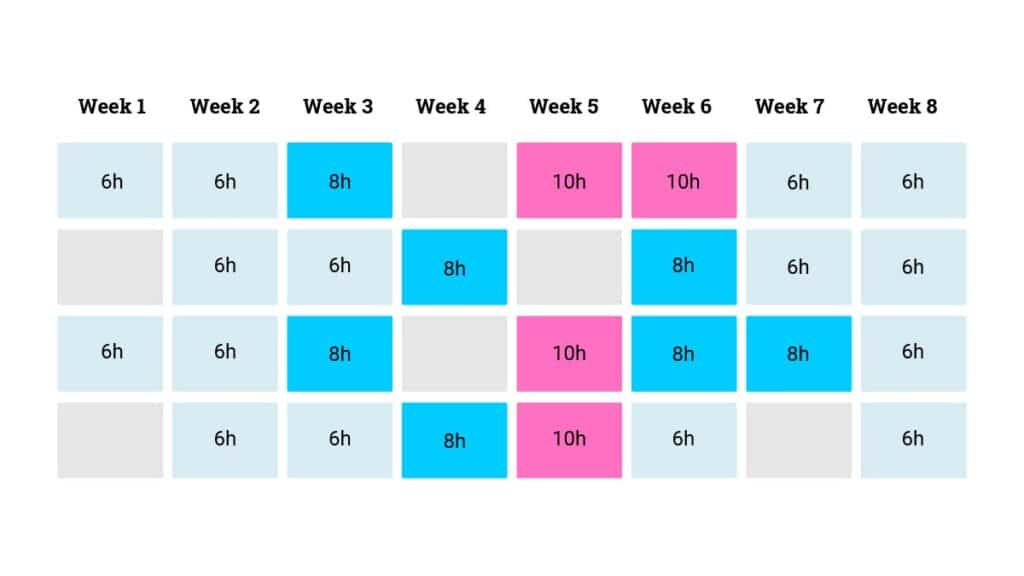
Mavenlink (Kantata) vs OpenAir vs Parallax: Which is Right for You?

Mavenlink, OpenAir and Parallax compared, blog header

See why digital services companies are choosing Parallax over Mavenlink and OpenAir to give their teams accurate, real-time insights and forecasts that accelerate their growth, with fewer disruptions to their workflows. Keep reading to discover in-depth feature comparisons and pricing for these three tools.

Table of Contents:

Platform Comparison Overview

Overview of Parallax 

Compared to the other monolithic, all-in-one PSA tools on the market, Parallax takes a decidedly different approach. Through native integrations with the best-in-class tools agencies and development shops already use, Parallax delivers better resource management, tighter operations, and stronger performance. With this integrations-first approach, Parallax resolves common friction points and business challenges for services companies and delivers shared visibility across the business. Parallax integrations include the top CRMs, timesheet tools, and project management platforms. 

Parallax brings data together to remove the friction and emotion from decision making – especially across sales and delivery teams, helping to answer critical business questions like:

  • “Do we have enough revenue to support our team size?” 
  • “Do we have the capacity to take on new work, or do I need to hire?”  
  • “What happens to capacity and utilization if we close certain deals in the sales pipeline?” 

Parallax makes it easy to pre-plan, schedule, and allocate resources by creating a shared view of planned utilization, making proactive resourcing planning and forecasting possible. Powerful insights and reporting curate data together to allow sales, delivery, finance, and management teams to scenario plan and make smarter decisions together. And a focused implementation and onboarding process gets Parallax customers up to speed and seeing value in the platform within 90 days.

A powerful and differentiated feature in Parallax also includes sales pipeline scenario planning and its impact on planned utilization. Within Parallax, users can see real-time sales pipeline data at any deal stage and toggle on or off certain deals in order to see their impact on future utilization. This centralized insight is the foundation for conversations on hiring, resource allocation, performance, and so much more. 

 Read more about Parallax solutions. 

The Mavenlink and Kimble PSAs recently combined under one brand called Kantata. This professional services automation platform centralizes operations and tools into one core solution to help services organizations optimize their resource planning and decision making. By offering an all-in-one automation solution or integrating components of existing tools, Mavenlink / Kantata helps organizations view and forecast their utilization and make data-driven decisions. In order to get the most out of the Mavenlink / Kantata platform, users are encouraged to migrate data from existing systems and adopt their tools and processes, meaning implementation can take six months or longer.

Overview of OpenAir

An extension of Oracle’s NetSuite ERP, OpenAir is an all-in-one cloud-based professional services automation platform for a wide array of services businesses. The platform provides integrated time tracking, project management, resource management, expense tracking, and invoicing – offering a single platform to run a services organization. OpenAir’s thousands of global customers all use the same version and codebase, with options for configurability and customization. Migration and adoption of this all-in-one ERP platform can often take 6-12 months to fully implement. 

Platform comparison table

ParallaxMavenlink / KantataOpenAir
Company InformationFounded in 2018
40+ employees
Founded in 2009
400+ employees
Founded in 1999
200+ employees
Websitegetparallax.comkantata.comopenair.com
Target Company Size2-500+50-5000+2-1000+
Implementation & AdoptionIntegration-first resource planning engine to curate data from across the business for smarter decisions. Rapid onboarding and implementation.Numerous features and many reporting options, all-in-one tools or integrations offered. 3-6 month implementation.Centralized, all-in-one platform for billing / invoicing, time / expense tracking, project management, and CRM. 6-12 month implementation. 
PricingPricing is per billable resource and locked for the duration of the contract, even if companies grow. No additional costs for implementation, consulting or custom reporting. Pricing per user can change during the duration of a contract term. Integrations often cost extra. Multiple pricing tiers, with a basic plan starting at $399/ month.
Support & TrainingLive in person, online, webinars, docs, and videosLive in person, online, webinars, docs, and videosLive in person, online, webinars, docs, and videos
Customer Review RatingsParallax reviewsMavenlink / Kantata reviewsOpenAir reviews

Parallax vs Mavenlink vs OpenAir: Which one is best? 

Resource management and forecasting tools all deliver better visibility into how your agency or studio operates. How companies achieve that visibility and the hidden costs of a consolidated toolset are what sets Parallax apart. Before taking the big bet and long implementation of an all-in-one tool, Parallax delivers resource visibility faster and keeps your teams in the tools they currently enjoy. Parallax delivers more value, faster, and locks in your price from the very beginning, even if you add more users along the way. 

Parallax is purpose-built for digital services companies: agencies and software development studios. Mavenlink and OpenAir offer a solution for a broad array of services companies which can result in an “everything for everyone” user experience. Plus, the implementation and adoption timelines for all-in-one tools can create massive disruptions to workflows and take months (or years) to get right. Parallax is committed to driving adoption and implementation in 90 days or less, so users can unlock value from their investment quickly. 

Feature Comparison

FeatureParallaxMavenlinkOpenAir
Focused on resource planning and capacity forecasting for digital agencies and software development shops only✓XX
Automatic integration of sales pipeline data at any deal stage allowing deeper scenario planning✓XX
Rapid adoption and implementation on a 90 day schedule✓XX
Additive to existing tech stack without disrupting existing tools and workflows✓XX

Platform advantages and potential drawbacks 

Standing up an ERP or all-in-one PSA tool can represent significant change and disruption for an organization. A single centralized tool with a long implementation and adoption timeline is a big bet that can take months or longer to reveal much value. Companies may struggle to unlock key insights tied to core elements of these tools – like resource management and planning – if time tracking and project management components aren’t properly dialed in first. 

Companies may also expect cost savings with a consolidated toolset, which can be true. However, the time, effort, and disruption required to replace core business applications can often outweigh long-term cost savings. 

Parallax advantages

  • Native integrations
    • Parallax is purpose built to serve as a force multiplier for the CRM, project management and timesheet tools your team is already using. Don’t rip and replace everything when you can curate a source of truth across the platforms teams already use and love. Parallax integrates with top CRM platforms like Salesforce and HubSpot, meaning sales team members get the same experience as always, but their deal and project data flows directly into Parallax for better visibility on resource planning. 
  • Predictable pricing
    • Parallax delivers a sense of pricing from the very first conversations, and there are no hidden fees for consulting or integrations. Plus, the company doesn’t charge for freelancers or non-billable users to use the tool. Parallax pricing is locked, even if companies add more employees. 
  • Ongoing consulting
    • Parallax customer success champions to get customers up and running in Parallax in weeks – not months of hard slogs to implement and integrate. And the company keeps its champions connected to customers as often as they want, ensuring everyone is getting as much value as possible from the platform. 

Ready to take the next step? 

Digital services companies have a bevy of great tools to do awesome work. Resource planning solutions like Parallax utilize the best parts of an existing tech stack to be a force multiplier for stronger operations. Others take a consolidated approach to merge operations, planning, and reporting into one system. Implementation timelines can often be a barrier to adoption. 

Get in touch to learn more about the Parallax approach to resource management and forecasting and start leveling up your operations today. 

Productized Services: How Custom Digital Services Firms Can Adopt Them

Productized services blog header

Many custom digital services firms are looking for a simplified way to experience higher margins and obtain predictable, repeatable work.

The answer lies in productized services, which allow you to serve more clients without spending a ton of time determining the scope, timing, pricing, and team resources required for each project. In this guide, we discuss productized services, why your firm should adopt them, and how to get started.

Key Takeaways:

  1. Productized services are standardized and repeatable packaged offerings of digital services that firms can resell to clients.
  2. Custom digital services firms can productize their services by developing value-add services that are standardized, predictable, and repeatable or by productizing their inputs.
  3. Firms should ask whether the value of a project is in the inputs or outputs before productizing services.
  4. The benefits of productized services include higher margins, service optimization, and increased value for clients.
  5. An example case study demonstrates how a custom creative agency successfully productized its inputs by focusing on its methodology and principles.

Table of Contents:

What are productized services?

Productized services are packaged service offerings that digital services firms and consultancies can resell in a repeatable, standardized way. These packaged offerings are common in production companies that bundle deliverables and deliver them for a fixed cost on a set timeline using the same roles for each project.

According to Service Performance Insight, a leader in Professional Service Market Research, the use of productized services is a leading indicator of more mature professional services companies. Best-in-class organizations generate nearly 80% of their revenue through productized service offerings.

How do productized services work? For example, a digital marketing agency may have a productized search engine marketing (SEM) package. Every client that chooses this package gets the roughly same thing for around the same price:

  • Discovery session
  • 3-page documented SEM strategy
  • 10 Google Ad campaigns
  • A number of campaign management hours
  • 1-hour monthly analytics review with campaign refinement
  • 30-minute weekly touch base

The agency has run these campaigns so often that it knows precisely what and how long it will take and which roles it will require to deliver the service successfully.

How to productize your services as a custom firm

Unfortunately, it’s a common misconception that custom firms and software development shops can’t productize their services. Clients typically approach these custom shops with high-level business challenges unique to their organizations — situations that almost always make it impossible to standardize and predict what each client will receive in the end.

However, there are opportunities for custom firms and development shops to productize their services to reap the many benefits of doing so. It just requires a new way of thinking.

Step 1 to productized services:

First, custom firms have many opportunities to develop value-add services that are standardized, predictable, and repeatable. Examples could include packages for website security audits or accessibility updates.

This à la carte work is easy, repeatable, and high margin for your firm. The output is always the same, and you can do it really well because you’ve done it so many times before.

Step 2 to productized services:

Then there are the big, challenging, and ambiguous projects. A client has a significant business challenge, and you know your team can solve it using its insights, experience, and unique methods. But you’re not sure what the exact outputs of the project will be.

When your firm doesn’t know the specific deliverables (the outputs) that will result at the project’s end, it needs to productize what it knows will remain the same — the inputs.

Inputs include your firm’s principles, methodology, process, team, tools, and artifacts. These inputs, shaped by how your team thinks and its experience, set you apart from other firms. Custom shops that productize these inputs can scale their differentiated value in ways they haven’t been able to otherwise. As a result, they can market, sell, and deliver their services more consistently and profitably.

Step 2 to productized services graphic

Start here: Is the value in the inputs or outputs?

When starting a new project, you should first ask whether the value of the project is in the inputs or outputs. In most cases, it makes sense to have some services productized on their outputs and others on their inputs.

However, you risk becoming commoditized if you only productize your outputs (“You get a new website that includes deliverables X, Y, and Z for $50k.”). Prospects will compare your price and list of deliverables against the other proposals they receive.

If you’re the higher price and haven’t demonstrated why you’re worth it (your unique value), we can almost always guarantee that the prospect will choose the lower-cost firm.

So, how can a firm or custom agency effectively productize its inputs to protect and communicate its differentiated value?

Productizing inputs: An example case study

Let’s consider an example. A global food and drink company approached a custom creative agency for an innovation project to develop a new food brand. All of the other agencies this one was competing against delivered proposals that included project plans with a slew of deliverables.

The creative agency knew it would waste valuable (and expensive) time if it took the same approach. The agency didn’t know, without first going through discovery and an innovation process, what the exact outputs of the project would be. How could they possibly create a project plan and promise specific deliverables?

Instead of following the pack, the creative agency pitched the food and drink company on how their agency works and the methodology it had developed over time, through relevant experience, to help clients navigate innovation.

The agency took the stance that innovation isn’t about following a project plan. It’s about the discovery process, methodology, and principles used to uncover insights to drive the project forward in the right way.

The creative agency won the work.

The agencies that competed against the creative agency likely went through rounds and rounds of revisions to develop their proposed project plans, deliverables, and price. The time spent ate into their margins, and they didn’t even win the work.

The creative agency, meanwhile, had productized how it approaches innovation projects. It structured its discovery phase and methodology, demonstrated why its team was the right one for the job, and shared what tools it would use to successfully deliver the project.

The agency could then use a similar version of that proposal over and over again with other clients seeking innovation projects.

The agency effectively: saved time, protected their profit margin, demonstrated their unique value, set clear expectations for the client and project team, and ultimately won the work. They also eventually won more high-dollar innovation projects using the same proposal and approach.

Business benefits of productized services

Business benefits of productized services graphic

It takes time and thoughtful planning to turn your firm’s inputs into productized services and determine when it makes sense to productize your outputs. But the business benefits you gain justify the effort. Here are just a few of the biggest benefits your agency can expect from productized services.

Higher margins

First, you’ll experience higher margins by spending less time estimating, scoping, and selling work. There’s a lot of upfront work that goes into selling custom projects. Often this requires ongoing discovery sessions with the client to figure out what they are asking the firm to do or build, plus various rounds of estimates and scopes that require collaboration between many internal teams.

If you haven’t productized this phase of the process, you aren’t getting paid for the time, and it’s a margin loss. Firms that standardize their inputs — including the discovery phase — can charge for this time, shorten their sales process, and increase their margins.

For example, instead of spending 4-8 weeks drafting various scopes and estimates and attempting to define the project deliverables (that will almost certainly change by the project’s end), the firm can create standard proposals that showcase their approach and methodology.

Then, they can more quickly close the deal and get paid to do the heavy lifting and discovery.

Service optimization

You’ll also experience optimized service offerings because you can compare them to each other. It’s difficult, if not impossible, for agencies to compare their services against each other when they approach each project as entirely new and custom.

Different teams do the work at different rates, and there’s often a lot of nuance to each project. As a result, comparing the health and margins of each custom project is challenging at best. Firms that productize their services can better compare their projects’ performance against each other because offerings are more defined and repeatable.

For example, let’s say a firm has two productized service offerings. One is a 2-week discovery phase, and the other is a 4-week website audit and security project. When both services are productized, you can compare their profitability, on-time delivery, on-budget delivery, customer demand, and how effectively each leads to additional business.

These insights can inform whether either service needs adjustments or which service the firm might promote more with clients.

Increased value for clients

Productized services lead to greater value for your clients. They allow for more predictable client relationships because you set clear expectations with clients upfront. As a result, your clients understand your approach and methodology because you documented it in detail to sell the work.

Moreover, your team operates more efficiently and effectively because you’ve done the work before, and everyone knows which process to follow. The repeatable nature of productized work leads to on-time and on-budget delivery and happier teams.

Productize your services with Parallax

Are you ready to productize your services? We’d love to show you how Parallax, a professional services automation platform built for digital firms and consultancies, helps our customers launch, run, analyze, and optimize their productized services. Together, we’ll get your firm operating smarter, healthier, and happier. Book a live demo today!

Productized Services FAQs