Best PSA Software Platforms for Resource Optimization

Resource optimization is an essential but difficult best practice to nail down for services organizations because it’s an inherently dynamic industry we live in. The services wanted and needed today – paired with the talent and resources required to deliver those services – is always. in. flux. It’s what makes the services world exciting, but it’s also what makes it really challenging. Without the right solution, resource managers can experience limited control, lack of predictability, and a feast or famine mentality, and it’s exhausting. You don’t like this, and we don’t like this for you. 

Stick around and learn how the right platform can help leaders and resource managers avoid common resourcing challenges and instead feel empowered to effectively manage each day and accurately forecast for the days ahead.

Table of Contents

What is PSA software?

The benefits of using PSA software for resource optimization

  • Greater visibility into sales pipeline 
  • More streamlined capacity planning
  • Fewer disruptions to workflows
  • Reliable, forward-looking insights
  • One source of truth

3 key features to look for is PSA software

  • Integration-first 
  • Enhanced visibility 
  • Reliable forecasting

5 Best PSA software platforms for resource optimization

  • Parallax
  • Kantata 
  • Projector PSA 
  • OpenAir 
  • Teamwork

How to choose the best PSA software for your organization

What is PSA software?

Professional services automation (PSA) is a category of software that provides various functionalities needed to manage core processes and operations within services businesses, such as agencies and software development shops. PSA solutions streamline workflows, increase visibility, and enable greater efficiency for services organizations by providing a variety of project management, resource optimization, time tracking, expense management, revenue tracking, and forecasting capabilities. Some PSA solutions integrate with business-critical applications, such as accounting software and CRMs, to allow for seamless orchestration between best-in-class tools while encouraging best practices across business functions, while others simply look to replace those tools with an all-in-one approach. 

At Parallax, we believe that PSA platforms and other comparable solutions should be built to keep teams in the tools they already love (or help eliminate the ones they don’t love!) while providing holistic, real-time insights into the business. They should always enable better, faster decision-making that drives strategic performance.

The benefits of using PSA software for resource optimization

Services businesses – where people are the product – spend a lot of time coordinating day-to-day management of resources. It often feels like a never-ending game of Tetris, with leaders and resource managers attempting to put the best people on a project that matches the project needs, while also trying to maximize utilization for everyone. Those two motivations rarely line up perfectly, and it’s that conflict that makes resource optimization incredibly time consuming and challenging to get “right.”

But when they do get it right, leaders understand what skill sets their current employees have and what services they can deliver today and tomorrow, with all relevant information typically held and managed within PSA software. Modern solutions not only help streamline resource management but level up these core business processes into resource optimization.

Here’s what services businesses gain when they adopt a top-of-the-line solution:

Greater visibility into sales pipeline 

PSA software and other similar solutions should provide access to sales pipeline data to enable better resource optimization. Without visibility into the pipeline, leaders can’t know what’s being sold, whether those opportunities are enough to hit financial and operational targets, and if they have the right people available to do the work. Importantly, services companies need to ensure sales pipeline information is regularly updated, too, so that their data can provide directionally-correct insights early on and add higher fidelity along the way.

More streamlined capacity planning

To optimize resources, leaders must also plan for capacity — this can and should happen within the PSA solution, too. Capacity planning essentially helps leaders “read the tea leaves” earlier by planning for future demand based on social, cultural, and industry trends. This helps them understand how customer demand has changed and impacted the value of the services they currently offer, , AND assess the future of the services they may want to invest in based on industry direction and customer demand.

Fewer disruptions to workflows

Consider the cost, time, resources, and implementations that it takes to replace everything in the tech stack versus the quick wins services companies can achieve by integrating PSA software with their existing toolset. Solutions that have native integrations for the best-in-class tools organizations already use help to avoid disruption to workflows, which helps to avoid unexpected changes to resourcing plans — and ultimately helps to deliver value quickly. The best kind of win-win-win.

Reliable forward-looking insights

PSA software that allows for real-time resource planning unlocks actionable, meaningful forecasts that 1) enable proactive decision-making 2) provide teams with more growth opportunities and 3) ease the stress and anxiety that leaders often associate with resource management. By removing outdated resourcing methods and implementing best practices for tried-and-true resource optimization, services companies can focus on continuously optimizing operations, evolving their service offerings and driving growth.

A shared source of truth

We know everyone just loooves spreadsheets (ha, ha…), but it’s time to ditch the training wheels. Today’s solutions should replace clunky spreadsheets that are used to fill the gaps between the different functions of a services business and instead provide reliable data and actionable insights, all in one place. By curating critical data with a resource management AND planning engine (like Parallax ), services companies get a better source of truth on how the business is performing. Leaders can then free up their valuable (and very limited) time to make smart and future-looking resourcing decisions based on a shared view of data vs. gut instinct.

3 key features to look for in PSA software

Integration-first

Legacy PSA platforms and monolithic ERPs force project and delivery teams to use sub-optimal tools for project management and resource planning, often creating a significant learning curve and administrative burden for teams. And we all know no one wants to rip-and-replace their current systems and platforms, as it can cause significant disruption to daily operations. Think of how you would want to spend the next 12-18 months for a moment… learning how to use tools to do things you already know how to do, like time tracking and project management, OR spending that time (and money) learning best practices that will help you optimize operations, maximize utilization and grow your business and people? We know what we’d choose.

Solutions with an integrations-first approach don’t take away valuable time or add on unnecessary administrative work to people’s days but instead broaden the power of an organization’s toolset. Integration-first solutions empower teams with the tools they already use while optimizing operations for better performance… an operational leader’s dream!

Enhanced visibility

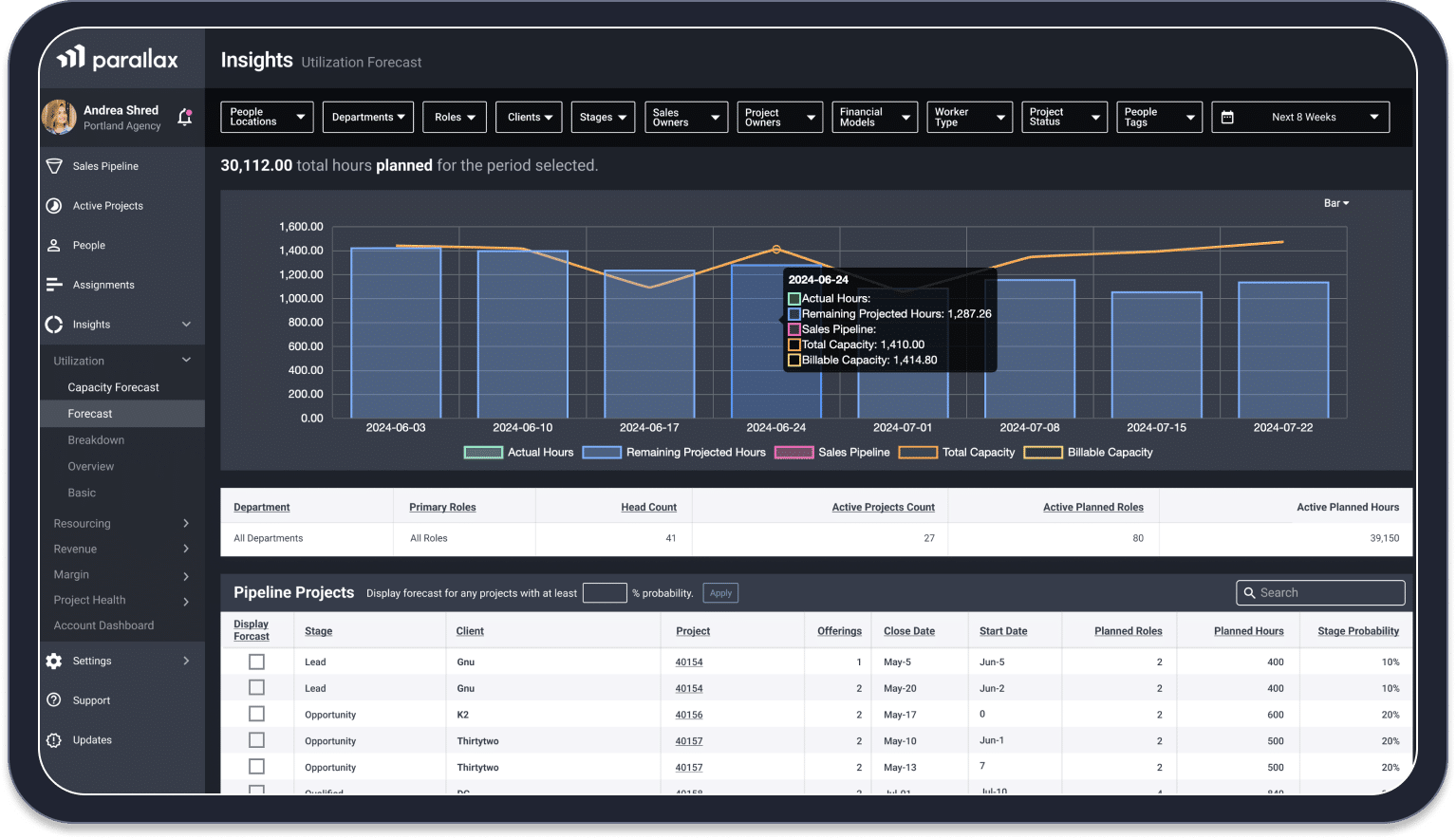
PSA platforms should create enhanced visibility into resource assignments across projects, teams, and accounts in real-time, allowing resource managers and team leads to determine planned capacity and resource needs with certainty. With the right platform, they’re able to quickly evaluate workloads, make real-time adjustments to maintain higher utilization and team engagement, and match the best resources to the right projects for optimal team performance.

Reliable forecasting

Purpose-built platforms enable leaders to make smart, proactive decisions in support of their business and people. The solution they’re using to manage resources should also provide them with reliable, real-time insights that inform forecasts. This combination – real-time forecasting and smarter resource planning – provides a view into how the business is performing on a variety of financial and operational metrics and enables leaders to project future performance as well. The key here is that these forecasts are actionable. It’s information that leaders can actually use to make informed decisions about their business and people. Having it at their fingertips means they spend less time gathering information and making half-baked predictions and more time trusting the data and taking confident action.

5 Best PSA software platforms for resource optimization

Services companies have a ton of options today for the platforms they use for resource optimization. While every business will have a unique set of requirements and a specific wish-list for what they want from their platform, it’s important for everyone to be able to have smooth, streamlined workflows that allow them to take their resource management processes to the next level. 

When in doubt, look for a tool that’s a force multiplier, allowing the business to shift from a heroic organization to one that’s future-forward and teed up for steady, streamlined growth. Which brings us to…

Parallax

Effectively managing resources requires finding the right cadence and leveraging best practices so that it becomes second nature to everyone involved. Once service companies find that sweet spot, they experience better utilization rates, higher margins, and a happier more engaged workforce. 

Parallax is built with that sweet spot in mind. It’s a solution designed by a team of industry experts who have lived the challenges of resource management and know the joy of achieving resource optimization. That’s why Parallax leverages a different approach than other platforms on the market—it’s a purpose-built platform for services companies, including software development firms, full service digital agencies, digital marketing companies, and technology consultancies, and has native integrations for the best-in-class tools that are already in use. This provides fewer disruptions to current workflows as well as a forward-looking view into the business to enable better resource management, tighter operations, and stronger performance. 

Parallax turns resource management into quality resource planning that results in accurate, confident forecasting – meaning everyone from leadership and finance to resource planners and project managers benefit from the platform. Plus, it delivers value quickly, driving adoption and implementation in 90 days or less, and locks in price from the very beginning, even if more users along the way. 

Parallax is a solution that empowers growth-minded organizations with greater transparency across the business and helps leaders free up their time spent in spreadsheets so they can focus on what truly matters: setting vision, delivering great work, inspiring their teams, and growing the business.

Kantata (Mavenlink)

Formerly Mavenlink and Kimble, Kantata is a PSA platform that centralizes operations and tools into one core solution to help services organizations optimize their resource planning and decision making. By offering an all-in-one automation solution or integrating components of existing tools, Kantata helps organizations view and forecast their utilization and make data-driven decisions. The platform allows users to more easily balance supply and demand, explore impact to revenue and margin, configure resource recommendations, align skills with project demands, and more. It’s designed for creative and consulting firms as well as IT and software shops. 

In order to get the most out of the Kantata platform, users are encouraged to migrate data from existing systems and adopt their tools and processes, meaning implementation can take twelve months or longer.

Projector PSA (BigTime)

BigTime Software’s Projector PSA is a cloud-based, best-of-breed PSA solution for services organizations. It’s designed to manage and optimize operations for users, allowing them to experience improved project performance, optimized resourcing, and higher profits. Its resource scheduling software “balances the art and science of resource management” by allowing project managers to easily match skills to profiles and review information regarding hiring, utilization, forecasts, and profitability. 

Its foundation caters to various operational elements, including time and expense management, project budgeting, invoicing, subcontractor management, rate and revenue management, revenue recognition, financial reporting, and more. Projector targets various industries, including software and high tech, accounting firms, creative agencies, architecture and engineering firms, and more.

OpenAir

An extension of Oracle’s NetSuit ERP, OpernAir is an all-in-one cloud-based professional services automation platform for a wide array of services businesses, such as IT services, advertising and digital marketing agencies, and other professional services organizations. The platform provides integrated time tracking, project management, resource management, expense tracking, and invoicing – offering a single platform to run a services organization. Its capabilities focus on achieving optimized resource management, improved project profitability, complete project financials, increased productivity, and greater insights and monitoring. 

OpenAir’s thousands of global customers all use the same version and codebase, with options for configurability and customization. Migration and adoption of this all-in-one ERP platform can often take 6-12 months to fully implement.

Teamwork

Teamwork is a project management tool centered around collaboration and delivering work on time and on budget. It makes resource management simple by providing a view of everything in one place for the team, clients, and freelancers. Teamwork has advanced features for time tracking, budgeting, and resource allocation. It integrates with companies’ other project applications, such as the CRM platform, and automates repetitive tasks with straightforward workflows. 

Teamwork targets agencies, professional services, and creative teams who want to gain visibility into performance and profitability, more easily manage financials, and address challenges before they cause problems.

How to choose the best PSA software for your organization

There’s nothing worse than researching platforms, implementing the “one” you think will be best for your business, and then experiencing disappointing adoption and/or frustrating features. 

We want to help you avoid this. The right combination of tools – the best combination of tools – will enable forward-thinking resource planning and optimization, which creates a significant impact for the business. When you know when and where your people are spending time, you’ll know how and when you’ll earn revenue from that work. When you know how your team is utilized, you’ll know your costs and how much you’ll earn—and you’ll know your margins and can focus on hitting those targets. With these inputs, all delivered through better resource planning and active forecasting, you’ll be able to make smarter business decisions and improve performance.

Your solution should tell you if you have enough revenue to support your team, whether you need to hire, if and when to take on new work, and the impact deals will have capacity and utilization. It should take the guesswork out of operations so you can focus on your craft, your people, and the growth of your business.

Keep this in mind when you’re choosing a strategic platform that’s best for your organization—because if the solution you’re considering doesn’t help you achieve all of this, it’s probably not for you.

Let’s chat!

At Parallax, we know that services businesses need to move fast and move smart—and they need a platform that provides greater visibility and predictability, enables stronger adoption across the toolset, and provides better insights to inform resource optimization and strategic planning, all with fewer disruptions to the team’s workflow. 

We know your world because we’ve lived it, too. We have tools and experts ready, willing, and able to help you tackle unnecessary resource optimization challenges and prepare the business for the next stage of growth. 

Questions? Let us show you the ropes: www.getparallax.com/book-a-demo

Resource Forecasting Tools for Digital Agencies [Complete Guide]

Resource forecasting usually isn’t anyone’s favorite task. Leaders often approach resourcing meetings with dread and leave them feeling deflated—but it doesn’t need to be this way. Today’s solutions can serve up the exact information they need to make smart resourcing choices and help establish best practices and workflows that make forecasting a less stressful (maybe even fun? ) activity. Let’s dive in!

Table of Contents:

What is resource forecasting?

Resource forecasting vs. resource planning vs. resource management

The benefits of resource forecasting for digital agencies

Features to look for in resource forecasting tools

Top resource forecasting tools for your agency

How to choose the right resource forecasting software

What is resource forecasting?

Resource forecasting is essentially a balancing act where leaders and resource managers attempt to 1) bring in enough new business to hit revenue targets, 2) have the right amount of talent on staff to deliver quality results, and 3) keep everyone engaged and driven. 

Did we mention this is a challenging balancing act? It’s one that often leads to reactive, instinctual actions rather than confident, data-informed decisions, but there is a way around the stressful ebb and flow of resource forecasting… 

Reliable, real-time insights from a solution that’s designed specifically for resource planning and forecasting can reduce volatility by providing a clear, concise picture to leaders of what’s currently happening across every business function, what’s coming down the sales pipeline, and what they should consider doing to better balance the needs of the business with the needs of their people. When this clicks – when it all comes together to enable better resource planning AND active forecasting – operations are smoother, performance is enhanced, growth is possible, and everyone is happier.

Resource forecasting vs. resource planning vs. resource management

The services industry loves coming up with new terminology for best practices and processes, even using them interchangeably. And depending on which agency or software development shop you’re at, different phrases could mean slightly different things – so let’s clear up what we mean at Parallax when we’re talking about everyone’s favorite activity: 

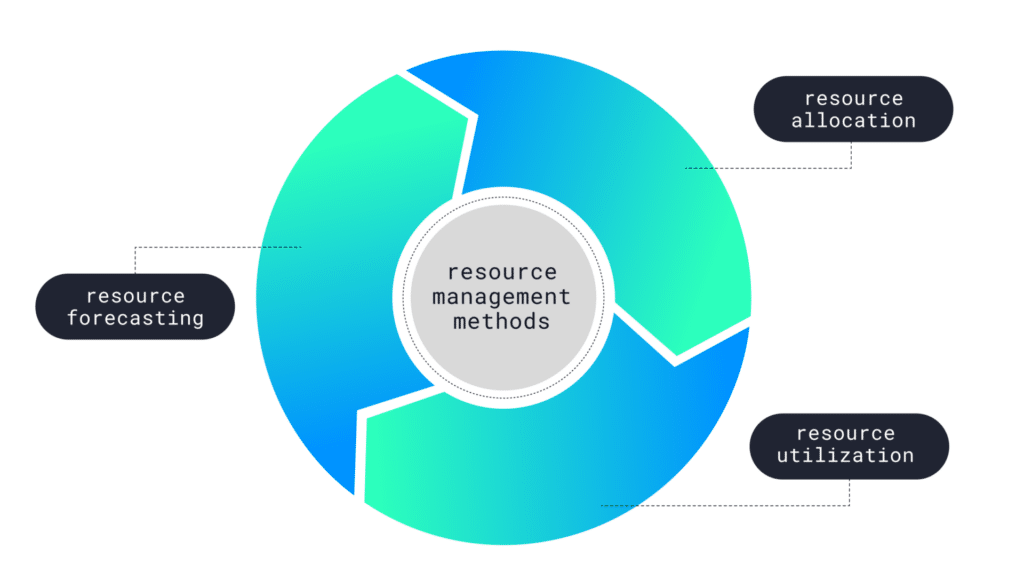
  • Resource forecasting: Demand for and profitability of services is always changing—resource forecasting involves leaders predicting where they should invest in resources to meet those changes, using current workloads and sales pipeline data to inform their predictions  
  • Resource planning: Leveraging said forecast to develop an actionable plan, assigning specific resources (i.e., talent) to specific projects 
  • Resource management: Monitoring progress of projects against resources, ensuring everything is on time and on budget + making real-time adjustments as needed 

These are (clearly) nuanced best practices, but they’re all working towards the same thing: enabling smarter decision-making about the business and your people, all to ultimately help your organization evolve into a strategic operation, poised for innovation and growth. 

The benefits of resource forecasting for digital agencies

Good resource forecasting, planning, and management is crucial to predicting and navigating anything else in the business. Resource forecasting informs your revenue and margin forecasts and is key to making confident decisions related to cash flow. It reduces reactive, rushed hiring and instead enables proactive, selective hiring. So many critical elements of the business hinge on successful resource forecasting—and when you get it right, magic happens ✨…

Achieve higher utilization

Every organization is tasked with optimizing and stabilizing utilization: the measurement of the team’s total time spent on billable work versus the total billable time available. Low utilization means team members aren’t meeting their billable targets and are spending more time than expected on internal or non-billable work or simply not having enough to do (which is no good for anyone). High utilization on the other hand indicates that an organization is efficiently using the capacity of its team and that everyone is meeting or exceeding their billable targets (which is great for everyone). Effective resource forecasting allows digital services organizations to achieve higher utilization, which allows them to more easily hit revenue targets. 

Keep strong talent

Billable utilization isn’t a zero-sum game, meaning that you can’t offset low billable hours of some employees by expecting more from others to offset the overall shortage. But when there’s a lack of foresight that leads to reactive decisions, this is the common scenario we see play out: you put your best people on new work because they can be trusted to deliver, even if they are already busy. Strong talent steps up, balances work themselves, and completes the work—but keep in mind good, reliable, smart employees are likely more expensive, too, meaning you have cheaper employees doing less while expensive employees do more, which directly impacts profitability. This strategy also leads to the risk of over relying on your “A players” to step up. They’ll do it for a while, but they’ll eventually resent your lack of planning, and they’ll burn out. They’ll take their skills and domain knowledge with them and leave behind low morale that continues to impact those who stay. Sound familiar? 

Don’t worry—there’s good news. Better planning and forecasting can help you keep strong talent happy because once leaders are confident in meeting the basic needs of their people and the business, everyone will have a balanced workload and can focus on the parts of their job that are much more fulfilling. 

Experience less stress 

Let’s be honest: without the right tool and the right information, resource forecasting is stressful. It can feel like a game of Tetris, where leaders are trying to perfectly fit the best people into the resource gaps across projects – but right when something fits, there’s another problem to solve. There are platforms designed to help you see “above the screen” so to speak – alleviating the stress of resource forecasting by enabling smarter resource planning, providing an actionable view into how the business is performing on a variety of financial and operational metrics, enabling leaders to project future performance and take action as needed. 

Unlock informed decision-making

With access to accurate, real-time forecasts, leaders can make decisions driven by data rather than emotion. This also gives the team time to staff projects in a way that allows for growth opportunities for employees and healthy resource management. There’s way less scrambling – no more ‘too much work, not enough work’ rollercoaster rides – and way more intention behind everything. 

Enable smart, strategic growth 

When services businesses unlock the power of accurate data and reliable forecasting, they’re teed up for future growth, as everyone has more time to focus on their craft. Teams are working from a shared perspective, rid of siloed thinking and siloed workflows, and they can finally scale the magic that makes their company unique. Accurate resource forecasting is really that important.   

Features to look for in resource forecasting tools

While there’s a plethora of forecasting tools out there, they’re not all created equal. It’s important to ensure the resource forecasting tool you choose supports your business today and can evolve to support your future business. We’re in a dynamic industry, one where both the services offered and talent required are rapidly evolving, so your solution should be just as dynamic. Here’s what to look for:

Real-time visibility

Without a doubt, your platform should provide enhanced visibility into resource assignments across projects and accounts, allowing leaders and resource managers to determine current resource needs and confidently assess future needs. It should provide a clear path for how to best match resources to future projects for optimal performance.

Integrations-first

Your solution should enable orchestration between best-in-class tools, providing automatic integrations for both sales pipeline data to enable smart forecasting and deeper scenario planning for leaders as well as resource and project management capabilities to bring smoother, streamlined operations to life.

Personalized workflows

Only some solutions are built with personalization as a priority. When it comes to resource forecasting, leaders need to be able to access the data they need quickly and easily, and they can’t be bogged down by other workflows and information that are irrelevant to the task at hand. Look for platforms that provide personalization capabilities so you can move smart, with fewer clicks and way less hassle. 

One shared view

Ok, we’ll say it: spreadsheets need to go. Your solution should seamlessly bring together the different functions of the business and provide reliable data and actionable insights in one shared view, so everyone is operating from the same source of truth on how the business is performing. Rather than chasing down data and cobbling it together in spreadsheets, leaders can focus their valuable, limited time on making smart and future-looking resourcing decisions. 

Purpose-built

The services industry, especially digital agencies and software development shops, needs technology that understands their world – that’s designed for them and built with their unique needs and wants in mind. Resource forecasting is inherently challenging, but the right solution will bring together all the necessary information and capabilities to make it an easier, more streamlined best practice that results in reliable, actionable insights.

Top resource forecasting tools for your agency

Everyone wants to feel confident in the tools and technologies they’re investing in and leveraging in their day-to-day, especially when the information the platform is serving up heavily factors into business-related decisions. There’s a lot to choose from, so let us help you start to better understand a few of your options…

Parallax

Parallax turns resource management into quality resource planning that results in accurate, confident forecasting – meaning everyone from leadership and finance to resource planners and project managers benefits from the platform. The platform allows leaders to step away from outdated, often-manual approaches for collecting and uncovering business-critical insights and serves up centralized insights and a future-looking view to help inform forecasts that 1) drive the business forward and 2) keep everyone aligned, focused, and yes – happy.

Parallax leverages native integrations for the best-in-class tools that are already in use to reduce disruptions to current workflows and provide a cohesive, shared forward view into the business. Instead of planning for 1-2 weeks out, for example, the platform allows you to allocate time and resources out 6-8 weeks based on the information you have on hand (as a starting point; you can and should adjust as you go). It’s a small shift that results in better resource management and forecasting and helps leaders achieve stronger performance, both at the individual level and for the business at large. 

Parallax delivers value quickly, driving adoption and implementation in 90 days or less, and locks in price from the very beginning. We made it this way because we know the challenges and pain that come with surprises, costly add-on features and vague implementation timelines. No thank you.

That’s why Parallax is a “no gotchas” solution—one that empowers growth-minded organizations with greater transparency across the business and helps leaders focus on setting vision, delivering great work, inspiring their teams, and growing the business.

pssssst…

Better Resource Planning Ebook

Image flipping from reactive to proactive once and for all. Download now to learn exactly how to allocate time and resources out 6-8 weeks vs. 1-2 weeks at a time.

Kantata (Mavenlink) 

Kantata is a professional services automation (PSA) platform that centralizes operations and tools into one core solution to help services organizations optimize their resource planning and decision making. Kantata helps organizations view and forecast their utilization and make data-driven decisions by providing the ability to understand and allocate resources in detail. The platform allows users to more easily balance supply and demand, explore impact on revenue and margin, configure resource recommendations, align skills with project demands, and more.

It’s designed for creative and consulting firms as well as IT and software shops, and it prices out by user, meaning the price can change during the duration of a contract term. Integrations often cost extra, and in order to get the most out of the Kantata platform, users are encouraged to migrate data from existing systems and adapt their tools and processes (implementation can take twelve months or longer). 

Metric.AI

Metric.AI is an all-in-one platform designed to provide a single source of truth for agencies’ financial data. The platform includes various capabilities, ranging from time tracking, resource allocation, and project budgeting, to invoicing, analytics, and forecasting. It provides real-time metrics around profit, utilization, and effective bill rates and also allows users to create custom metrics for enhanced decision-making. Metric.AI offers more predictability into the planning process, identifying potential risks and uncovering insights that can help inform business strategy.  

Metric.AI pricing starts at $19/seat/month, requiring an annual commitment and a 50-seat minimum. There’s also an enterprise package for businesses that require customizations or add-ons.

OpenAir

An extension of Oracle’s NetSuite ERP, OpernAir is an all-in-one cloud-based PSA platform for a wide array of services businesses. The platform provides integrated time tracking, project management, resource management, expense tracking, and invoicing – offering a single platform to run a services organization. Its forecasting functionality leverages similar features as invoicing and revenue recognition but time is not timesheet-based but rather “resource scheduling” based. 

OpenAir’s customers all use the same version and codebase, with options for configurability and customization. It offers multiple pricing tiers, with a basic plan starting at $399/month. Migration and adoption of this all-in-one ERP platform can often take 6-12 months to fully implement.

Wrike

An easy-to-use tool, Wrike streamlines the internal project management and collaboration processes across teams. The platform focuses on the accomplishment of tasks rather than entire projects, offering workflow customization for companies to make processes more company- or industry-specific. It’s built to streamline proofing and reporting for marketing campaigns, to more easily develop creative assets and have them routed through approvals quickly, and to support project managers more easily track deadlines and deliver results. 

Wrike’s Resource Bookings capability allows leaders to estimate hours for a project without having to create a detailed plan, which then helps project managers and team leaders collaborate on resource requirements so that resources are available for high-priority projects. Wrike offers various plans with different pricing structures depending on the company’s needs.

Forecast

Forecast by Harvest organizes schedules into visual plans so that leaders can more easily map out upcoming projects and make smarter resourcing decisions. The platform lets users assign people to projects and determine how many hours they can dedicate to each one without overbooking their time. It also shows when people have open time and can be allocated new work as it is secured. 

Forecast enables collaboration between project managers, leaders, and the entire team. It creates a central place to house all plans so there’s less confusion about who’s working on what and when. Forecast costs $5.00/user/month.

nTask

nTask is a flexible project management tool built to help teams collaborate and communicate about project progress and workloads. The platform provides various views, including Gantt charts and calendar views, to display critical information across projects so that the team knows which tasks have been assigned to who as well as the status of each task. nTask also allows teams to start planning upcoming projects by assigning resources and time to each one, gathering all information necessary to monitor and optimize each project. 

nTask has a basic plan for free, limited to 5 members per team It also has Premium and Business packages for $8 per month as well as a customizable Enterprise plan.

How to choose the right resource forecasting software

Choosing the right resource forecasting software can be challenging, mainly because there’s no one-size-fits-all solution that will work for every business. Your business is unique, and your platform needs to accommodate what makes you you

So, when in doubt: 

  • Align on your budget 
  • Create a list of mission-critical features 
  • Discuss what’s currently working with your tool and what isn’t 
  • Map out objectives and goals you want to achieve with your new solution 
  • Demo your shortlist

Ready to chat? 

It’s time to take your forecasting to the next level, and we want to help you get there. We know that you’re expected to move fast and move smart and that you’re on the hook for anticipating what’s coming and what’s around the corner. And we know that you need a platform that provides greater visibility and predictability in order to do any of that—one that provides better insights to achieve resource optimization, improve strategic planning, and deliver active forecasting. 

That’s why we created Parallax, and we’re more than happy to show you exactly how it works: www.getparallax.com/book-a-demo.

Mavenlink (Kantata) vs OpenAir vs Parallax: Which is Right for You?

See why digital services companies are choosing Parallax over Mavenlink and OpenAir to give their teams accurate, real-time insights and forecasts that accelerate their growth, with fewer disruptions to their workflows. Keep reading to discover in-depth feature comparisons and pricing for these three tools.

Table of Contents:

Platform Comparison Overview

Overview of Parallax 

Compared to the other monolithic, all-in-one PSA tools on the market, Parallax takes a decidedly different approach. Through native integrations with the best-in-class tools agencies and development shops already use, Parallax delivers better resource management, tighter operations, and stronger performance. With this integrations-first approach, Parallax resolves common friction points and business challenges for services companies and delivers shared visibility across the business. Parallax integrations include the top CRMs, timesheet tools, and project management platforms. 

Parallax brings data together to remove the friction and emotion from decision making – especially across sales and delivery teams, helping to answer critical business questions like:

  • “Do we have enough revenue to support our team size?” 
  • “Do we have the capacity to take on new work, or do I need to hire?”  
  • “What happens to capacity and utilization if we close certain deals in the sales pipeline?” 

Parallax makes it easy to pre-plan, schedule, and allocate resources by creating a shared view of planned utilization, making proactive resourcing planning and forecasting possible. Powerful insights and reporting curate data together to allow sales, delivery, finance, and management teams to scenario plan and make smarter decisions together. And a focused implementation and onboarding process gets Parallax customers up to speed and seeing value in the platform within 90 days.

A powerful and differentiated feature in Parallax also includes sales pipeline scenario planning and its impact on planned utilization. Within Parallax, users can see real-time sales pipeline data at any deal stage and toggle on or off certain deals in order to see their impact on future utilization. This centralized insight is the foundation for conversations on hiring, resource allocation, performance, and so much more. 

 Read more about Parallax solutions

The Mavenlink and Kimble PSAs recently combined under one brand called Kantata. This professional services automation platform centralizes operations and tools into one core solution to help services organizations optimize their resource planning and decision making. By offering an all-in-one automation solution or integrating components of existing tools, Mavenlink / Kantata helps organizations view and forecast their utilization and make data-driven decisions. In order to get the most out of the Mavenlink / Kantata platform, users are encouraged to migrate data from existing systems and adopt their tools and processes, meaning implementation can take six months or longer.

Overview of OpenAir

An extension of Oracle’s NetSuite ERP, OpenAir is an all-in-one cloud-based professional services automation platform for a wide array of services businesses. The platform provides integrated time tracking, project management, resource management, expense tracking, and invoicing – offering a single platform to run a services organization. OpenAir’s thousands of global customers all use the same version and codebase, with options for configurability and customization. Migration and adoption of this all-in-one ERP platform can often take 6-12 months to fully implement. 

Platform comparison table

ParallaxMavenlink / KantataOpenAir
Company InformationFounded in 2018
40+ employees
Founded in 2009
400+ employees
Founded in 1999
200+ employees
Websitegetparallax.comkantata.comopenair.com
Target Company Size2-500+50-5000+2-1000+
Implementation & AdoptionIntegration-first resource planning engine to curate data from across the business for smarter decisions. Rapid onboarding and implementation.Numerous features and many reporting options, all-in-one tools or integrations offered. 3-6 month implementation.Centralized, all-in-one platform for billing / invoicing, time / expense tracking, project management, and CRM. 6-12 month implementation. 
PricingPricing is per billable resource and locked for the duration of the contract, even if companies grow. No additional costs for implementation, consulting or custom reporting. Pricing per user can change during the duration of a contract term. Integrations often cost extra. Multiple pricing tiers, with a basic plan starting at $399/ month.
Support & TrainingLive in person, online, webinars, docs, and videosLive in person, online, webinars, docs, and videosLive in person, online, webinars, docs, and videos
Customer Review RatingsParallax reviewsMavenlink / Kantata reviewsOpenAir reviews

Parallax vs Mavenlink vs OpenAir: Which one is best? 

Resource management and forecasting tools all deliver better visibility into how your agency or studio operates. How companies achieve that visibility and the hidden costs of a consolidated toolset are what sets Parallax apart. Before taking the big bet and long implementation of an all-in-one tool, Parallax delivers resource visibility faster and keeps your teams in the tools they currently enjoy. Parallax delivers more value, faster, and locks in your price from the very beginning, even if you add more users along the way. 

Parallax is purpose-built for digital services companies: agencies and software development studios. Mavenlink and OpenAir offer a solution for a broad array of services companies which can result in an “everything for everyone” user experience. Plus, the implementation and adoption timelines for all-in-one tools can create massive disruptions to workflows and take months (or years) to get right. Parallax is committed to driving adoption and implementation in 90 days or less, so users can unlock value from their investment quickly. 

Feature Comparison

FeatureParallaxMavenlinkOpenAir
Focused on resource planning and capacity forecasting for digital agencies and software development shops onlyXX
Automatic integration of sales pipeline data at any deal stage allowing deeper scenario planningXX
Rapid adoption and implementation on a 90 day scheduleXX
Additive to existing tech stack without disrupting existing tools and workflowsXX

Platform advantages and potential drawbacks 

Standing up an ERP or all-in-one PSA tool can represent significant change and disruption for an organization. A single centralized tool with a long implementation and adoption timeline is a big bet that can take months or longer to reveal much value. Companies may struggle to unlock key insights tied to core elements of these tools – like resource management and planning – if time tracking and project management components aren’t properly dialed in first. 

Companies may also expect cost savings with a consolidated toolset, which can be true. However, the time, effort, and disruption required to replace core business applications can often outweigh long-term cost savings. 

Parallax advantages

  • Native integrations
    • Parallax is purpose built to serve as a force multiplier for the CRM, project management and timesheet tools your team is already using. Don’t rip and replace everything when you can curate a source of truth across the platforms teams already use and love. Parallax integrates with top CRM platforms like Salesforce and HubSpot, meaning sales team members get the same experience as always, but their deal and project data flows directly into Parallax for better visibility on resource planning. 
  • Predictable pricing
    • Parallax delivers a sense of pricing from the very first conversations, and there are no hidden fees for consulting or integrations. Plus, the company doesn’t charge for freelancers or non-billable users to use the tool. Parallax pricing is locked, even if companies add more employees. 
  • Ongoing consulting
    • Parallax customer success champions to get customers up and running in Parallax in weeks – not months of hard slogs to implement and integrate. And the company keeps its champions connected to customers as often as they want, ensuring everyone is getting as much value as possible from the platform. 

Ready to take the next step? 

Digital services companies have a bevy of great tools to do awesome work. Resource planning solutions like Parallax utilize the best parts of an existing tech stack to be a force multiplier for stronger operations. Others take a consolidated approach to merge operations, planning, and reporting into one system. Implementation timelines can often be a barrier to adoption. 

Get in touch to learn more about the Parallax approach to resource management and forecasting and start leveling up your operations today. 

Productized Services: How Custom Digital Services Firms Can Adopt Them

Many custom digital services firms are looking for a simplified way to experience higher margins and obtain predictable, repeatable work.

The answer lies in productized services, which allow you to serve more clients without spending a ton of time determining the scope, timing, pricing, and team resources required for each project. In this guide, we discuss productized services, why your firm should adopt them, and how to get started.

Key Takeaways:

  1. Productized services are standardized and repeatable packaged offerings of digital services that firms can resell to clients.
  2. Custom digital services firms can productize their services by developing value-add services that are standardized, predictable, and repeatable or by productizing their inputs.
  3. Firms should ask whether the value of a project is in the inputs or outputs before productizing services.
  4. The benefits of productized services include higher margins, service optimization, and increased value for clients.
  5. An example case study demonstrates how a custom creative agency successfully productized its inputs by focusing on its methodology and principles.

Table of Contents:

What are productized services?

Productized services are packaged service offerings that digital services firms and consultancies can resell in a repeatable, standardized way. These packaged offerings are common in production companies that bundle deliverables and deliver them for a fixed cost on a set timeline using the same roles for each project.

According to Service Performance Insight, a leader in Professional Service Market Research, the use of productized services is a leading indicator of more mature professional services companies. Best-in-class organizations generate nearly 80% of their revenue through productized service offerings.

How do productized services work? For example, a digital marketing agency may have a productized search engine marketing (SEM) package. Every client that chooses this package gets the roughly same thing for around the same price:

  • Discovery session
  • 3-page documented SEM strategy
  • 10 Google Ad campaigns
  • A number of campaign management hours
  • 1-hour monthly analytics review with campaign refinement
  • 30-minute weekly touch base

The agency has run these campaigns so often that it knows precisely what and how long it will take and which roles it will require to deliver the service successfully.

How to productize your services as a custom firm

Unfortunately, it’s a common misconception that custom firms and software development shops can’t productize their services. Clients typically approach these custom shops with high-level business challenges unique to their organizations — situations that almost always make it impossible to standardize and predict what each client will receive in the end.

However, there are opportunities for custom firms and development shops to productize their services to reap the many benefits of doing so. It just requires a new way of thinking.

Step 1 to productized services:

First, custom firms have many opportunities to develop value-add services that are standardized, predictable, and repeatable. Examples could include packages for website security audits or accessibility updates.

This à la carte work is easy, repeatable, and high margin for your firm. The output is always the same, and you can do it really well because you’ve done it so many times before.

Step 2 to productized services:

Then there are the big, challenging, and ambiguous projects. A client has a significant business challenge, and you know your team can solve it using its insights, experience, and unique methods. But you’re not sure what the exact outputs of the project will be.

When your firm doesn’t know the specific deliverables (the outputs) that will result at the project’s end, it needs to productize what it knows will remain the same — the inputs.

Inputs include your firm’s principles, methodology, process, team, tools, and artifacts. These inputs, shaped by how your team thinks and its experience, set you apart from other firms. Custom shops that productize these inputs can scale their differentiated value in ways they haven’t been able to otherwise. As a result, they can market, sell, and deliver their services more consistently and profitably.

Start here: Is the value in the inputs or outputs?

When starting a new project, you should first ask whether the value of the project is in the inputs or outputs. In most cases, it makes sense to have some services productized on their outputs and others on their inputs.

However, you risk becoming commoditized if you only productize your outputs (“You get a new website that includes deliverables X, Y, and Z for $50k.”). Prospects will compare your price and list of deliverables against the other proposals they receive.

If you’re the higher price and haven’t demonstrated why you’re worth it (your unique value), we can almost always guarantee that the prospect will choose the lower-cost firm.

So, how can a firm or custom agency effectively productize its inputs to protect and communicate its differentiated value?

Productizing inputs: An example case study

Let’s consider an example. A global food and drink company approached a custom creative agency for an innovation project to develop a new food brand. All of the other agencies this one was competing against delivered proposals that included project plans with a slew of deliverables.

The creative agency knew it would waste valuable (and expensive) time if it took the same approach. The agency didn’t know, without first going through discovery and an innovation process, what the exact outputs of the project would be. How could they possibly create a project plan and promise specific deliverables?

Instead of following the pack, the creative agency pitched the food and drink company on how their agency works and the methodology it had developed over time, through relevant experience, to help clients navigate innovation.

The agency took the stance that innovation isn’t about following a project plan. It’s about the discovery process, methodology, and principles used to uncover insights to drive the project forward in the right way.

The creative agency won the work.

The agencies that competed against the creative agency likely went through rounds and rounds of revisions to develop their proposed project plans, deliverables, and price. The time spent ate into their margins, and they didn’t even win the work.

The creative agency, meanwhile, had productized how it approaches innovation projects. It structured its discovery phase and methodology, demonstrated why its team was the right one for the job, and shared what tools it would use to successfully deliver the project.

The agency could then use a similar version of that proposal over and over again with other clients seeking innovation projects.

The agency effectively: saved time, protected their profit margin, demonstrated their unique value, set clear expectations for the client and project team, and ultimately won the work. They also eventually won more high-dollar innovation projects using the same proposal and approach.

Business benefits of productized services

It takes time and thoughtful planning to turn your firm’s inputs into productized services and determine when it makes sense to productize your outputs. But the business benefits you gain justify the effort. Here are just a few of the biggest benefits your agency can expect from productized services.

Higher margins

First, you’ll experience higher margins by spending less time estimating, scoping, and selling work. There’s a lot of upfront work that goes into selling custom projects. Often this requires ongoing discovery sessions with the client to figure out what they are asking the firm to do or build, plus various rounds of estimates and scopes that require collaboration between many internal teams.

If you haven’t productized this phase of the process, you aren’t getting paid for the time, and it’s a margin loss. Firms that standardize their inputs — including the discovery phase — can charge for this time, shorten their sales process, and increase their margins.

For example, instead of spending 4-8 weeks drafting various scopes and estimates and attempting to define the project deliverables (that will almost certainly change by the project’s end), the firm can create standard proposals that showcase their approach and methodology.

Then, they can more quickly close the deal and get paid to do the heavy lifting and discovery.

Service optimization

You’ll also experience optimized service offerings because you can compare them to each other. It’s difficult, if not impossible, for agencies to compare their services against each other when they approach each project as entirely new and custom.

Different teams do the work at different rates, and there’s often a lot of nuance to each project. As a result, comparing the health and margins of each custom project is challenging at best. Firms that productize their services can better compare their projects’ performance against each other because offerings are more defined and repeatable.

For example, let’s say a firm has two productized service offerings. One is a 2-week discovery phase, and the other is a 4-week website audit and security project. When both services are productized, you can compare their profitability, on-time delivery, on-budget delivery, customer demand, and how effectively each leads to additional business.

These insights can inform whether either service needs adjustments or which service the firm might promote more with clients.

Increased value for clients

Productized services lead to greater value for your clients. They allow for more predictable client relationships because you set clear expectations with clients upfront. As a result, your clients understand your approach and methodology because you documented it in detail to sell the work.

Moreover, your team operates more efficiently and effectively because you’ve done the work before, and everyone knows which process to follow. The repeatable nature of productized work leads to on-time and on-budget delivery and happier teams.

Productize your services with Parallax

Are you ready to productize your services? We’d love to show you how Parallax, a professional services automation platform built for digital firms and consultancies, helps our customers launch, run, analyze, and optimize their productized services. Together, we’ll get your firm operating smarter, healthier, and happier. Book a live demo today!

Productized Services FAQs

Parallax Introduces New Features to Enhance Personalization, Optimize Usability 

Working in the services industry means dealing with fast-paced everything. People are often tasked with finding and sharing information with both colleagues and clients at the drop of a hat – so getting trapped in workflows that require never-ending clicks to get to the information they need can quickly turn into a nightmare. 

We understand the annoyance of constant clicking until you land on a view or report that works for you. Whether you’re an ops lead, account lead, or project manager, there are details that will only be relevant to you and your role, and sorting through everyone else’s information just slows you down. We get it. And we want to help. Now, within Parallax, users have new features available to them that bring a more personalized experience to how they use our solution. Take a look at what’s new

screenshot of graphs showing worker capacity
Saved Views

Saved Views: This feature allows users to personalize their default views so they can quickly access the information that’s most important to them and their role. They can save and name each view as well so they know exactly what they’re accessing, removing any guesswork. A project manager of a specific practice area, for example, can save a view of each individual project they’re owning rather than sorting through everyone’s projects across all practice areas each time they jump on the platform.

Assignments View Filtering

Assignments View Filtering: Within Assignments View, users can filter by employee type, department, project status, etc. They can filter these views through different deal stages in the pipeline, too, giving resource managers and delivery leads a great head start on planning for incoming work that’s likely to close. This future-forward view allows teams to plan ahead and better prepare both teams and resources, avoiding any last-minute scrambles.  

Save as a Template

Save as a Template: Users now have the ability to convert any project offering shape into a template for other projects. Rather than recreating something new every time, an account lead can save the three different offerings they regularly use for their role as templates, saving them time and streamlining their daily workflow. So if a team creates a perfect project, they can save it and use it again! 

Expand/Collapse Offerings

Expand/Collapse Offerings: We all covet more screen real estate, so we made it easy to expand and collapse information within the service offering view in Project Shaper. Users can filter out irrelevant information – say details from the discovery phase that’s now complete – so they can only see and focus on what matters at that moment. 

A platform that works with you, and for you

We’ve lived in your world. We know the pressure you experience on a daily basis to move fast and move smart. That’s why Parallax is designed to work with you and for you, no matter what your role is. These new features and capabilities make it possible to weed out excess information and zero in on the details that make it easier to do your job, all with fewer clicks and way, way less hassle. 

Don’t hesitate to reach out if you have any questions or if you need help learning the ropes with these new features in Parallax. We’re always game to hang. 

Stay Profitable and Innovative: Use the Three Horizon Framework to Forecast Growth

It’s a familiar story: A couple of founders leave an agency or consultancy. They band together to deliver innovative work for cool clients. These leaders figured they could do better work on their own, so they developed unique methods and processes – great work started flowing. The first few years in business were busy, exciting, and fulfilling. The team gained a solid reputation, and the company grew organically from word-of-mouth referrals. This new team is at the top of their game.

Nothing is permanent, though. As the industry evolves (or catches up) that innovative work from the early days isn’t all that innovative anymore. With more commoditization and competition, profitability plateaus and profit margins shrink.

All of the sudden, these founders are facing a growth problem. Without thinking about the profitability of current services offerings while also planning for future innovation, that early excitement and once-innovative work feels like a slog.

Read on to discover how McKinsey’s Three Horizon’s framework can prevent this all-too-common growth problem.

What is the Three Horizons Model

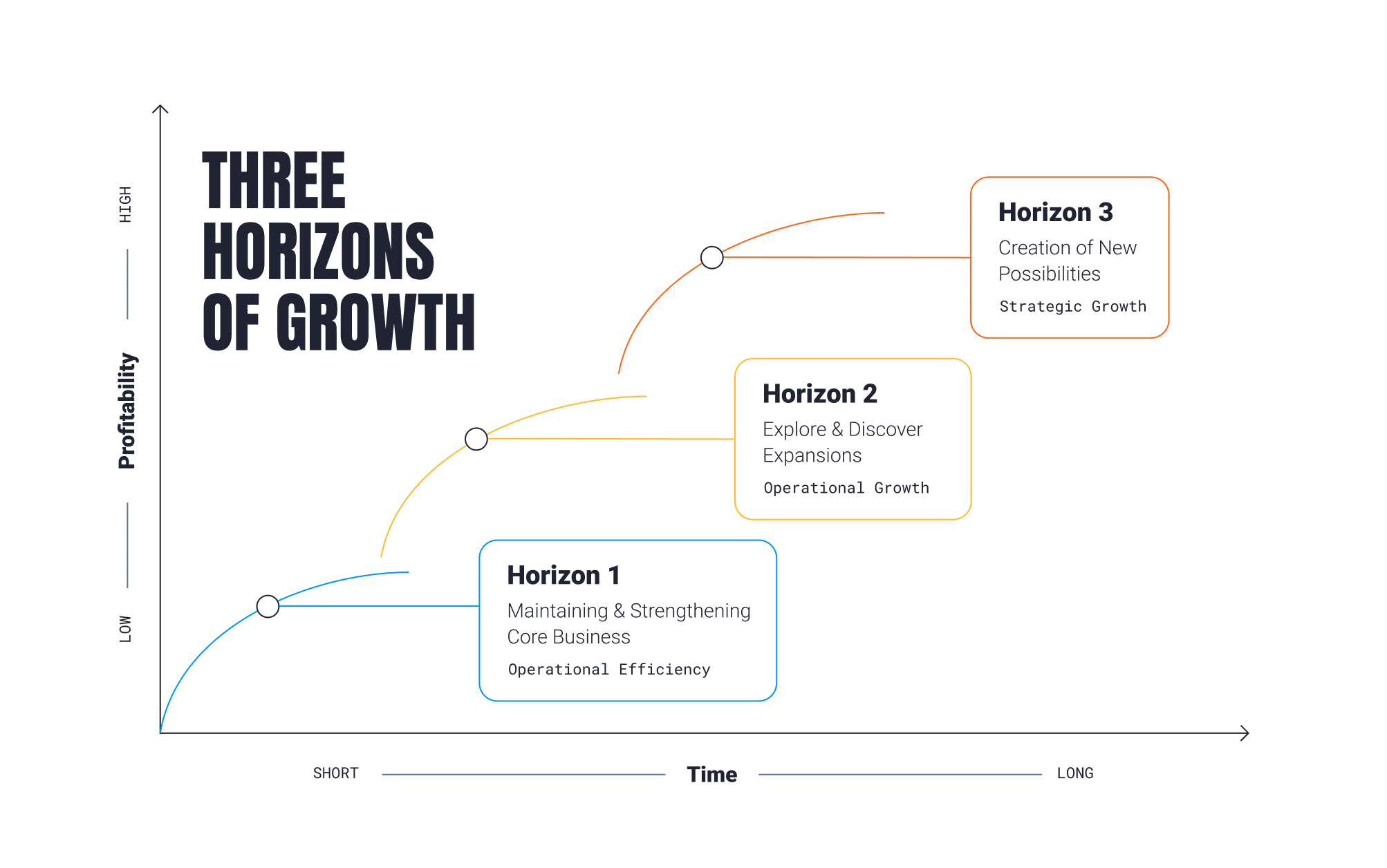
McKinsey’s ‘Three Horizons of Growth’ framework helps businesses manage their current performance while maximizing future opportunities for growth. At Parallax, we’re big fans of this concept – it becomes a set of guiding principles to do good (and profitable) work today, while dedicating time to focus on the innovations and opportunities of tomorrow.

Here’s an introduction to the Three Horizons Framework and how it might apply to you:

Horizon Model – Step 1: The work that pays the bills

Horizon 1 is your company’s bread and butter work that pays your bills. It’s the kind of work that you know how to do well on a repeatable basis. You know how to market it, deliver it, and staff it. The goal of Horizon 1 is about profitability. You want to make this work as profitable as possible and extend the life of the work as long as possible. 

Just like in the story above, Horizon 1 work eventually plateaus in value because it becomes commoditized. The cost of doing the work goes up (e.g., your staff needs raises), but, at some point, clients won’t be willing to pay more for it. Think about the impact that the rise of services like Squarespace and Shopify had on your ability to charge more for simple CMS or eCommerce websites. These services aren’t innovative anymore because so many people can do them well and quickly. To compete, companies need to sell these services based on their ability to do them faster and cheaper versus providing differentiated value

The profitability of Horizon 1 work will always erode, but that’s okay. This is a natural business cycle, which is why investing in Horizon 2 work is equally important.

Horizon Model – Step 2: The work that keeps you relevant

Horizon 2 is the innovative work your company develops as it predicts what services clients will want in the future. It’s less important for Horizon 2 work to be profitable. Instead, it must be growing in demand. Are more and more clients asking for this work? Is it a service you can sell on your value versus price because of your unique approach and experience? Does it set you apart from competitors?

Horizon 2 challenges you to constantly think about innovation. As leaders see profit from bread and butter Horizon 1 work, they also need to predict what will be valuable to customers next and invest in developing the team’s capabilities to support Horizon 2 work.

Eventually, the work you develop and identify in Horizon 2 will become Horizon 1 work. This continuous cycle means companies must routinely assess how profitable and innovative its work portfolio is — and keep taking action to stay well-funded and relevant. 

Horizon Model – Step 3: The futuristic trend-setting work

Horizon 3 work identifies future industry and macro trends — and considers how the business will be ready to address them. It’s an important consideration for many types of business, like global manufacturers and med device companies. But the reality is that most companies don’t have the luxury of thinking about Horizon 3 work. Most don’t and can’t think that far out, so this Horizon isn’t likely to drive any real behavior for services companies. While mastering Horizon 1 and 2 levels of work – continually evaluating how each type of work is performing – is key, having an overall vision for where the industry is headed is important to consider at some level, too.

How the Three Horizon Framework supports your growth

Adopting the Horizon Model helps you balance profitability and innovation — both of which are needed to keep you competitive and thriving today and for years to come. Identifying your Horizon 1 and 2 work also supports your business because it:

1. Encourages standardized services

Many services companies fall into the trap of treating every project as custom and making employees feel like only the new, innovative work is cool and exciting. This mindset can be dangerous for the business because it downplays the importance of standardized services and the bread and butter work that pays your bills and keeps your staff employed. 

Standardizing this bread and butter work (Horizon 1) with repeatable processes, pricing, and delivery helps you deliver it as efficiently and profitably as possible. If you’re really good at standardized delivery, other things in your business will also be true. Your bid-to-sale ratio will be higher, project delivery will be on-time more often, and your project margin will be higher because you don’t waste time and energy reinventing the wheel.

Plus, you need this profitable work to fund the innovative work (Horizon 2) that keeps you in business in the future.

2. Informs hiring decisions and resource allocation

Not all employees are cut out for dreaming up innovative new services. Others aren’t cut out to extend the life and profitability of bread and butter work. It’s critical to recognize that different employees have different professional pursuits and skill sets. This can help you match employees to the Horizon that they can best support. 

Horizon 1 work is often best for the employees we call Builders and Teachers. Builders like the challenge of figuring out how to do good work smarter and more efficiently. They also are effective bridge-builders between Horizon 1 and Horizon 2 work because they excel at finding concrete ways to create value for the business (i.e., making the innovative work profitable). Teachers are inspired by helping others succeed through training, coaching, and mentorship. Horizon 1 work is great work for Teachers to use as a training ground for new employees to learn the business. 

Horizon 2 work is best for Explorers. These employees are future-focused, entrepreneurial, and creative. While Builders and Teachers focus on ensuring profitability for the company, Explorers can identify new customer demand trends and build innovative services to address them and support future growth.

Knowing which employees support which Horizon best can help your company allocate existing resources effectively and better hire the types of employees it needs.

3. Keeps your eye on the future

It’s easy to get bogged down in the day-to-day operations of services business. The Horizons model encourages leaders to continuously think about the sustainability, profitability, and longevity of the work they deliver.

How sustainable the work we’re doing today? Will it continue growing? Is profitability eroding? Has it plateaued already? The Horizons Model encourages you to get ahead of declining profitability to inform proactive, strategic, and innovative business decisions. It supports growth by maximizing the services of today while preparing for the demands of tomorrow.

Parallax is purpose built to support both Horizon 1 and Horizon 2 work for digital agencies and software development companies. It can help standardize services using repeatable project templates and resources plans we call “project shapes.” These shapes make it easier for teams to sell, deliver, and track Horizon 1 projects. It also gives employees more visibility into what’s happening across the business to spot concerning trends in metrics like project margin and profit. Keeping an eye on these metrics helps you stay on top of growth so you can innovate toward the second horizon.

Conclusion 

A common challenge with growth – especially for services business – is that once-innovative work becomes commoditized and profitability lags. By embracing the Three Horizon’s Framework, organizations can optimize their delivery for great results today, while also making room for future innovation and growth tomorrow. Parallax is built to support this important cycle. We help you optimize performance, improve profitability, and standardize your core offerings, while also providing data and insight into new, innovative work on the next horizon. Want to see Parallax in action and learn more? Reach out to book a demo today.

Interested in seeing more articles like this, delivered straight to your Inbox? Subscribe to Parallax’s newsletter!

FAQ

The Power of OKRs for Professional Services Companies

Objectives and Key Results, what most people call “OKRs,” is more than a buzzy acronym used across the tech community. 

This article explains the power of Objectives and Key Results (OKRs) for professional services companies. It provides an overview of OKRs and explains how they can be used to set ambitious goals and track performance. The article also outlines how companies can use OKRs to improve communication, alignment, and engagement among employees. 

The key takeaways from the article are:

  1. OKRs are a framework that helps companies set ambitious goals and track performance.
  2. OKRs can be used to improve communication, alignment, and engagement among employees.
  3. Companies typically set OKRs using a similar structure to the org chart, with company-level, department-level, and individual employee OKRs.
  4. OKRs can be especially useful for digital services companies, as they allow for more qualitative objectives with quantitative and measurable key results.
  5. There are many examples of OKRs for different levels of a digital services company, which can help companies align to their goals and improve their workplace culture.

Table of Contents

The power of OKRs

OKRs are a framework that helps companies set ambitious goals (objectives) and track how they’re performing against them (key results).

Former Intel CEO, Andy Grove, created the idea for OKRs by bringing it to Intel. In his book, High Output Management, Grove wrote that there are two essential questions companies need to answer to use a framework like OKRs:

  1. Where do I want to go? — This gives you the objective.
  2. How will I pace myself to see if I am getting there? — This gives you the key results.

Even though OKRs originated at Intel, they didn’t become popular in the tech community until people learned that Google used the framework  to scale to the industry giant it is today. OKRs are now regarded as one of the best goal-setting frameworks, alongside other popular systems, like 4 Disciplines of Execution® , the Entrepreneurial Operating System® (EOS), and SMART Goals.

Setting OKRs

Typically, companies set OKRs using a similar structure to the org chart. There’s a high-level company OKR, supported by department OKRs, and individual employee OKRs. Here’s an example of a company-level OKR (see digital agency OKR examples further down in the article!):

  • Objective: Be regarded as the industry leader in our market
  • Key result #1: Be sought out for speaking or writing in three industry events or publications
  • Key result #2: Secure the industry-leader spot on the G2 grid in our category
  • Key result #3: Exceed a Net Promoter Score® of 80

OKRs for digital services companies

OKRs for marketing agencies have also gained popularity. The framework encourages leadership teams to write down and formalize what they’re trying to achieve and make it visible across the organization. 

This exercise aligns employees on what the company is working toward, makes it easier for digital agencies to only say yes to the type of work that jives with where they’re trying to go, and improves communication through clarity and transparency. OKRs give structure to ambitious growth goals, giving digital agencies a path forward to achieve those goals.

Matthew Zehner , Founder & CEO of The Stable, a full-service digital agency specializing in eCommerce (and a Parallax customer), recently implemented OKRs. An unexpected benefit for his agency was that “the process of brainstorming OKRs across teams got employees out of their day-to-day work and thinking about where The Stable wants to go and how they fit into that. It inspired creative thinking and got people excited about the future.” – Matthew Zehner, Founder & CEO of The Stable

We’re a little biased since we use OKRs ourselves. But like Matthew, we think it’s a pretty cool framework. Here’s what we like best about OKRs for digital agencies:

  • It allows agencies or software development firms to focus on Objectives that can be more qualitative in nature (e.g., “Win more work with the type of clients we like best.”), while still being quantitative and measurable with the supporting Key Results (e.g., “Win three new deals with companies disrupting the healthcare industry.”)
  • Having different OKRs at each level of the company (high-level company objective, department objective, and individual employee objectives) helps employees see how they contribute to the firm’s success, increasing motivation and engagement.
  • It makes the company’s direction and expectations of its employees crystal-clear, which companies often struggle with no matter how much they communicate.

OKRs, supported by the right tools to accurately measure how you’re performing (hint, hint ), can fuel growth for digital services companies.

OKR examples for digital services companies

While the OKR framework is simple, actually implementing and writing your objectives and key results can be tricky. You can find tons of advice about how to implement OKRs (including from Google, Hacker Noon, and Sachin Rekhi). When it comes to writing yours, don’t reinvent the wheel and waste your strategic energy. A lot of people (including us!) have already put in the work to craft OKR examples based on industry standards and best practices for what to measure.

To make this process simpler for you, we wrote OKR examples for all levels of a digital services company. These OKRs will help you align your company to its goals, create a workplace that wins the best clients, and attract and retain the best employees.

See a few of the OKR examples below or download our editable template for the complete list.

Company-level OKR

OKR example for professional service

  • Objective: Significantly increase the enterprise value of the business                
  • Key Result: Increase annual revenue by 40%                      
  • Key Result: Maintain at least an 80% repeat purchase rate               
  • Key Result: Maintain a net positive employee growth & self actualization rate

Department-level OKR

OKR example for marketing

  • Objective: Build a brand that’s recognized as an industry leader in the craft
  • Key Result: Secure five earned media placements per quarter                     
  • Key Result: Publish or launch at least 5 forms of new content per month (e.g., thought leadership blog posts, white papers, events, or downloadable assets)           
  • Key Result: Increase the number of marketing qualified leads by15% month-over-month  
  • Key Result: Grow LinkedIn engagement by 200%

OKR example for sales

  • Objective: Consistently bring in new opportunities that enable us to innovate our craft and do our best work
  • Key Result: Maintain a pipeline value that is at least 250% of quarterly bookings target
  • Key Result: Hit 100% of each quarter’s bookings goals for new logos
  • Key Result: Achieve at least 100% average on-target earnings (OTE) across the sales team
  • Key Result: At least 50% of all new sales reps meet or exceed first-year on-target earnings (OTE)

OKR example for project management

  • Objective: Deliver measurable and meaningful impact in all of our work
  • Key Result: Lead customer in defining measurable success factors for each active project 
  • Key Result: Deliver at least 80% of all customer-defined success factors for projects completed
  • Key Result: Actively update 100% of all resource plans on a weekly basis
  • Key Result: Complete 100% of timesheets by the weekly due date

OKR example for human resources

  • Objective: Support an environment where every employee has a chance to realize their potential
  • Key Result: Set objectives and key results that track to department goals for 100% active employees
  • Key Result: Check in with 100% of active employees each month on their performance to OKR goals
  • Key Result: Document career goals and development plan for 100% of active employees, including prioritized list of skills, capabilities, and experiences the employee aspires to develop
  • Key Result: Develop recruiting pipeline for top five in-demand roles

OKR example for finance

  • Objective: Profitably enable growth in revenue and continuous improvement in all aspects of the business
  • Key Result: 100% of active projects in backlog mapped to revenue forecast and measured to benchmark
  • Key Result: 100% of qualified deals in CRM mapped to revenue forecast and measured to benchmark
  • Key Result: Maintain revenue, costs, and cash flow forecast with 100% coverage of pipeline and backlog
  • Key Result: Maintain governance and data reporting for 100% of pipeline, backlog, and planned expenses

OKRs + Parallax = a winning combination

Goal-setting frameworks, including OKRs, are only as good as how well you can measure against them. If you don’t know what to measure — or how — the framework is useless. Once you know what to measure, your metrics are only useful if they’re based on accurate data. This is the downfall of most services companies when trying to implement OKRs. They think the framework sounds good in theory, but when it comes down to actually tracking the data needed to evaluate whether they’ve met their key results, they don’t know where to start.

It’s easy to see why this happens. Before Parallax, the tools for OKRs that digital agencies or software studios had available to them to measure and get visibility into data across the entire business (from the sales pipeline through project delivery) were old school and clunky. They didn’t work how these services companies needed them to.

Parallax was built to enable visibility, alignment, and accountability across the business. It supports the adoption of agency best practices and allows teams to track against agency benchmarks for metrics like utilization, project margin, and revenue. Like OKRs, Parallax fosters better and clearer communication between leadership and teams because it offers a level of transparency that’s otherwise difficult to achieve. Parallax is the measurement and resource planning tool that can sit on top of OKRs — helping everyone make smarter decisions that enable the company to grow.

FAQ

How To Strive For 100% Productive Utilization: Complete Guide

This article discusses how digital services companies and tech consultancies can achieve a 100% productive utilization rate by pairing their billable utilization targets of 75-85% with productive utilization targets. The article defines the difference between billable utilization and productive utilization, why it matters, and how to achieve it. The article also suggests that companies should set aside time for innovation, cross-training, and investing in their employees’ professional development.

The key takeaways are:

  1. The difference between billable and productive utilization.
  2. Why it is essential to focus on both billable and productive utilization targets.
  3. The benefits of dedicating the remaining non-billable time to innovation and development.
  4. Tips on setting aside time for innovation and cross-training.
  5. The importance of investing in professional development to retain top talent.

How to pair billable & productive utilization targets

High-performing digital services companies and tech consultancies regularly achieve billable utilization rates of 75-85%. If you consistently hit this target, you’re doing pretty darn well. However, what really sets high-utilization businesses apart from one another is how they dedicate the remaining 15-25% of their employees’ time.

Digital services companies that proactively plan how their employees spend their non-billable time can more effectively innovate to stay competitive and build a culture that attracts and retains the best talent. It’s time digital services companies and consultancies pair their billable utilization targets of 75-85% with productive utilization targets of 100%.

Billable utilization vs. productive utilization

First, let’s define how we think of the difference between billable utilization and productive utilization. We’ll approach this with a 40-hour work week in mind.

Billable utilization is the number of hours employees bill (invoice) to clients divided by the number of hours they’re available (capacity). If your employees bill 32 hours of a 40-hour work week, their billable utilization rate is 80%. Most digital services companies will segment utilization rates by employee type because individual contributors will typically bill more to clients than managers or leaders who spend more non-billable time on people development and managing the business.

On the other hand, productive utilization is the percentage of time employees charge time to clients plus other budgeted value-added initiatives that are also important but don’t contribute to immediate revenue. Building a new service offering or other intellectual property (IP), doing pro bono work for a client, or deploying new internal tools (like Parallax to improve your services’ KPIs ) are all examples of work that is “productive.” Filling out timesheets, attending internal meetings, and admin activities are examples of true non-billable, non-value-added time that tend to bloat services firms as they start to grow (but are usually still necessary to get done).

Why the difference matters: Billable & productive utilization

When digital services companies focus only on billable utilization and neglect productive utilization, it leaves a gray area. How should employees spend the remaining hours they have available each week?

Of course, if there’s more work in the backlog, you can fill some or all of your employees’ time with more client work. There’s nothing wrong with billable utilization rates exceeding your target, as long as employees aren’t consistently and regularly billing 100% of their time.

Tip: You don’t want billable utilization to hit 100% regularly. Maxing out billable utilization means employees don’t get time for professional development or to support the development of new service offerings. Plus, 100% billable utilization can lead to burnt-out employees, which isn’t good for you or them.

Billable utilization targets of 75-85% make sense, but your agency should also have a productive utilization target, and it should always be 100%.

In reality, you might rarely hit this 100% productive utilization target because your team still needs some time for non-billable admin work, like timesheets and updating the CRM. But striving for 100% productive utilization means you’re proactively planning for how your employees spend all of their time — even the time you can’t bill clients.

This prevents valuable time from going to waste and encourages you to strategically put this time to good use. The best agencies put this “extra” time toward smart investments into their futures.

The best digital services companies plan time for innovation and development

Digital services companies that proactively plan how employees spend all of their time can proactively set aside time to develop new service offerings, cross-train employees, and better invest in their people to create a healthier and happier culture. Here’s how.

Set aside time for innovation. To survive and remain relevant, every company needs to innovate. To innovate, companies must set aside time to evaluate which of their services:

  • Are growing in demand (and which are declining)
  • They can sell on their unique approach and experience (and not solely on price)
  • Set them apart from competitors

This innovation work only happens when companies schedule time for it. Otherwise, day-to-day client needs take priority, and innovation falls to the backburner.

Assign your employees time to think about recent client projects and needs. Challenge them to identify needs that emerged during those projects that the company could build, sharpen, or expand their service offering around.

How can the company start taking steps to create these new or refreshed service offerings? Think beyond billable utilization to fully utilize your employees’ time to support company innovation and strategic growth.

Tip: Not all employees are cut out for innovation work. It’s important to understand the different roles different employees play at your agency. Consider each employee’s unique talents when determining how best to utilize their time fully. Check out our Explorers, Builders, and Teachers framework for one way to think about this.

Invest in your people. If you’re doing innovation work correctly, your teams will likely identify skill gaps at your agency. Your team will always need to be learning to deliver the next big strategy, methodology, or technology to clients. Investing in professional development is important not only to ensure your business has the talent it needs to succeed in the future but also because, without it, employees will likely become bored and disengaged. Today’s employees expect their employers to invest in their learning and growth.

Allocating time for managers to dedicate to the development of their people and for individual contributors to dedicate to training and courses, will help your business acquire the skill sets it needs for the future while keeping employees happy, growing, and engaged.

Factor professional development into your utilization plans and ensure the training and education you support aligns your people’s goals with the skills your business will need in the future.

When digital services companies allocate time to innovation and employee development, their business strategy is stronger, and they have a more talented workforce. These things support a better company that can attract more of the good work that everyone wants to be a part of — the work that supports the company’s strategic direction and is more rewarding for employees to work on.

It’s a positive, rewarding cycle that gives everyone a reason to celebrate: Invest in your business and your people, and attract and retain better employees and clients. Attract and retain better employees and clients, earn even better work. Your company can more intentionally create strategic growth when you strive for 100% productive utilization.

Utilization pitfalls to avoid

Before you rethink your approach to utilization, be mindful of the pitfalls many digital services companies fall into. Avoid these common mistakes to ensure you’re not using the metric in the wrong ways or for the wrong reasons

1. Getting carried away with non-billable projects

Sometimes when companies first start allocating their employees’ time to non-billable projects, they end up with too many or the wrong kind of projects. If they don’t pay attention, they can soon find themselves with numerous committees meeting to discuss initiatives that don’t have much impact on the business or employees (company picnic, anyone?).

This misalignment of priorities can lead to the backlog piling up and employees not billing enough of their time. Billable utilization and revenue targets get missed, and the company can’t invest in its future or its people as much as it needs to. Non-billable projects should always align with the company’s business strategy to support and elevate the company and its employees.

2. Using utilization as a lagging indicator

If you review your actual billable utilization weekly and then react to low numbers by pushing employees to bill more or work harder, you’re reacting too late. You’ll stress out employees and hurt your culture, but you won’t do much to improve utilization.

Instead, visibility into the sales pipeline can help your company proactively:

  • Understand what work is coming.
  • Assess whether the projected work is enough to hit billable utilization targets.
  • Determine if you have enough people staffed to complete the work.

If your forecasted billable utilization is too low, you may need to step up marketing and business development efforts to win more work. If your projected billable utilization is too high, you may need to revisit your resourcing model and bring on more people to get the work done. Either way, you’ll know early enough to take an action that will make an appreciable difference.

3. Increasing billable utilization by stuffing meetings

One of the worst mistakes digital services companies make is increasing their billable utilization by sending employees to meetings they don’t need to participate in. They do this so they can charge more (and increase their employees’ billable utilization).

This practice isn’t good for anyone. Clients pay for time that didn’t generate any value. Employees are bored and annoyed because they’re in meetings they don’t need to be in. The company wastes valuable time it could instead allocate to identifying opportunities for company innovation or investing in employee skill development. Avoid this utilization pitfall at all costs and instead determine the root cause for low billable utilization — and fix it.

It’s time for digital services companies to plan how they will fully and productively utilize their employees to better support their professional development and the business’s growth. Companies that make good use of their employees’ non-billable time will stay relevant and competitive and create a work culture that attracts the best employees.

Use software that helps calculate utilization rate

Becoming a high-performing digital services company or consultancy doesn’t happen overnight. There will be inherent challenges tied to utilization targets, especially as your business scales. That’s expected. The savviest organizations, however, understand the nuanced nature of billable vs. productive utilization rates and plan for how employees spend all their time. This is how happy, healthy cultures are established and nurtured, no matter the stage of the business. Book a demo to learn how Parallax can not only help you avoid common utilization pitfalls but take control back when it comes to reaching your targets. 

FAQ

5 Best Mavenlink (Kantata) Alternatives And Competitors To Consider

Nearly all decisions that leaders of digital service companies make rely on accurate insights and forecasts — but to gather those insights and create those forecasts, they need the right people, the right processes, and (definitely) the right tools in place to bring it all together. 

Today’s modern, strategic solutions can enable smooth, streamlined project management, resource planning, and forecasting for services organizations, allowing them to step away from their old school, often tedious approaches for collecting and monitoring business-critical insights. With the right tools in place, leaders can more easily elevate core practices and strategically drive the business forward by creating a cohesive, forward-looking view into how they operate.  

So, where to turn? How can you know which solution is best for you? 

There’s a lot of hype over platforms like Mavenlink (Kantata), a professional services automation (PSA) solution that centralizes operations and tools into one place to help services organizations optimize their project management and resource planning — but, in truth, every business will have a unique set of requirements and objectives that dictate which platform is right for them. 

We dive into the different PSA platforms and other alternatives available today – some that may be even better than Mavenlink (Kantata) – so stick around and scroll down to learn more. 

Table of Contents: Top Mavenlink (Kantata) Alternatives & Competitors 

5 Best Mavenlink Alternatives And Competitors To Consider 

Why do you need an alternative to Mavenlink (Kantata)? 

Key Features For A Strong Mavenlink (Kantata) Alternative

Top 5 Mavenlink (Kantata) Alternatives

Which Mavenlink (Kantata) Alternative will work best for you?

Why do you need an alternative to Mavenlink (Kantata)?

You need simple, straightforward pricing

If you’re a services company looking for sustainable growth, you should look for simple, straightforward pricing from your platform that doesn’t come with any surprises. When comparing solutions, ask how their pricing works. It’s not uncommon for all-in-one solutions, for example, to lead with one price to get folks in the door but then, to get their real value, it requires additional features, custom insights, and LOTS of training, which usually comes with additional, significant costs. There are platforms today that have fixed pricing for the duration of the project, access to all features, AND tied to billable resources where ROI is actually realized.

You need better planning capabilities

Some platforms have dashboards that don’t always enable the transparency and collaboration that teams want and need today. Services companies are looking for advanced resource planning and capacity forecasting capabilities that provide one source of truth by connecting to the CRM (sales pipeline) and Backlog (active projects). This provides a forward-looking shared view of performance and forecasts—because that’s how you plan. It’s all about less reactive planning and more proactive planning with a complete picture of the data, accessible in the right ways for all team members.

You need more integration options

Whenever possible, digital services companies want to avoid disruption to daily operations, that includes avoiding the need to rip and replace the tools and technologies their people have come to love and rely on. Many leaders today are seeking integration-first resource planning engines that can curate data from across the business for smarter decisions. Being able to leverage the tools you already have is certainly less disruptive, but it also costs less (even just considering hours) than adopting all new tools and allows for speed to value because you don’t need to learn a completely new toolset. Talk about a win-win-WIN! 

You want more customization

Getting trapped in workflows that require never-ending clicks to get to the information needed can quickly turn into a nightmare for people trying to make real-time decisions. Being able to personalize and customize workflows to create a view that works for you, no matter your role, not only makes these solutions more enjoyable to use but an incredibly valuable time saver. 

Key Features For A Strong Mavenlink (Kantata) Alternative

Integration-first 

Digital services companies want a platform that connects and leverages the tools their teams are already using such as CRM and timesheet tools. A platform that integrates with top CRM platforms like Salesforce and HubSpot, for example, means sales team members get the same experience they’re used to, but their deal and project data will flow directly into the platform for better visibility for resource planning, which helps improve utilization, project margin, and growth.

Approachable, predictable pricing 

Leaders need to have an understanding of a platform’s pricing structure straight away; they want tools without any hidden fees and that don’t charge for freelancers or non-billable users to use the tool. They want approachable, predictable pricing

Rapid adoption and implementation 

The implementation and adoption timelines for all-in-one tools can create massive disruptions to workflows and take months, even years, to get right. There are other tools that drive adoption and implementation in 90 days or less so that services organizations can unlock value from their investment quickly. (Yes, we’re talking about Parallax. ) 

Designed specifically for digital agencies and software development shops

Some platforms are designed for any type of company, while other platforms are designed specifically for digital agencies and software development shops. These businesses have different needs, unique workflows, and they move fast—and their tools need to do the same

Top 5 Mavenlink (Kantata) Alternatives

1. Parallax

Parallax takes a different approach than monolithic, all-in-one PSA tools on the market. A purpose-built platform for digital services companies, specifically agencies and software development studios, Parallax leverages native integrations for the best-in-class tools that are already in use, all to deliver a forward-looking view into the business that enables better resource management, tighter operations, and stronger performance. 

Parallax is a team of industry experts dedicated to removing friction points and solving business challenges for services companies, and the platform proves it — it provides shared visibility across the business, creating centralized insights to inform conversations on hiring, resource allocation, and much more. And the outcome? Everyone will be empowered to make more strategic decisions that can positively impact performance and forecasting and, ultimately, drive measurable growth.

5 reasons why Parallax is the best Mavenlink (Kantata) alternative 

  • Rapid adoption: Parallax is committed to driving adoption and implementation in 90 days or less.
  • Additive to existing tech stack: Parallax works with your existing tools and technology and doesn’t disrupt any current workflows. 
  • Automatic integrations: Parallax provides automatic integration of sales pipeline data to enable deeper scenario planning for leaders. 
  • Predictable pricing: Parallax delivers a sense of pricing from the very first conversations, and there are no hidden fees for consulting or integrations. In other words, pricing is locked.
  • Ongoing consulting: Parallax keeps its champions connected to customers as often as they want, ensuring everyone is getting as much value as possible from the platform.

2. Wrike

Source: wrike.com/vy

An easy-to-use tool, Wrike streamlines the internal project management and collaboration processes across teams. The platform focuses on the accomplishment of tasks rather than entire projects, offering workflow customization for companies to make processes more company- or industry-specific. It’s built to streamline proofing and reporting for marketing campaigns, to more easily develop creative assets and have them routed through approvals quickly, and to support project managers more easily track deadlines and deliver results. Wrike offers various plans with different pricing structures depending on the company’s needs. 

3. monday.com

Source: monday.com

Monday is a comprehensive platform that’s designed to help teams manage their entire workflow within a single digital workspace. It’s a project management software that helps to increase transparency and visibility within day-to-day operations—it automates repetitive tasks, enhances team collaboration, and creates visibility in workflows. Teams can use the platform to manage all projects, but they can also use it as a CRM, to manage ad campaigns, or even to manage video production. Monday has various plans available depending on the company’s needs. 

 4. OpenAir

Source: openair.com/Resource-Management

An extension of Oracle’s NetSuite ERP, OpenAir is an all-in-one cloud-based professional services automation platform for a wide array of services businesses. The platform provides integrated time tracking, project management, resource management, expense tracking, and invoicing – offering a single platform to run a services organization. OpenAir’s global customers all use the same version and codebase, with options for configurability and customization. Migration and adoption of this all-in-one ERP platform can often take 6-12 months to fully implement.

5. Teamwork

Source: teamwork.com

Teamwork is a project management tool focused on collaboration by providing key features such as instant chat. It makes resource management simple by providing a view of everything in one place for the team, clients, and freelancers. Teamwork has advanced features for time tracking, budgeting, and resource allocation. It integrates with companies’ other project applications, such as the CRM platform, and automates repetitive tasks with straightforward workflows. 

Which Mavenlink (Kantata) Alternative will work best for you?

There’s a long list of stand-out applications and next-generation tools available today for digital services organizations, and choosing the one that’s best for your business can feel overwhelming. What’s important to remember in your search is that your project management and resource planning solution should be just as dynamic as your business. Your platform should grow as you grow, and it should work for you and with you, not against you—because thoughtful, strategic growth is hard enough. 

Parallax was built specifically for digital services companies and informed by top industry leaders. We’re a driven team that’s ready to solve operational challenges and deliver better insights for purposeful growth… so, if you have questions, know that we’re here to help. 

We’re always happy to chat and share more about the Parallax approach and help you decide whether it’s the right tool for you and your business.