When good tools are used for the wrong job

A lot of operational frustration in agencies is not caused by bad tools.

It is caused by good tools being asked to do work they were never designed to do. When this happens, you see teams forcing a project tool to behave like a planning system. They might be forcing a CRM to answer delivery questions or trying to get a finance reporting to become a forecasting process.

The tool is fine. The job is wrong.

This post is a practical way to spot those mismatches, understand why they keep happening, and fix them without turning your stack into a bigger mess.

Quick takeaways

  • Tool frustration often means a role is trying to make decisions without the right kind of visibility.
  • Execution tools track work. They do not reliably forecast tradeoffs across projects.
  • CRM tracks deals. It does not know delivery capacity or timing constraints.
  • Finance reporting explains what happened. It does not steer what happens next.
  • If you name the job clearly, you can choose the right system behavior, often without replacing everything.

Definitions

  • Execution or Delivery tool: A tool designed to manage work already in motion, tasks, owners, due dates, and delivery coordination.
  • Planning tool or planning layer: A system built for forward-looking decisions that connect demand, capacity, timing, and tradeoffs.
  • System of record: The source you trust as the official answer for a specific category of truth, pipeline, time, billing, staffing, delivery status.
  • Decision layer: The cross-functional view leaders need to make commitments without guessing.

The mismatch pattern

Here is the pattern that shows up over and over.

  1. A team needs to answer a question.
  2. The existing system does not answer it in a clean way.
  3. So someone builds a workaround.
  4. The workaround becomes a new process.
  5. The process becomes a dependency.
  6. Then the tool gets blamed for not being flexible enough.

This is not a team failure. It is a category mismatch.


Four common examples in agencies

1) Using project management for resource forecasting

What the team is trying to do:

  • Predict whether the agency can take on work, staff upcoming projects, and avoid double booking.

Why the tool feels like it should work:

  • It already contains projects, tasks, and a schedule.

Why it usually breaks:

  • Project tools are designed around what is planned inside a project.

Resource forecasting is designed around what is possible across all projects, plus pipeline, plus real-life volatility.

The tool can show a schedule, but it struggles to answer:

  • What happens if we move this start date?
  • Which roles are constrained six weeks out?
  • If we accept this deal, what is the tradeoff?
  • Where is double booking hiding across multiple teams?

The symptom: Spreadsheets appear to connect the dots.

Are you seeing this pattern with how you are using spreadsheet? Check out Why Spreadsheets Keep Showing Up in Tech Stacks

2) Using CRM for delivery commitments

What the team is trying to do:

  • Use pipeline and stages to predict start dates, staffing needs, and revenue timing.

Why the tool feels like it should work:

  • Deals and dates live there.

Why it usually breaks:

  • CRM is optimistic by design. That is not a criticism. It’s the job.

But delivery reality has constraints.

  • Roles are limited
  • People are already committed
  • Timelines shift
  • Scope changes

The CRM can tell you the sales story. It cannot tell you whether that story is compatible with capacity.

The symptom:

  • Start dates get promised and then renegotiated after the deal closes.

3) Using finance reporting as a forecasting process

What the team is trying to do:

  • Understand margin risk and profitability early enough to act.

Why the tool feels like it should work:

  • Finance reports show margin, revenue, costs.

Why it usually breaks:

  • Finance reporting is historical.

It answers what happened. Leaders need to know what is about to happen.

Forecasting margin risk requires:

  • current actuals that are close enough to trust
  • staffing plans for the next six to twelve weeks
  • scope and timeline shifts
  • change request volume

The symptom:

  • Margin surprises show up when it is too late to change the plan.

4) Using a PSA as the only decision system

What the team is trying to do:

  • Use one system to manage staffing, time, billing, and forecasting.

Why it feels like it should work:

  • It touches many parts of the business.

Why it usually breaks:

  • Many PSAs do parts of this well, but decision-making still requires cross-team alignment.

Even when the data exists, the workflow for making tradeoffs is often missing.

The symptom:

  • The PSA becomes a reporting tool, while planning decisions happen elsewhere.


How to diagnose mismatches quickly

Here is the fastest way to spot when a good tool is being used for the wrong job.

Step 1) Start with the questions

List the recurring questions that create stress.

Examples

  • Can we take this work without breaking delivery?
  • Who is overloaded in the next six weeks?
  • What work is at margin risk and why?
  • When should we hire versus contract?
  • What is the tradeoff if we pull forward a start date?

Step 2) Identify the tool being used to answer each question

Often, the same tool gets forced into answering multiple unrelated categories.

Step 3) Look for mismatch symptoms

Mismatch symptoms include

  • manual exports and copy-paste
  • multiple versions of truth
  • heavy reliance on one person to reconcile data
  • long meetings that end with no decisions
  • changes made in conversation but not reflected in the plan

If you see these patterns, the tool is not the problem.

What you are asking it to do is wrong.


What to do about it

This does not require a rebuild of your whole stack. It requires naming the jobs and making sure the right systems own each one. Here is the simplest approach.

1) Declare systems of record

This reduces arguments.

Examples:

  • CRM owns pipeline truth
  • Project tool owns work status
  • PSA or time tool owns actuals
  • Finance owns invoicing and financial truth

Then you identify what is missing, which is the decision layer.

2) Add or build a planning layer

The planning layer connects the dots leaders need.

It is designed to answer:

  • demand by confidence
  • capacity by role
  • timing and tradeoffs
  • what happens if we shift dates
  • where margin risk is building

This layer can be a dedicated system or a structured process backed by the right views.
The point is that it must be forward-looking and resilient to change.

3) Create a weekly decision cadence

Even the best system fails without a cadence.

A weekly rhythm with clear inputs and decision rules turns planning into an operating habit. Our Resource Management Best Practices Guide can help set and define that rhythm.

4) Reduce side door work

Most tool mismatch pain is amplified by uncontrolled change requests.

If work changes scope, timing, or staffing, it needs one intake path and an explicit tradeoff.

Copy and paste templates

Tool mismatch worksheet

Questions we need to answer:

  • Who asks it and why?
  • What tool we use today?
  • What breaks or feels painful?
  • Workarounds we rely on?
  • What job this question really belongs to?
  • What system should own it?
  • What cadence should support it?

Phrase that keeps it calm:

We are using a good tool for a job it was not designed to do. Let’s name the job, then decide what should own it.

Checklist: Signs you are in tool mismatch mode

  • The tool works fine for its core job, but feels terrible for planning
  • People keep asking for custom fields, reports, or views to force it into a new role
  • Spreadsheets keep appearing as glue
  • Meetings are long because the data is not aligned
  • Decisions are made but the source of truth is never updated
  • Ops depends on heroic upkeep to keep plans current

If you checked more than two, you are likely dealing with job mismatch, not tool failure.


FAQ

Q: Does this mean we chose the wrong tools?

A: Not necessarily. Most stacks cover execution and financial reporting well. The gap is usually a planning and decision layer.

Q: Why does this show up more as agencies grow?

A: Because volatility increases. More projects, more roles, more overlap, more change requests. The cracks show up faster.

Q: What is the fastest first move?

A: List the recurring questions leadership needs answered weekly, then map them to systems of record. The gaps will be obvious.

Q: Do we need to replace our CRM or project tool?

A: Usually no. Most teams keep those and add a planning layer that connects the dots.


Next step

If you want a practical operating rhythm that reduces mismatch pain, start with the Resource Management Best Practices guide.

That guide lays out the weekly cadence, forecasting approach, and decision routines that keep planning decisions grounded in reality.


Callum Broaderick
Vice President
Parallax

Strategic Planning 2026: You’ve Got January. What About the Rest of the Year?

New year energy. Fresh plans. Clear priorities.

January is usually the month when agencies feel the most organized. Then February shows up with a client surprise, a deal that starts early, a project that runs long, and someone on the team taking a much-needed break, and suddenly, the plan becomes a guessing game again.

If your agency can see one month clearly but the rest of the year feels like fog, you are not failing. You are missing a forecasting rhythm that can survive volatility.

This post is a practical way to think about year planning that does not collapse after January. It is built for agencies where work changes constantly and planning needs to be more like steering than scheduling.

Quick takeaways

  • Annual plans fail when they try to be exact. They work when they create direction, guardrails, and decision cadence.
  • You do not need a perfect twelve-month plan. You need a reliable six to twelve-week forecast that you refresh weekly.
  • The goal is fewer surprises, faster tradeoffs, and clearer hiring and start date decisions.
  • Planning is not a document. Planning is a rhythm.

Definitions

  • Rolling forecast: A forecast window, often 6 to 12 weeks, that is refreshed weekly so the plan stays connected to reality.
  • Capacity: The people and time available to do work, by role and skill.
  • Demand: The work you need to deliver, including active projects and likely upcoming work.
  • Confidence bands: A simple way to separate sold work from likely work from speculative work, so you do not staff hope like it is reality.

Why January feels clear

January is clear because it contains fewer unknowns.

  • Projects already in flight are known
  • Holiday schedules stabilize
  • Many clients slow down or reset
  • New work is still in early stages

That temporary calm makes it easier to plan. The problem is what most agencies do next. Most treat January planning as the plan and then reality returns and the plan breaks.

The real reason annual plans break in agencies

Agencies are too volatile for a fixed schedule. Clients pause and restart mid-engagement, scope expands after kickoff, approvals slip, and sales cycles stretch in ways that push March work into May. The plan breaks not because of poor planning, but because the conditions it was built on have already changed.


The planning stack that works

Think of planning in three layers.

Layer 1: Annual direction

This answers

  • What are we trying to accomplish this year?
  • What types of work do we want more of?
  • What do we want to avoid?
  • What are our constraints, hiring limits, margin targets, client mix goals?

This layer should be stable.

Layer 2: Quarterly focus

This answers

  • What matters most this quarter?
  • What bets are we making?
  • What capacity assumptions are we operating on?

Quarterly planning is where you decide where leadership attention goes.

Layer 3: Rolling six to twelve-week forecast

This answers

  • What is likely to start soon?
  • Where are the role hotspots?
  • What tradeoffs do we need to make now?
  • Where is margin risk building?

This is where reality lives and changes weekly.

If you only have layer 1 and layer 2, you will feel good in January and stressed by March. If you add layer 3, planning stops being a quarterly surprise.


The weekly rhythm that keeps the year from collapsing

This is the simplest planning rhythm that works in real agencies.

Weekly

  • Update delivery changes, scope shifts, timeline shifts, staffing shifts
  • Update pipeline changes, start date shifts, and confidence shifts
  • Review the next six to twelve weeks for capacity hotspots by role
  • Decide on tradeoffs
  • Update the plan the same day

Monthly

  • Review margin risk and client health signals
  • Review whether hiring or contracting needs to change
  • Review client mix and delivery strain

Quarterly

  • Reconfirm quarterly priorities
  • Adjust annual direction only if necessary

This rhythm is how you get control without pretending the year will behave.


Check out the Resource Management Best Practices guide for meeting cadence and agenda templates.

Get the Guide


How to plan the year without fake precision

Here is a practical approach that keeps the year honest.

Step 1: Define what success means

Not in slogans. In a few clear outcomes.

Examples

  • Grow revenue by a certain amount
  • Improve margin consistency
  • Reduce delivery fire drills
  • Shift client mix
  • Build capacity in a key discipline

Step 2: Define guardrails

Guardrails protect the plan when the year gets chaotic.

Examples

  • No new work enters delivery without a start date assumption and role needs
  • Change requests require a tradeoff
  • Double booking above a threshold triggers a decision, not overtime
  • Timesheets close weekly, so forecasts stay connected to reality

Step 3: Forecast demand using confidence bands

Separate demand into three confidence bands. This distinction prevents the most common annual planning mistake of treating hoped-for work as if it were confirmed, and staffing against it accordingly.

The three confidence bands:

  • Green: sold, and scheduled
  • Yellow: likely but timing may shift
  • Red: early, or speculative

This prevents the most common annual planning mistake: staffing hope.

Step 4: Forecast capacity by role, not by person

Most resourcing stress is role-based and you run out of senior design capacity, technical leadership, or a specific delivery role long before you run out of people in general.

Role-based forecasting lets leadership make clearer decisions on hiring versus contracting versus timing shifts.

Step 5: Decide what happens when reality changes

Before the year starts, write down your default responses to the disruptions that will inevitably occur.

If a deal slips

  • move it to lower confidence
  • release held capacity unless explicitly approved

If a client adds scope

  • intake the change
  • confirm tradeoff
  • reset timeline or staffing if needed

If a role becomes overloaded

  • change work
  • change staffing
  • change commitments

The point is not to avoid change. The point is to have a consistent response to change.


Copy and paste templates

Annual planning questions for leadership

  • What do we want more of this year?
  • What do we want less of?
  • What is the biggest constraint, people, sales, delivery, margin, leadership attention?
  • What capacity bets are we making?
  • What risks do we want to avoid?
  • What operating guardrails will we enforce?

Weekly rolling forecast checklist

  • What changed in delivery?
  • What changed in pipeline?
  • What are the next six week role hotspots?
  • What tradeoffs do we need to make?
  • Who owns each update?
  • What gets updated today?

Check out the Resource Management Best Practices guide for meeting cadence and agenda templates.

Get the Guide


Checklist: Signs you are planning only one month at a time

January looks clean, the rest of the year looks like vibes

  • Hiring decisions feel urgent instead of intentional
  • Start dates get promised then renegotiated after the deal closes
  • The same resource conflicts repeat weekly
  • Leadership sees margin issues after they happen

If you checked more than one, the fix is not more planning meetings. It is a rolling forecast with clear decision cadence.


FAQ

Q: Do we really need a twelve-month plan?

A: You need annual direction. You do not need a twelve-month schedule. Agencies win by steering, not by predicting.

Q: How far out should we forecast capacity?

A: Six to twelve weeks is usually the sweet spot. Far enough to see hiring and staffing issues early. Close enough to still be real.

Q: What is the fastest way to make annual planning feel real?

A: Add a weekly rolling forecast and treat planning as a cadence. That is what keeps the year from drifting.

Q: How do we keep sales and delivery aligned?

A: Use confidence bands and a weekly review to update start-date assumptions and staffing realities together.


Next step

If you want a practical guide behind this, start with the Strategic Planning Guide. The guide lays out the weekly cadence, forecasting approach, and decision routines that keep plans connected to reality beyond January.

Resource Management Best Practices


Callum Broaderick
Vice President
Parallax

Top 5 Factors to Consider When Choosing Capacity Planning Software

Top 5 Factors to Consider When Choosing Capacity Planning Software

To have an effective capacity planning approach, you need a system that allows you to make strategic, confident, and future-forward decisions. That being said, finding the right solution can feel daunting—so stick around! We outline key factors to consider when assessing capacity planning software below.

Table of Contents

Understanding Capacity Planning for Digital Agencies

When we talk about “capacity planning”, we know this could have a number of different meanings and associations. So, let’s first align on what capacity planning really is and why it matters. 

Capacity planning helps agencies understand what kind of services and products their customers and prospects want now. It helps predict future needs so agency leaders can plan and invest in the right resources with confidence. In it’s simplest form, capacity planning is about knowing supply and demand, both now and in the future.

Gaining a clear picture of supply and demand comes with phenomenal perks that both leaders and their teams benefit from.

What are the Benefits of Capacity Planning?

  • Improved Resource Management: Resource management focuses on assigning the right talent to keep projects moving forward, and capacity planning focuses on forecasting future needs—but these two practices should lean on each other. When you hit your stride with capacity planning, for example, you’ll be able to better, more effectively manage resources for current projects AND avoid overcommitting to future projects if the right resources aren’t available.
  • “What If?” Planning: Capacity planning provides the ability to create what-if scenarios to help leaders truly think through and plan for everything so no one is caught off guard. It’s “if this, then that”-type of planning that helps avoid last-minute scrambles and ease the rollercoaster of too much work/not enough people (or vice versa). 
  • Proactive Decision-making: Capacity planning helps leaders identify potential resource constraints early on in the project lifecycle so they can take steps to address them before they become a bigger problem. This can help businesses avoid delays and ensure the successful delivery of projects.

The services industry will constantly be evolving, and there will always be economically challenging times that leaders will have to navigate. Given that capacity planning helps organizations navigate with more confidence and greater ease, you need to ensure your approach to capacity planning is effective and scalable.

project budget at risk warning sign with "take action" button

Factors to Consider When Choosing Capacity Planning Software

How should you go about choosing the right system? We know there’s a lot of noise in the market, and navigating all the different options can be overwhelming. So, let’s break it down…

Consider discussing the following capabilities and characteristics with the solution partners you connect with:  

  1. Ease of Use: How easy is it to use? 

It’s a simple question, but you’d be surprised how many systems aren’t easy to use today. Your software should be easy to use once onboarded onto the platform. If it needs training during the product implementation process, be sure to keep an eye out for unexpected fees. This is especially important for digital agencies that may have multiple team members and various roles using the software. The software should include easy-to-follow instructions, tutorials, and customer support to assist users in using it.

  1. Integration with Existing Tools: Does it integrate with other tools? 

Another crucial factor to consider when choosing capacity planning software is its compatibility with other tools. The software should work well with tools you already use, like your CRM and project management tools. This helps provide you and your teams with a central, cohesive home-base for everything.

  1. Scalability: Can it scale? 

Your capacity planning software should be scalable and able to handle a growing number of projects, users, and resources. As your business grows, it’s essential to have a software solution that can handle current needs and keep up with the increasing and evolving demands.

  1. Reporting and Analytics: What reporting and analytics features does it offer? 

The solution you use should provide detailed reporting and analytics, helping you and your team make informed, strategic decisions about your capacity and resources now and for future. It also should offer real-time visibility into the resources being utilized so you can easily identify trends, patterns, and areas for improvement, which can help build confidence, enable strategic forecasting, and drive profitability.

  1. Budget and Pricing: How much does it cost? 

Of course, you need to consider the budget and pricing of capacity planning solutions. Ideally, the software should drive both immediate and long-lasting value, so it’s important to consider not only the upfront costs of the software but also any ongoing maintenance or support and training fees (don’t forget to inquire about add-on fees!). Make sure to also consider any potential cost savings or efficiencies that the software may provide in the long run. 

How to Start Capacity Planning

At Parallax, we work with companies spanning every stage of the operational maturity curve to drive the behaviors that will lead to strategic forecasting and capacity planning. Unlike legacy PSA solutions, which take between 12-18 months to roll out and adopt, Parallax has you up and running in 90 days with minimal disruption to your broader team. 

We also understand the importance of maintaining business continuity, which is why our software is designed to integrate seamlessly with your existing toolset, ensuring a smooth transition and minimizing the learning curve for your team. By leveraging the tools you already know and love, Parallax can help you streamline your capacity planning processes, optimize your resources, and achieve greater efficiency and profitability without causing any major disruptions to your existing workflows.

Ultimately, we’re here to help you sustain your business, grow your business AND keep your talent happy and fulfilled. All it takes is implementing capacity planning best practices and unlocking true, strategic forecasting—and that’s exactly what we do. 

Interested to learn more? We’re ready when you are

Stay Profitable and Innovative: Use the Three Horizon Framework to Forecast Growth

It’s a familiar story: A couple of founders leave an agency or consultancy. They band together to deliver innovative work for cool clients. These leaders figured they could do better work on their own, so they developed unique methods and processes – great work started flowing. The first few years in business were busy, exciting, and fulfilling. The team gained a solid reputation, and the company grew organically from word-of-mouth referrals. This new team is at the top of their game.

Nothing is permanent, though. As the industry evolves (or catches up) that innovative work from the early days isn’t all that innovative anymore. With more commoditization and competition, profitability plateaus and profit margins shrink.

All of the sudden, these founders are facing a growth problem. Without thinking about the profitability of current services offerings while also planning for future innovation, that early excitement and once-innovative work feels like a slog.

Read on to discover how McKinsey’s Three Horizon’s framework can prevent this all-too-common growth problem.

What is the Three Horizons Model

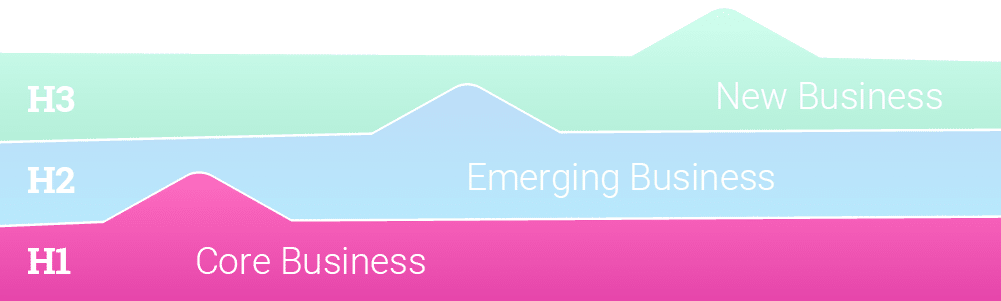
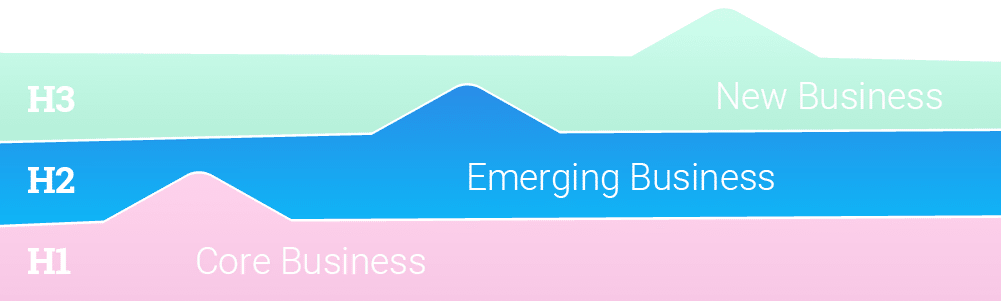
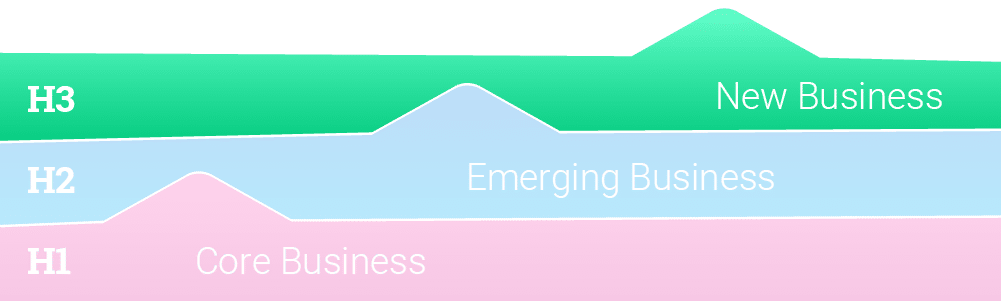
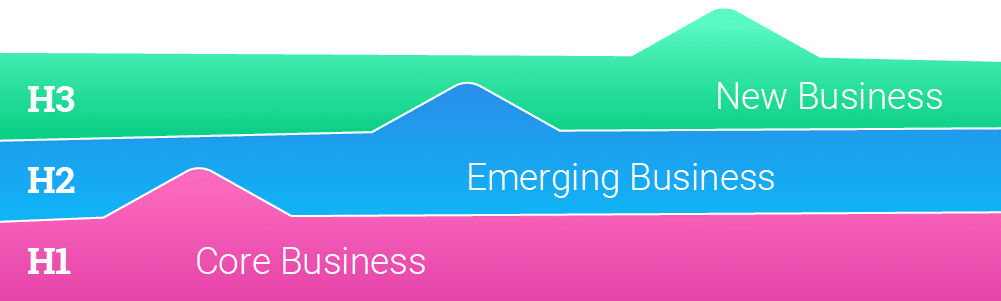
McKinsey’s ‘Three Horizons of Growth’ framework helps businesses manage their current performance while maximizing future opportunities for growth. At Parallax, we’re big fans of this concept – it becomes a set of guiding principles to do good (and profitable) work today, while dedicating time to focus on the innovations and opportunities of tomorrow.

Here’s an introduction to the Three Horizons Framework and how it might apply to you:

Horizon Model – Step 1: The work that pays the bills

Horizon 1 is your company’s bread and butter work that pays your bills. It’s the kind of work that you know how to do well on a repeatable basis. You know how to market it, deliver it, and staff it. The goal of Horizon 1 is about profitability. You want to make this work as profitable as possible and extend the life of the work as long as possible. 

Just like in the story above, Horizon 1 work eventually plateaus in value because it becomes commoditized. The cost of doing the work goes up (e.g., your staff needs raises), but, at some point, clients won’t be willing to pay more for it. Think about the impact that the rise of services like Squarespace and Shopify had on your ability to charge more for simple CMS or eCommerce websites. These services aren’t innovative anymore because so many people can do them well and quickly. To compete, companies need to sell these services based on their ability to do them faster and cheaper versus providing differentiated value

The profitability of Horizon 1 work will always erode, but that’s okay. This is a natural business cycle, which is why investing in Horizon 2 work is equally important.

Horizon Model – Step 2: The work that keeps you relevant

Horizon 2 is the innovative work your company develops as it predicts what services clients will want in the future. It’s less important for Horizon 2 work to be profitable. Instead, it must be growing in demand. Are more and more clients asking for this work? Is it a service you can sell on your value versus price because of your unique approach and experience? Does it set you apart from competitors?

Horizon 2 challenges you to constantly think about innovation. As leaders see profit from bread and butter Horizon 1 work, they also need to predict what will be valuable to customers next and invest in developing the team’s capabilities to support Horizon 2 work.

Eventually, the work you develop and identify in Horizon 2 will become Horizon 1 work. This continuous cycle means companies must routinely assess how profitable and innovative its work portfolio is — and keep taking action to stay well-funded and relevant. 

Horizon Model – Step 3: The futuristic trend-setting work

Horizon 3 work identifies future industry and macro trends — and considers how the business will be ready to address them. It’s an important consideration for many types of business, like global manufacturers and med device companies. But the reality is that most companies don’t have the luxury of thinking about Horizon 3 work. Most don’t and can’t think that far out, so this Horizon isn’t likely to drive any real behavior for services companies. While mastering Horizon 1 and 2 levels of work – continually evaluating how each type of work is performing – is key, having an overall vision for where the industry is headed is important to consider at some level, too.

How the Three Horizon Framework supports your growth

Adopting the Horizon Model helps you balance profitability and innovation — both of which are needed to keep you competitive and thriving today and for years to come. Identifying your Horizon 1 and 2 work also supports your business because it:

1. Encourages standardized services

Many services companies fall into the trap of treating every project as custom and making employees feel like only the new, innovative work is cool and exciting. This mindset can be dangerous for the business because it downplays the importance of standardized services and the bread and butter work that pays your bills and keeps your staff employed. 

Standardizing this bread and butter work (Horizon 1) with repeatable processes, pricing, and delivery helps you deliver it as efficiently and profitably as possible. If you’re really good at standardized delivery, other things in your business will also be true. Your bid-to-sale ratio will be higher, project delivery will be on-time more often, and your project margin will be higher because you don’t waste time and energy reinventing the wheel.

Plus, you need this profitable work to fund the innovative work (Horizon 2) that keeps you in business in the future.

2. Informs hiring decisions and resource allocation

Not all employees are cut out for dreaming up innovative new services. Others aren’t cut out to extend the life and profitability of bread and butter work. It’s critical to recognize that different employees have different professional pursuits and skill sets. This can help you match employees to the Horizon that they can best support. 

Horizon 1 work is often best for the employees we call Builders and Teachers. Builders like the challenge of figuring out how to do good work smarter and more efficiently. They also are effective bridge-builders between Horizon 1 and Horizon 2 work because they excel at finding concrete ways to create value for the business (i.e., making the innovative work profitable). Teachers are inspired by helping others succeed through training, coaching, and mentorship. Horizon 1 work is great work for Teachers to use as a training ground for new employees to learn the business. 

Horizon 2 work is best for Explorers. These employees are future-focused, entrepreneurial, and creative. While Builders and Teachers focus on ensuring profitability for the company, Explorers can identify new customer demand trends and build innovative services to address them and support future growth.

Knowing which employees support which Horizon best can help your company allocate existing resources effectively and better hire the types of employees it needs.

3. Keeps your eye on the future

It’s easy to get bogged down in the day-to-day operations of services business. The Horizons model encourages leaders to continuously think about the sustainability, profitability, and longevity of the work they deliver.

How sustainable the work we’re doing today? Will it continue growing? Is profitability eroding? Has it plateaued already? The Horizons Model encourages you to get ahead of declining profitability to inform proactive, strategic, and innovative business decisions. It supports growth by maximizing the services of today while preparing for the demands of tomorrow.

Parallax is purpose built to support both Horizon 1 and Horizon 2 work for digital agencies and software development companies. It can help standardize services using repeatable project templates and resources plans we call “project shapes.” These shapes make it easier for teams to sell, deliver, and track Horizon 1 projects. It also gives employees more visibility into what’s happening across the business to spot concerning trends in metrics like project margin and profit. Keeping an eye on these metrics helps you stay on top of growth so you can innovate toward the second horizon.

Conclusion 

A common challenge with growth – especially for services business – is that once-innovative work becomes commoditized and profitability lags. By embracing the Three Horizon’s Framework, organizations can optimize their delivery for great results today, while also making room for future innovation and growth tomorrow. Parallax is built to support this important cycle. We help you optimize performance, improve profitability, and standardize your core offerings, while also providing data and insight into new, innovative work on the next horizon. Want to see Parallax in action and learn more? Reach out to book a demo today.

Interested in seeing more articles like this, delivered straight to your Inbox? Subscribe to Parallax’s newsletter!

FAQ