The Weekly Resourcing Meeting That Actually Works

What makes a good resourcing meeting?

If your weekly resourcing meeting feels like group therapy where everyone vents and nothing changes, you are not alone. Most agencies have some version of this meeting. It usually includes a lot of screenshots, a lot of “we will figure it out,” and at least one person quietly updating a spreadsheet that nobody wants to admit is still running the show.

This guide is the version that actually works because it is built around a single idea:

The meeting is not a status meeting, it’s for decisions.

Quick takeaways

  • A weekly resourcing meeting has one job: make tradeoffs before tradeoffs make you.
  • The meeting should be short and consistent. Thirty to forty five minutes.
  • Prep prompts are the difference between decisions and vibes.
  • Decision rules prevent the same debate from happening every week.
  • No decision is real until the plan is updated.

Definitions

  • Resourcing meeting: A recurring meeting where the team decides staffing tradeoffs across projects and pipeline.
  • Status meeting: A meeting where teams report what happened. Useful, but not the same thing as resourcing.
  • Capacity bottleneck: A role or skill that becomes constrained in the next few weeks, creating delivery risk.

If you want meeting agenda templates and checklists, check out the Resource Management Best Practices.

Get the Guide


What this meeting is for

A weekly resourcing meeting has one job. It’s to make tradeoffs before tradeoffs make you.

That means the meeting exists to:

  • Confirm what is real this week
  • Spot capacity conflicts before they explode
  • Make decisions quickly
  • Assign owners to updates
  • Leave with a plan people can follow

What this meeting is not for

  • Project status: Project status meetings belong in delivery.
  • Debating company priorities: Those discussions belong with leadership, with a simple escalation path.
  • Renegotiate old staffing decisions: If the decision is wrong, fix it and move on.

Who should be in the room

Keep this tight. If everyone is invited, nobody feels accountable.

Minimum attendees

  1. Resource owner: This could be a resource manager, operations lead, or whoever owns the plan.
  2. Delivery lead representation: Either a PM lead or a small set of delivery leads who can speak for active work.
  3. Sales or pipeline owner representation: Someone who can speak to changes in near term pipeline and timing.

Optional attendees

  1. Finance or leadership: Only if your agency needs them for fast tradeoff decisions. Otherwise, they are not needed weekly.

Rule of thumb

If someone cannot make or support a decision, they probably do not need to be in the meeting.


If you want meeting agenda templates and checklists, check out the Resource Management Best Practices.

Get the Guide


What you need before the meeting starts

This is the part that makes the meeting work. If you skip this, the meeting becomes vibes.

Every delivery lead comes to the meeting prepared to answer.

  1. What changed since last week?
    Scope change, timeline shift, staffing change, client surprise, anything that affects the plan.
  2. Where are you at risk?
    Anything likely to miss a deadline or exceed an estimate.
  3. What do you need?
    Specific roles, dates, and how much. Not “we need help.”
  4. What can move?
    If you had to give up something, what would it be?
  5. Are timesheets clean?
    Yes or no. If no, what is missing and when will it be fixed?

⚠️ Looking for ideas to make timecards less painful? Check out Timesheets Without Resentment.


The agenda that keeps it moving

This meeting should be 30 to 45 minutes. If it is longer, the inputs are messy, or the decision rules are missing.

Here is the agenda.

1) Quick reality check – 5 minutes

  • Question: What has changed since last week that affects the plan?
  • Output: A short list of changes everyone agrees are real.

2) Confirm capacity bottlenecks – 10 minutes

  • Questions
    • Where are we overloaded in the next two to six weeks?
    • Where do we have excess capacity?
    • Where are we double-booked?
  • Output: A list of conflicts that require decisions today.

3) Make tradeoffs using decision rules – 15 minutes

This is the heart of the meeting. You do not solve every problem. You decide what happens next.

  • For each conflict, answer these questions fast:
    • What is committed versus optional?
    • What has the closest deadline with real consequences?
    • What has unique skill constraints that cannot be substituted?
    • What is the cleanest tradeoff if we move work, swap roles, or adjust scope?
  • Output: Decisions and owners, not just problems.

4) Pipeline impact review – 10 minutes

  • Question: What deals, start dates, or staffing assumptions changed this week?
  • Output: Updated assumptions that feed next week’s forecast.

5) Close and commit – 2 minutes

  • Do this out loud
    • Repeat decisions
    • Confirm owners
    • Confirm what gets updated and by when
  • Output: A clean list of actions and owners.

The decision rules that prevent chaos

If your meetings turn into debates every week, you don’t have decision rules. You have opinions.

Here are simple rules that keep resourcing decisions consistent.

  • Rule 1: Work already sold and in flight wins over new internal requests.
  • Rule 2: If a project is in danger, fix the constraint, not the symptoms. That could mean scope reset, timeline shift, or staffing change. Heroic efforts should be the exception, not the rule..
  • Rule 3: If the same emergency keeps repeating, it is a process failure. Capture it and fix the root cause, not just the current week by escalating to the appropriate leaders and updating the process.
  • Rule 4: If you cannot decide in the room, escalate with clear options. Do not escalate the drama. Escalate the choice.
  • Rule 5: No decision is real until the plan is updated. The meeting output is not the conversation. The meeting output is the updated plan.

If you want meeting agenda templates and checklists, check out the Resource Management Best Practices.

Get the Guide


What the meeting outputs must be

If you want this to feel like a machine, not a conversation, your outputs need to be consistent.

At the end of every meeting, you should have:

  • A prioritized list of staffing decisions
  • Owners assigned to each change
  • A list of risks that need escalation
  • Updated pipeline assumptions
  • A clear list of what gets updated today

If your meeting ends with “we’ll figure it out,” you did not have a resourcing meeting. You had a calendar event.


Common failure modes and fixes

Failure mode: You show up with no prep, then spend the meeting discovering problems.

Fix: Require the 5 key questions are ready to be answered. No prep, no meeting.

Failure mode: The meeting becomes a status meeting.

Fix: Move project status back into delivery and keep this meeting about decisions only.

Failure mode: Every conflict becomes a debate about priorities.

Fix: Use decision rules and an escalation path. Get to decisions fast.

Failure mode: Decisions are made, but nothing is updated.

Fix: Assign an owner to every update and confirm that the update happens on the same day.


Weekly checklist

Before the meeting

  1. Delivery leads answer pre-meeting questions
  2. Timesheets are confirmed clean or flagged
  3. Resource owner updates the view that will be used in the meeting

During the meeting

  1. Changes and risks are confirmed
  2. Conflicts are identified
  3. Decisions are made with decision rules
  4. Owners are assigned
  5. Actions are repeated out loud at the end

After the meeting

  1. The plan is updated the same day
  2. Owners confirm updates are complete
  3. Escalations are scheduled quickly, not next week

If you want meeting agenda templates and checklists, check out the Resource Management Best Practices.

Get the Guide


Copy and paste templates

Meeting invite description

This meeting is for resourcing decisions, not project status. Come prepared with changes since last week, staffing needs, and any risks that could affect delivery in the next six weeks. We will leave with decisions, owners, and updates to the plan.

Message to delivery leads

Before the weekly resourcing meeting, reply with

  1. What changed since last week?
  2. Where are you at risk?
  3. What you need, including role and dates?
  4. What can move if needed?
  5. Whether your team’s time is up to date

Meeting close checklist

  • Here is what we decided today
  • Here is who owns each update
  • Here is what gets escalated

FAQ

Q: How long should a weekly resourcing meeting be?

A: Thirty to forty five minutes. If it takes longer, either the inputs are messy, or the team is trying to solve delivery status in a resourcing meeting. To scale, use 30-45 minute meetings per department or team.  Longer meetings will always deviate from the goals.

Q: Who should run the meeting?

A:The person who owns the resourcing plan. That might be a resource manager, ops lead, or delivery operations leader. The key is ownership of the plan and the authority to assign follow-up.

Q: What is the difference between resourcing and project status?

A:Status is what happened and what tasks are next. Resourcing is whether the right people are available at the right time to deliver what was promised.

Q: What if we cannot make priority calls in the meeting?

A:Then the meeting should produce a clear set of options and quickly escalate the decision. Do not carry the conflict week to week.


Next step

If you want the full operating rhythm for this meeting, including forecasting cadence and conflict-resolution routines, start with Resource Management Best Practices for Agencies

Grant Hultgren
Vice President
Parallax

Timesheets Without Resentment

How to get clean actuals without turning into the time police

Nobody grows up dreaming of a career in timesheets, but if you work at an agency, you already know the truth. When timesheets are messy, everything downstream gets messy too. In particular, invoicing and closing the monthly books becomes near impossible and a process fraught with frustration.

The need to “just complete timesheets” so your controller stops yelling at you yields completed timesheets that are wildly inaccurate. From here, it’s a quick and slippery slope to losing the value of timesheets as a primary feedback mechanism, to an administrative task that, when not done, ends with harsh reprimands. This is a practical guide to getting reliable time data without turning timesheets into a culture problem.

Quick takeaways

  • Timesheets fail when they feel like surveillance. They succeed when they feel like protection.
  • Two rules beat a ten-page policy: when time is due, and who owns follow-up.
  • Unless you’re a law firm, focus on 15-minute increments, not precise seconds.
  • A weekly rhythm is the secret: Friday close, Monday cleanup.
  • Managers own compliance. Finance supports. Ops uses the data. Leadership sets the expectation.
  • If you want people to care, connect timesheets to fewer fire drills, better planning, and smarter pricing.

Definitions

  • Actuals: The time that was actually spent, not what was planned.
  • Available hours: The hours a person can work in a period after subtracting time off and non-working time.
  • Billable hours: Hours tied to work the agency bills to a client.
  • Non-billable hours: Hours spent on work that is not billed to a client. For example, internal meetings, admin, training, presales, and internal projects.

The real job of a timesheet

A timesheet is not a moral scorecard it’s a receipt for reality.

It tells you three things you cannot run an agency without.

  • What work actually happened?
  • What did it really take to deliver the work?
  • What is it doing to next month’s capacity?

When timesheets are missing or late, you don’t just lose data. You lose the ability to plan off of the actual effort delivery is requiring. That’s when teams get double-booked, scope creep hides until it is too late, and everyone ends up reacting instead of steering.


Check out the Resource Management Best Practices guide for a list of message templates and meeting guides.

Get the Guide


The simple system that works

Step one: Set two rules

Most timesheet policies fail because they try to cover every scenario. People do not follow policies. People follow expectations.

  • Rule one: Pick a time that matches how your agency actually works. The end of the day on Friday is common. Some teams pick Friday at lunchtime to leave room for cleanup.
  • Rule two: If a timesheet is late, the manager is responsible for follow-up. Not finance. Not ops. Not the resource manager. The manager. This one shift changes the vibe. It stops timesheets from feeling like a finance nag and turns it into a leadership habit.

Step two: Run the weekly rhythm

Timesheets work best as a weekly loop, not a daily burden or a month-end panic.

  • Friday close
    • People submit their time by the deadline
    • Managers do a quick scan for obvious gaps
    • Anything missing gets flagged, not fought
  • Monday cleanup
    • Managers follow up with anyone who missed Friday
    • Corrections happen while memories still exist
    • Then the week starts clean

The goal is not perfection. The goal is a reliable habit, so your planning inputs are good enough to trust.

Step three: Use language that reduces resistance

A lot of timesheet resistance is not about the task. It’s about what people think the task means. If timesheets sound like oversight, they will be treated like a chore. If they sound like protection, they get done.

  • Message to the team: Timesheets are how we protect the schedule. If we don’t know where time went, we cannot forecast capacity, spot scope creep early, or plan. We end up reacting instead.
  • Message to leadership: We are not chasing time to micromanage anyone. We are doing it so we can plan realistically, price work confidently, and avoid putting people into constant fire drills.
  • Message to sales: Accurate actuals help us price projects based on what work really takes, not what we wish it took. It also helps us set start dates that will not implode delivery.

The gentle Friday nudge: Quick reminder to wrap up your time today. It keeps next week’s plan honest and saves future you from a mess.

Step four: Make accountability boring and clear

Timesheets go off the rails when ownership is unclear. Here is the model that keeps everyone sane.

  • Leadership: Sets the expectation that timesheets are part of how the agency stays healthy.
  • Managers: Own compliance for their team and do the follow up.
  • Operations and resourcing: Use the data to forecast and surface risks early.
  • Finance: Uses the data for billing and margin and helps define what good looks like.
  • Individuals: Submit time on schedule and ask questions when something is unclear.

Step five: Use a calm escalation path

You need an escalation path, even if you rarely use it. People relax when expectations are clear and consistent.

  • Step one: Same-day reminder on Friday.
  • Step two: The manager follows up on Monday morning.
  • Step three: If still missing by the end of Monday, the manager and ops align on what is blocked by the missing time. For example, forecasting review, billing review, and project health review.
  • Step four: If someone repeatedly misses, address it as a reliability habit, not a finance issue. This is a leadership conversation, not a spreadsheet fight.

Check out the Resource Management Best Practices guide for a list of message templates and meeting guides.

Get the Guide


Common objections and real answers

Objection: “I forgot what I worked on.”

  • Answer: That is exactly why Friday close and Monday cleanup exist. The longer you wait, the worse it gets. The fix is speed, not pressure.
  • ⚠️ Pro-tip: Timesheets that integrate with calendars or that can be informed by planned work significantly reduce this objection.

Objection: “It takes too long.”

  • Answer: It should take minutes, not an hour. If it takes an hour, your categories are too complex, or your tooling is fighting you. Simplify codes and stop asking for essays.
  • ⚠️ Pro-tip: Remember, we should not be accounting for every second of every working day.  Be as specific as possible without exceeding the 15-minute rule of filling out your timesheet.

Objection: “It feels like micromanagement.”

  • Answer: Make the purpose explicit. Timesheets protect planning, pricing, and sanity. If leaders treat them like surveillance, people resist. If leaders treat them like inputs, people comply.

Objection: “My work does not map cleanly to a project”

  • Answer: That is a taxonomy problem. Create a small set of standard buckets for internal work, presales, and investment time so people are not forced to guess.

Weekly checklist

Friday

  • Send a reminder early enough to act on
  • Team submits by the deadline
  • Managers scan for missing chunks
  • Anything missing gets flagged

Monday

  • Managers follow up on missing time
  • Corrections are submitted
  • Ops updates forecasts and flags risks based on the new actuals
  • Finance moves forward with billing and margin review as needed

Copy and paste message templates

Timesheet policy text for your internal doc

Timesheets are due every Friday by [time]. If you miss the deadline, your manager will follow up on Monday. The purpose is to keep our planning, pricing, and workload sustainable. Timesheets are not used for micromanagement. They are used to understand actual effort so we can forecast realistically and protect the team.

Friday reminder message

Quick reminder to wrap up your time by [time] today. This keeps next week’s plan honest and helps us avoid last-minute surprises.

Monday cleanup message from a manager

Hey, I did not see your time come through on Friday. Can you knock it out this morning so we can finalize planning and reporting for the week?


Check out the Resource Management Best Practices guide for a list of message templates and meeting guides.

Get the Guide


FAQ

Q: What is the best timesheet deadline for an agency?

A: Pick a consistent weekly deadline that matches your work rhythm. The best answer is the one you will enforce every week without exceptions becoming the norm.

Q: Should managers really own follow-up?

A: Yes. When finance owns it, it feels like policing. When managers own it, it becomes a reliability habit tied to how the team operates.

Q: How do we improve timesheet compliance fast?

A: Simplify the policy to two rules, create a Friday close and Monday cleanup rhythm, and have leaders consistently reinforce the purpose.

Q: Do timesheets matter if the work is fixed-fee or retainer-based?

A: Yes. Fixed fee still has a cost. Timesheets are how you learn what work really takes, so you can price the next one smarter.

Q: What if people hate timesheets no matter what?

A: They might. Your job is not to make timesheets fun. Your job is to make them predictable, quick, and clearly connected to fewer fire drills and better planning.


Next step

If you want the full system behind clean actuals, including forecasting cadence, resourcing decision meetings, and conflict resolution routines, start with Resource Management Best Practices for Agencies in Resources.

Grant Hultgren
Vice President
Parallax

The Questions Leaders Ask That No System Really Owns

Every agency leadership team has a familiar moment.

Pipeline looks fine. Delivery looks busy but stable. Finance looks mostly fine.

Then someone asks a simple question.

And suddenly, everyone is staring at three different dashboards like they are going to fuse into one answer.

They never do.

Not because your stack is bad. Not because your team is doing anything wrong.

This is because many of the questions leaders rely on are not owned by any single system. They sit in the gaps between CRM, project management, PSA, and finance.

This post is a structured list of those questions and how to use them. Not a pitch. Just a practical way to spot the blind spots that create surprises.


Quick takeaways

  • Leadership questions are decision questions. They are forward-looking and require assumptions.
  • Most systems are built around their own world, deals, tasks, time, and invoices.
  • The unanswered questions live in the overlap between those worlds.
  • You do not need a new tool to start. You need ownership, a cadence, and a shared scorecard.


Why these questions slip through the cracks

Most tools have a job and a point of view.

CRM is organized around deals and stages.

Project tools are organized around work and tasks.

PSA systems are organized around time, staffing, and billing.

Finance is organized around invoices, costs, and actuals.

Leadership is organized around decisions.

Those decisions are usually about what happens next, not what already happened. They involve tradeoffs. They change when a client pauses, a deal slips, or a senior person gets pulled into a pitch.

That is why these questions become everybody’s problem and nobody’s responsibility.


The six categories of questions leaders keep asking

Use these categories as a map. If a question keeps showing up in exec meetings, it is probably in one of these buckets.

1) Revenue questions that are not really revenue questions

These sound like finance or sales questions until you try to answer them. Then you realize they require delivery reality too.

Common examples

  • How much revenue is actually likely to land next month, not just what is in the forecast?
  • If these two deals close, what work starts first and what gets delayed?
  • Which deals are we quietly counting on, even though staffing them would be painful?
  • What is the revenue impact if a key client pauses for four weeks?
  • Are we over relying on one team, one discipline, or one client for next quarter?
  • If we win this big deal, what do we stop doing to make room for it?
  • Which deals look profitable in a proposal but become margin problems once staffed with real people?

What this category is really asking?

Are we selling a plan we can execute without breaking delivery and margin?

What makes it hard to answer

CRM can show stages and probability. Finance can show historical run rate. Neither can tell you what happens when the same two senior specialists are already booked across multiple deadlines.

2) Capacity questions that are really risk questions

These show up as resourcing questions, but they are usually risk questions in disguise.

Common examples

  • Do we have the right people for the work that is likely to start soon?
  • Where are the real pinch points by skill and seniority, not just total availability?
  • Which teams are one unexpected absence away from a scramble?
  • How much capacity is already spoken for by unplanned work?
  • If we shift a key leader to a pitch, what breaks in delivery?
  • If we accept this deal, which current clients will feel the impact first?
  • Who is the hidden bottleneck that every project depends on?

What this category is really asking?

Where does the plan break first?

3) Hiring questions that live between pipeline and delivery

Leaders rarely ask “Should we hire” in the abstract. They ask questions about timing and risk.

Common examples

  • When do we need to hire so we are not late, but also not early?
  • What role do we need next, and what work proves it?
  • Are we trying to solve a skills gap or a scheduling gap?
  • If we do not hire, what is the cost in missed revenue or delivery strain?
  • If we do hire, what must be true for that hire to pay off?
  • Should we use contractors, partners, or a hire based on the shape of demand?
  • If the pipeline slips by one month, do we still feel good about the headcount plan?

What this category is really asking?

Is this demand a spike, or a new baseline?

4) Delivery risk questions that nobody wants to own

These questions tend to show up late, right after something starts to feel off.

Common examples

  • Where are we building delivery debt right now?
  • Which projects look fine on paper but are quietly consuming senior attention?
  • What happens if scope expands after kickoff, which it usually does?
  • If timelines compress, which milestones become unrealistic first?
  • Which clients are about to experience a confidence wobble?
  • What work is at risk because it depends on a single person or a single approval?
  • Where are we likely to have to rescope, and what does that do to margin and trust?

What this category is really asking?

What is likely to go wrong next, and do we see it early enough to act?

5) Margin questions that are really planning questions

Margin issues almost never start as finance issues. They start as planning issues, then show up later as financial surprises.

Common examples

  • Which projects will miss margin if nothing changes?
  • Which projects can still be saved, and what change would actually save them?
  • Are we staffing with the right mix, or just the available mix?
  • How much non billable work is riding along inside delivery?
  • What work is being done that is not in scope, not billed, and not discussed?
  • If we keep taking rush work, what does that do to profitability next month?
  • Are we pricing based on a delivery plan we cannot actually execute?

What this category is really asking?

Are we making preventable profitability mistakes because the plan is unclear?

6) Client questions that do not fit neatly into any dashboard

These are often the most important questions and the least reportable ones.

Common examples

  • Which clients feel stable but are one mistake away from escalation?
  • Which clients are at risk because we are stretched thin, not because the work is bad?
  • Where have we trained a client to expect immediate turnaround that we cannot sustain?
  • Which relationships rely on one person and would wobble if that person stepped away?
  • Where are we over delivering to protect trust, and what is the cost of that habit?
  • Which clients should we push back on now to avoid a larger conflict later?

What this category is really asking?

Where is relationship risk building even if the work looks fine on paper?


📕 Check out Resource Management Best Practices for a list of questions and meeting guides


The real issue is not data. It is ownership.

When a question spans multiple systems, it usually spans multiple teams too.

Sales owns pipeline truth.

Delivery owns staffing reality.

Finance owns margin truth.

Operations owns process and planning habits.

But the executive question is often one combined sentence.

If we win this, can we deliver it without harming everything else

That sentence has no natural owner.

So it gets answered through a mix of exports, spreadsheets, gut feel, and the heroic effort of whoever knows where the bodies are buried.


A simple way to use this list in your next leadership meeting

This turns the post into an action, not a reading exercise.

Step 1: Pick ten questions that come up most often

In a leadership meeting, circle the ten questions you hear repeatedly.

Step 2: Score each question

For each one, answer three quick prompts.

  • Can we answer it in under two minutes
  • Do we trust the answer
  • Who owns the answer

Step 3: Assign ownership and cadence

For questions that are important and hard to answer, assign an owner and a weekly cadence.

Owner does not mean they personally gather every datapoint.

Owner means they make sure the answer exists and is discussed.

Step 4: Turn it into a weekly executive scorecard

Pick a small set of signals that cover the categories above.

Review weekly.

If something is yellow or red, decide what happens next.


📕 Check out Resource Management Best Practices for a list of questions and meeting guides


Copy and paste template: Question ownership worksheet

Use this table in a doc or spreadsheet.

  1. Question
  2. Category
  3. Current source of truth
  4. What we do today to answer it
  5. Owner
  6. Cadence
  7. Action when the answer is unclear


Checklist: Signs the questions are running your business from the shadows

  • Decisions slow down because confidence is low
  • Decisions speed up because someone has to make a call anyway
  • Good deals get passed on because staffing feels uncertain
  • Risky deals get accepted because the risk is hard to see early
  • Hiring happens late because the signal arrives after the pain starts
  • Delivery becomes reactive even when the team is working hard

If you checked more than one, this list is not theoretical. It is already your operating system.


FAQ


Are these questions a sign we have the wrong tools?

Not necessarily. They are a sign that leadership decisions live between systems.

What is the fastest way to reduce the scramble?
Pick a few high value questions, assign ownership, and review them weekly. Consistency beats perfect reporting.

Who should own these questions?
Different questions belong to different owners, but the scorecard belongs to leadership. If leadership reviews it weekly, it becomes real.

What if the answers require assumptions?
That is normal. The goal is not certainty. The goal is early warning and honest tradeoffs.


Next step

If you want the operating rhythm behind these questions, check out the Resource Management Best Practices to keep these tips handy.

That is the place where the weekly cadence, forecasting approach, and decision routines live in one place.

Brian LaMee
Recovering Professional Service Executive
Parallax

Interview recap: Amy Anderson of Wild Coffee Marketing

Capacity, clarity, and leading when there is no margin for error

This post is a Q and A pulled from our conversation with Amy Anderson, CEO and co-founder of Wild Coffee Marketing. It is lightly edited for readability, but the answers stay in Amy’s voice. Watch the full interview here


Q: First, what is Wild Coffee Marketing, and do you actually market coffee

A: I am the co-founder and CEO of Wild Coffee Marketing. We actually do not market coffee. It was a plant that was growing outside my window while I was writing a business plan in Miami, and it was growing up over the window, and I kept having to cut it back with a machete. I looked up what it was, and it was called wild coffee. So I thought it was a perfect name for a strategy led group that serves as a growth partner to our clients.

I would not describe us as a typical agency. I am a brand-side marketer of 30-plus years. When I say strategy-led, it is led by CMO thinking and fractional CMO services backed by a fractional marketing team. We have creative services and writing, but we are strategists at heart and lead every engagement with that.


Q: What did 2025 feel like from your seat

A: Postponements and scope demand. We were being asked to do more, and to be more nimble and flexible to drive results in a macroeconomic environment that had a lot of uncertainty.

Because we are strategy-driven, it was so much about our market contracting, where are we going to take the business, where is our area of focus, what are additional platforms, is our messaging right. In this environment, we were really asked to do more, and then had some unexpected turbulence in the market.


Q: You talked about operational clarity. What does that actually mean

A: Operational clarity is really important. Where are your resources going at any given time. When you have to pivot, you have to be able to pivot the resources as well.

So it is really understanding where I had capacity, what people were in what seats, were they in the right seats in order to deliver. That clarity from an operations standpoint is really important. You have to have processes. You have to have the right people in the seat.


Q: As a CEO, what are you focused on day to day

A: My primary areas of focus are always culture, and people, and the numbers. Capacity and utilization definitely comes up as a primary driver of those numbers.

Culture is the umbrella over it. Have you created a great place for your team to work. Feeling psychologically safe so they can be creative. We focused on work-life harmony. I do not even want to call it balance. That is very important, but we also work hard.

So to strike that balance of harmony and safety and kindness while demanding the rigor and the delivery is not the easiest balance to strike, but it is something we need to all be looking at.


Q: Capacity and utilization can get weird fast. What did you learn this year

A: You have to be careful with capacity number discussions. That is a major learning for me this year.

I hear 70 percent billable, 90 percent in an IT focused production firm. Well, we are strategy. How much discussion and work and participating in meetings that may not be directly billable do they do.

I took this year to figure out what that number was. The ambitious leader in me always wanted to drive the billable percentage. But what I started to notice is what is the impact on the team.

Given what I am asking of them, given what clients are asking of them, is it right to continue to try to drive that number up. The answer was no.

What I found is that the billable percentage is lower, and that has to be okay, and you have to run the business around that. But also, how do you talk about that with your team. It is sensitive.

I do not want people coming into meetings defending what their percentage is, and they cannot always control that. Maybe I did not sell enough, and our business development team did not sell enough. Maybe we did not sell something that directly correlated with billable work.

This year was really about learning caution and the nuance of how you handle your capacity in a turbulent market. When I have a lot of it, I have to make business decisions. When I have a little of it, I have to make staffing and operational decisions.


Q: You mentioned giving your team space to think. How do you protect that?

A: We will ask ourselves, what about this pivot. What about these 5 to 7 other strategies that we can deploy in this engagement. Our scopes are flexible because they have to be as an outsourced marketing team, and we have freedom and flexibility to do that.

If I do not give the team enough time to sit and think, they are not going to be able to deliver that. That is hard to quantify. That gray area of billable percentage.

We do reviews every 90 days, and they will ask, can you make sure the next quarter I have space to think.


Q: In a year where there is no margin for error, what do you lean on to make decisions

A: I have a conversation with my CFO quite a bit. He is always looking at margin. I think it is important. It is an important baseline.

What is your most profitable work. What do you think you and your team can lean into the most and be really proud of what you can produce. Where do you see it having a competitive edge in the market. One example of that for us is our branding work.


Q: You also talked a lot about foundations. Why does that matter so much right now
A: In most of our engagements, it does not make sense unless we start with that foundational piece.

Are you positioned right in the market? Because you cannot really afford to miss.

In this market with so much data, there is really not a lot of uncertainty with respect to return. Building that foundational layer is a key part of that. Then you get to know the business and each other so well that the subsequent activities and performance marketing comes from that.

When I say assertive strategy, it is bringing our experience to the strategy, who we are trying to target, bringing our point of view. That is what our clients are paying for. They want us to come in with our point of view, bringing our experience and energy.


Q: Let’s talk AI. What is your real take after living through it with a team
A: I really think I was looking for magic bullet platforms in 2025. Somebody brought one to me with highly trained marketing agencies, and I brought it to my team, and they said, Amy, that is what we are doing.

My big learning was that it is these micro interactions with AI, or AI features being built into multiple platforms that my team is using. That is creating efficiency and broadening the power of their work. It is expanding an idea set, not replacing the people.

Twelve months ago, there was slop work happening. A few prompts, copy-paste into a document, without realizing limitations. So, even helping them build project structure, helping them build instructions, turning off the model so it does not share our IP, that was a big one.

Your eye has to be on the ball, but not on it all the time. Keep looking and thinking and talking and asking, but be sensitive to your team.


Q: Any final thoughts heading into 2026
A: Finding balance in the capacity and the utilization, finding balance in the scale, controlled growth, figuring out how to ride these turbulent times going into 2026.

But I am super optimistic about this year. I find even-numbered years tend to be my better years than odd years, looking back on my life. Fingers crossed.

Watch the full recording here


Why Spreadsheets Keep Appearing in “Modern” Tech Stacks

If you have a modern tech stack but spreadsheets are still driving planning decisions, you are not alone. This shows up in agencies of every size, including the well-run ones.

Spreadsheets do not show up because anyone is careless. They show up because they create speed and flexibility, and they are great at answering questions that live between systems.

The problem is what happens next.

As work gets more chaotic, that spreadsheet layer becomes less forgiving. Plans drift. Assumptions harden. And leadership starts making commitments based on a file that cannot adapt fast enough when reality changes.

This post reframes spreadsheets as a signal, not a mistake. A signal that your stack has gaps in planning, tradeoffs, and foresight.


Quick takeaways

  • Spreadsheets are the universal adapter between systems that were never designed to speak.
  • They are strongest when used for one-time analysis and quick scenarios.
  • They get risky when they become the ongoing planning layer for staffing, forecasting, pricing, and growth decisions.
  • The fix is not another execution tool. The fix is a dedicated planning layer that can absorb change and keep assumptions honest.
  • You can diagnose the gaps without launching a massive internal project.


Definitions

Execution or Delivery tools
Tools that track work already in motion, tasks, owners, due dates, and day-to-day delivery.

Financial truth
Tools and reports that capture what happened, invoicing, costs, margin, and revenue reality.

Planning layer
A system, view, or workflow built for forward-looking decisions that connect demand, capacity, timing, and tradeoffs.

Tradeoff
A decision that makes one thing possible by explicitly deprioritizing something else.

Volatility
The real-world stuff that changes the plan, scope expansion, client pauses, approvals slipping, rush work, and shifting priorities.


Spreadsheets are the universal adapter

Most stacks do two things very well.

Execution tools show what is happening.

Financial tools show what happened.

Both matter. But many leadership questions sit in the gap between them.

Examples leaders ask all the time

  • Can we take on new work without creating margin risk?
  • Do we have the right people for the likely demand, not just signed work?
  • What happens to utilization and profit if scope expands or timing slips?
  • Are we pricing deals based on real delivery capacity or assumptions?

That gap is where spreadsheets appear. They connect the dots when no system provides one trusted view.


📕 Check out the Resource Management Best Practices guide for meeting cadence and agenda templates that help you get these answers.


Why leadership planning keeps falling back to spreadsheets

Spreadsheets show up for consistent reasons. None of them are embarrassing.

1) Data lives in separate places

Pipeline lives in the CRM. Delivery lives in the project tool. Financial truth lives in accounting.

Leaders need one narrative across all three, and spreadsheets make that possible quickly.

2) Planning requires assumptions, not just facts

Execution and finance systems track commitments and outcomes. Planning is conditional.

Spreadsheets make it easy to model scenarios without heavy configuration.

3) Tradeoffs are hard to see across projects

Many tools can show project health one project at a time.

Fewer can show what happens when the same person gets pulled across multiple deadlines with competing urgency.

Spreadsheets can create a cross-project view, even if it requires manual upkeep.

4) The business changes faster than systems can be adjusted

Agency models evolve fast. Spreadsheets adapt instantly.


The risk is not the spreadsheet. The risk is false confidence under volatility

When spreadsheets are used for occasional analysis, they are a strength.

Fragility shows up when spreadsheets become the planning layer while the environment gets more volatile.

Volatility often looks like

  • Scope expansion after kickoff
  • Client pauses and restarts
  • Rush work reshuffling priorities
  • Approvals slipping and compressing timelines

In that environment, spreadsheet planning gets tested.

Risk 1) Plans drift out of date faster than decisions slow down

A spreadsheet is a snapshot. In a world of constant change, snapshots go stale quickly, while leadership decisions still occur weekly or daily.

Risk 2) Growth becomes more stressful than it needs to be

This rarely creates one visible failure. Instead, it produces margin drift, conservative pricing, delivery strain, and growth hesitation that only become obvious after decisions are locked in.

Risk 3) Planning becomes dependent on heroic effort

Many agencies have a spreadsheet that quietly powers key decisions and depends on one or two people to keep it current.

That is not a team flaw. It is a structural dependency that concentrates planning risk on individuals rather than on systems.


The executive lens

A spreadsheet appearing in a modern stack is usually a signal that leaders are asking planning questions the stack does not answer cleanly.

So the useful question is not, why are we still using spreadsheets?

It’s this

What commitments are we making without a reliable forward-looking planning?

Once you ask that, the spreadsheet becomes a helpful indicator, not something to criticize.


A practical audit for leaders

If you want to act without creating a massive internal project, run this audit.

Step 1) List the leadership decisions you repeat

Focus on decisions, not reports.

Pick five to eight, like hiring timing, deal prioritization, when to reshape scope, and how to staff new work without harming delivery.

Step 2) Identify how each answer gets built

Look for patterns

  • Manual exports and copy-paste
  • Reconciling multiple sources of truth
  • Multiple versions of the same file
  • Heavy reliance on one person’s upkeep

These are not failures. They show where decision-making lacks system support.

Step 3) Name what repeatedly breaks the plan

Ask this

What happens that makes our plan wrong within days

Those answers define what your planning layer must absorb.

Step 4) Decide what stays in spreadsheets and what should graduate

Spreadsheets are great for one-time analysis and quick scenario modeling.

They get riskier when they drive ongoing capacity planning, cross-team staffing decisions, and recurring forecasting that leadership depends on.

If a spreadsheet drives recurring leadership decisions, it is functioning as a planning system, without the reliability, auditability, or adaptability a system requires.


Copy and paste template: Spreadsheet risk analysis

Decision
What decision is this spreadsheet helping us make?

Frequency
How often do we make that decision?

Inputs
What systems does the spreadsheet pull from?

Ownership
Who updates it, and how many people know how it works?

Volatility
What events make it wrong quickly?

Tradeoffs
What tradeoffs does this decision force when reality changes?

Risk level
Low if it is one time analysis
Medium if it is recurring, but low impact
High if it drives staffing, pricing, hiring, start dates, or margin commitments


Checklist: Signs the spreadsheet has become a planning system

  • The file is used weekly in leadership decisions
  • People delay decisions because the file is not current
  • People make decisions anyway because the file is not current
  • There are multiple versions of the file in circulation
  • One person carries the upkeep and the institutional knowledge
  • The file is used to decide staffing or start dates
  • The file is used to decide pricing or hiring

If you checked more than two, the risk is not inefficiency. The risk is committing the business based on plans that cannot adapt fast enough.


What a calmer stack looks like

Most agency stacks have execution covered and financial reporting covered.

What is often missing is a dedicated planning layer that connects demand, capacity, timing, and tradeoffs in a way leaders can trust week to week.

The goal is not to eliminate spreadsheets. They are useful.

The goal is to stop relying on spreadsheet glue for your highest impact decisions.


FAQ

Are spreadsheets always a problem?

No. They are excellent for quick analysis and scenario planning. The risk starts when they become the recurring engine for staffing, forecasting, pricing, and hiring.

Why do tools not solve this already?

Because most tools are designed around a single world, deals, work, time, billing. Leadership decisions live in the overlap.

What is the fastest way to reduce spreadsheet reliance?

Start with the audit. Identify the two or three spreadsheets that drive recurring leadership commitments, then decide what needs to graduate into a planning layer.

Do we need to replace our CRM or project tools?

Usually no. Most teams keep their execution tools and financial tools. They add a planning layer that connects the dots.


Next step

If you want a practical operating rhythm behind this idea, start with the Resource Management Best Practices guide.

That guide lays out the weekly cadence, forecasting approach, and decision routines that reduce reliance on spreadsheet planning for the decisions that matter most.


Brian LaMee
Recovering Professional Service Executive
Parallax

What Is Capacity Planning? How To Effectively Capacity Plan

balancing demand and capacity abstract image

Imagine you’re throwing a dinner party, but instead of knowing exactly who’s coming, you’re guessing based on vague RSVPs like “maybe” or “I’ll try to make it.” You buy too many groceries, and half the food goes uneaten—or worse, you run out of chairs because way more people show up than expected. 

Now scale that chaos to a professional services business. That’s capacity planning: the delicate art of aligning your team’s availability with unpredictable client demands. Done right, it keeps projects running smoothly and profits healthy; done wrong, you’re left scrambling for resources or sitting idle, wondering where it all went wrong. 

Optimize team performance with Parallax capacity planning software.

What We’ll Cover

What Is Capacity Planning?

benefits of capacity planning abstract image

Capacity planning is the process of determining the amount of work an organization can take on with their available resources in a given time period. It takes into account the types of roles, skills, time, and budget projects will need in order to be completed successfully, while considering projects that may already be in delivery or in the pipeline. 

The planning helps give decision-makers a clear view of what types of projects can be completed efficiently and cost-effectively while maintaining alignment with the organization’s strategic goals.

Why Is Capacity Planning Important?

Capacity plans help agencies and professional service organizations operate as efficiently as possible, minimizing unexpected roadblocks in delivery and producing quality output for clients. 

When done effectively, it supports:

Strategic growth goals: by aligning projects and resources with long term organizational goals and market trends.

Cost management: by guiding resource plans to staff projects effectively, avoiding underutilizing employees or last-minute hiring. 

Efficient operations: maintaining the balance between available capacity and upcoming demand, supporting smooth workflows and healthy employee utilization levels.

Learn how strategic capacity planning improves team utilization rates.

Capacity Planning Strategies

Planning strategies can differ based on an organization’s goals and current capacity. Each strategy aims to align resources with demand, however, lead, lag, and match strategies differ when it comes to approaching project forecasting. Let’s break down each strategy and how they work:

Lead Strategy

The lead strategy focuses on planning based on anticipated demand level. Organizations using this strategy adjust capacity ahead of time, ensuring that when demand increases capacity is available to deliver. 

The downside of this approach is risking being over capacity, resulting in increased costs and underutilized employees. 

Lag Strategy

Unlike the lead strategy, the lag strategy only takes into account current demand. This strategy allows businesses to minimize costs, avoiding the risk of being over capacity by acquiring resources as demand increases. 

A sudden increase in demand may cause challenges for organizations who use this strategy. Resources may become overutilized, risking employee burn out, or the business may need to delay projects until capacity has been adjusted. 

Match Strategy

The match strategy is a combination of both the lag and lead strategy, planning for current demand as well as forecasting for future demand. The goal of this strategy is to maintain healthy resource utilization by matching capacity to demand as accurately as possible. 

To succeed with the match strategy, teams must work diligently to forecast demand and plan capacity accurately. With the right approach, the match strategy is the most cost effective and efficient strategy. 

How To Capacity Plan

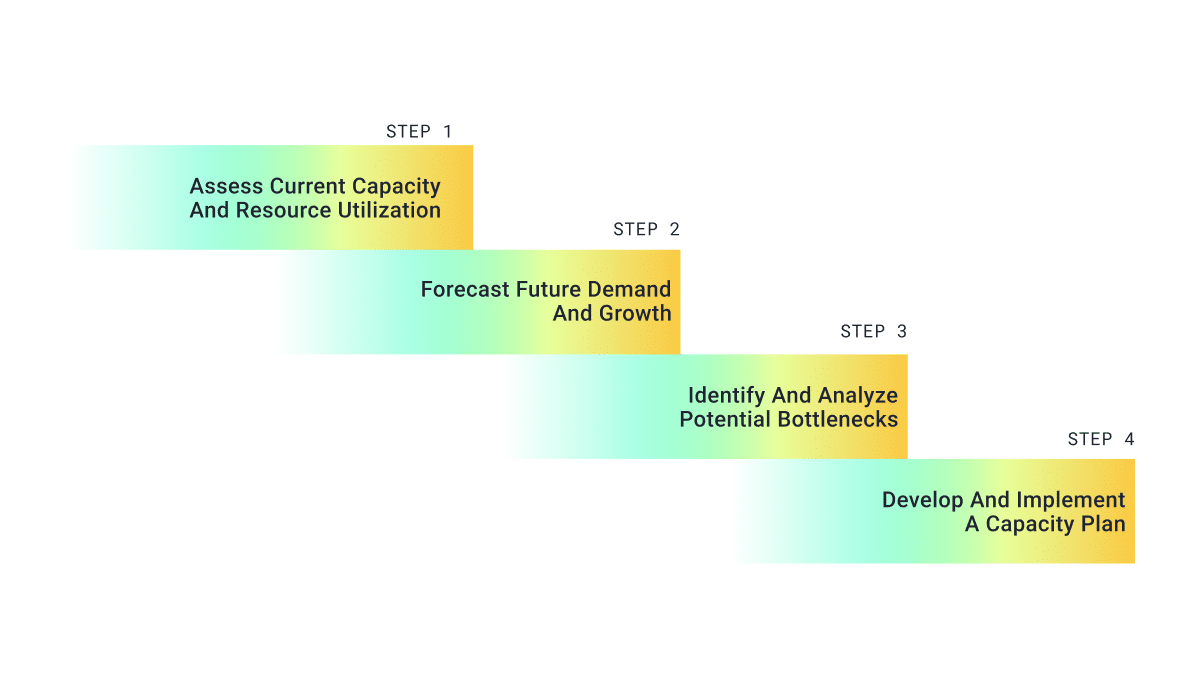
A well crafted capacity plan involves evaluating your current capacity, forecasting future demand, and strategically allocating resources. With the right approach, capacity planning can help organizations improve the accuracy of resource allocation, prepare for growth, and get ahead of potential roadblocks early. 

Steps of capacity planning

Assess Current Capacity And Resource Utilization

Assessing your current capacity and resource utilization is the first step to creating a successful plan. Tools like time-tracking software and resource management dashboards can provide insight into metrics like resource utilization and forecast variance to help identify gaps or inefficiencies to address. For example, trends that show resources are consistently over-utilized may indicate a capacity shortage. 

Forecast Future Demand And Growth

Forecasting future demand helps identify how much capacity you will need to successfully complete upcoming projects. With future demand taken into account, capacity plans help organizations prepare for fluctuations like seasonal dips or spikes in demand by allowing them to increase their workforce, adjust schedules, and allocate resources more efficiently.  

Identify And Analyze Potential Bottlenecks

Identifying potential roadblocks within your capacity plans ensure that projects are delivered on time and as efficiently as possible. By anticipating future demand, organizations can be proactive and get ahead of bottlenecks such as resource shortages, overstaffing, or delays that could affect project timelines or quality.  

Develop And Implement A Capacity Plan

Now that you know your team’s capacity and requirements of current and forecasted projects, it’s time to use these insights to create your capacity plan.

Team capacity planning consists of aligning resource schedules, skills, and workloads to strategically allocate resources to projects both present and future. Tools like Parallax that help you both forecast capacity and manage resources as well as scenario plan, provide transparency into who is available to be staffed based on their capacity and utilization.

Once you successfully align your capacity plan with your resource plan, regularly monitor its effectiveness and adjust as project or demand changes occur.

Capacity Planning Examples

  • Praxent improved the coordination between their sales and delivery teams by using capacity plans to scenario plan for won deals starting in the sales process.
  • Raindrop encountered many swings in demand, causing teams to be over capacity. By using a capacity planning tool, they were able to smooth out curves in resource demand and allocate team members based on utilization goals. 
  • Clear Digital forecasts their capacity and utilization to identify and understand where there may be discrepancies between resource availability and project requirements. As they grew their business, insights from the capacity plan became essential to their operations. 

Read more about how Parallax customers capacity plan to improve operations

Capacity Planning Benefits

Team Transparency

Capacity planning provides clear visibility into workload distribution and resource availability, helping project managers and resource managers create more reliable work plans and delivery scopes. Capacity plans also provide feedback to teams on delivery status and effectiveness of the resource plan, allowing for adjustments and improvements to be made on future forecasts. 

Enables Teams To Deliver Projects On Time And Budget

By aligning resources with forecasted project requirements, capacity planning helps teams meet deadlines and stay within budget. This helps to reduce last-minute surprises and account for different scenarios to drive successful project outcomes. 

Easier Scalability For Growth

Capacity forecasting and planning also supports strategic hiring initiatives by anticipating resource needs ahead of time. Businesses can more easily scale operations without over utilizing teams using capacity planning as new business increases. 

Challenges In Capacity Planning

Capacity planning offers many advantages, but to execute effectively, there are a few tips we recommend to keep forecasts accurate, and avoid challenges: 

  1. Use a capacity planning and resource management tool like Parallax to keep forecasts accurate and resource plans up to date. 
  2. Plan for different scenarios and build flexibility into your plans to adapt to demand changes. 
  3. Integrate your tools to limit inaccuracies and human error in forecast data. 

Learn more capacity planning best practices

How Does Capacity Planning Software Work?

Capacity planning software like Parallax helps teams efficiently create capacity plans and apply the insights to their resource plans. 

Parallax uses data from other operational software like your CRM (customer relationship management tool) and time tracking software to inform, predict, and summarize operational processes and key performance metrics. 

Lets look at a few Parallax features that support effective capacity planning: 

  1. Resource capacity forecasting by hours and full time employees
  2. Hiring forecasts
  3. Shaper tool 
  4. Project health and variance reports
  5. People and projects assignment views 
  6. Utilization reporting and forecasting 

See Parallax’s Capacity Planning Software

Creating an effective resource plan is essential to supporting efficient operations and growth within your organization. Forecasting and planning team capacity allows businesses to be proactive to market changes, increase transparency among teams, and maximizes team productivity.

Parallax’s software is designed to help you forecast demand, allocate resources, and reach your strategic business initiatives. 

Book a live demo to see how Parallax can help streamline your capacity planning and resource management process. 

Top 5 Factors to Consider When Choosing Capacity Planning Software

Top 5 Factors to Consider When Choosing Capacity Planning Software

To have an effective capacity planning approach, you need a system that allows you to make strategic, confident, and future-forward decisions. That being said, finding the right solution can feel daunting—so stick around! We outline key factors to consider when assessing capacity planning software below.

Table of Contents

Understanding Capacity Planning for Digital Agencies

When we talk about “capacity planning”, we know this could have a number of different meanings and associations. So, let’s first align on what capacity planning really is and why it matters. 

Capacity planning helps agencies understand what kind of services and products their customers and prospects want now. It helps predict future needs so agency leaders can plan and invest in the right resources with confidence. In it’s simplest form, capacity planning is about knowing supply and demand, both now and in the future.

Gaining a clear picture of supply and demand comes with phenomenal perks that both leaders and their teams benefit from.

What are the Benefits of Capacity Planning?

  • Improved Resource Management: Resource management focuses on assigning the right talent to keep projects moving forward, and capacity planning focuses on forecasting future needs—but these two practices should lean on each other. When you hit your stride with capacity planning, for example, you’ll be able to better, more effectively manage resources for current projects AND avoid overcommitting to future projects if the right resources aren’t available.
  • “What If?” Planning: Capacity planning provides the ability to create what-if scenarios to help leaders truly think through and plan for everything so no one is caught off guard. It’s “if this, then that”-type of planning that helps avoid last-minute scrambles and ease the rollercoaster of too much work/not enough people (or vice versa). 
  • Proactive Decision-making: Capacity planning helps leaders identify potential resource constraints early on in the project lifecycle so they can take steps to address them before they become a bigger problem. This can help businesses avoid delays and ensure the successful delivery of projects.

The services industry will constantly be evolving, and there will always be economically challenging times that leaders will have to navigate. Given that capacity planning helps organizations navigate with more confidence and greater ease, you need to ensure your approach to capacity planning is effective and scalable.

project budget at risk warning sign with "take action" button

Factors to Consider When Choosing Capacity Planning Software

How should you go about choosing the right system? We know there’s a lot of noise in the market, and navigating all the different options can be overwhelming. So, let’s break it down…

Consider discussing the following capabilities and characteristics with the solution partners you connect with:  

  1. Ease of Use: How easy is it to use? 

It’s a simple question, but you’d be surprised how many systems aren’t easy to use today. Your software should be easy to use once onboarded onto the platform. If it needs training during the product implementation process, be sure to keep an eye out for unexpected fees. This is especially important for digital agencies that may have multiple team members and various roles using the software. The software should include easy-to-follow instructions, tutorials, and customer support to assist users in using it.

  1. Integration with Existing Tools: Does it integrate with other tools? 

Another crucial factor to consider when choosing capacity planning software is its compatibility with other tools. The software should work well with tools you already use, like your CRM and project management tools. This helps provide you and your teams with a central, cohesive home-base for everything.

  1. Scalability: Can it scale? 

Your capacity planning software should be scalable and able to handle a growing number of projects, users, and resources. As your business grows, it’s essential to have a software solution that can handle current needs and keep up with the increasing and evolving demands.

  1. Reporting and Analytics: What reporting and analytics features does it offer? 

The solution you use should provide detailed reporting and analytics, helping you and your team make informed, strategic decisions about your capacity and resources now and for future. It also should offer real-time visibility into the resources being utilized so you can easily identify trends, patterns, and areas for improvement, which can help build confidence, enable strategic forecasting, and drive profitability.

  1. Budget and Pricing: How much does it cost? 

Of course, you need to consider the budget and pricing of capacity planning solutions. Ideally, the software should drive both immediate and long-lasting value, so it’s important to consider not only the upfront costs of the software but also any ongoing maintenance or support and training fees (don’t forget to inquire about add-on fees!). Make sure to also consider any potential cost savings or efficiencies that the software may provide in the long run. 

How to Start Capacity Planning

At Parallax, we work with companies spanning every stage of the operational maturity curve to drive the behaviors that will lead to strategic forecasting and capacity planning. Unlike legacy PSA solutions, which take between 12-18 months to roll out and adopt, Parallax has you up and running in 90 days with minimal disruption to your broader team. 

We also understand the importance of maintaining business continuity, which is why our software is designed to integrate seamlessly with your existing toolset, ensuring a smooth transition and minimizing the learning curve for your team. By leveraging the tools you already know and love, Parallax can help you streamline your capacity planning processes, optimize your resources, and achieve greater efficiency and profitability without causing any major disruptions to your existing workflows.

Ultimately, we’re here to help you sustain your business, grow your business AND keep your talent happy and fulfilled. All it takes is implementing capacity planning best practices and unlocking true, strategic forecasting—and that’s exactly what we do. 

Interested to learn more? We’re ready when you are

Parallax Expands Capacity and Utilization Planning Capabilities to Account for Holidays and Paid Time Off 

Digital services shops are often guilty of a costly and frustrating mistake: overestimating peoples’ availability. Especially when it comes to holidays and time off, which have traditionally been tough to track in resource plans. Managers inadvertently overbook their teams with projects that their schedules can’t accommodate — or reporting looks skewed because people are taking (well-deserved) time off .

At Parallax, we understand the pressure resource planners and managers are under to create achievable plans aligned to available resources, and we know accurate data is required to get it right. And now, within our platform, users can improve their resource planning process with access to a more accurate, more intuitive capacity and utilization view that automatically accounts for holidays and paid time off. Take a look at what’s new: 

  • Better time off visibility: The Parallax resource planning tool (project shaper) allows for direct editing of time off in employee scheduling. Users can now improve their resource planning process with a complete view of employee schedules and available capacity. 
  • Improved capacity forecasting: Parallax users can improve their capacity forecasting with a more accurate view of schedules and availability – including for part-time and non-traditional work schedules. 
  • Updated alerts: Employee availability in the Parallax schedules is now calculated by subtracting time off and holidays from the base schedule, and alert thresholds have been updated to reflect the total available billable capacity. This will allow resource managers to keep billable capacity in line with project assignments and to see potential conflicts ahead of time. 

So what? Why capability and utilization planning matters

Resource planners and project managers don’t always have full visibility into what an employee’s schedule is – and therefore, what their capacity and availability is to take on new (or more) work. It’s a missing link that makes planning peoples’ time a pretty tough exercise. Two of the biggest factors commonly missed from this view are time off and variable schedules. Managers are left to manually calculate these hours out, which is a tedious process and prone to human error. 

New views in Parallax show a more accurate view into an individual’s capacity and utilization targets so that managers can 1) ensure they have the right staff in place to execute the work 2) hit their milestones for the project and 3) not burnout any team members. It’s a big win-win for both resource planners and billable team members and a solution to a long-standing issue in digital services and resource planning. Learn more about capacity and utilization by visiting support.getparallax.com.

Questions? Let’s chat 

We love best practices around capacity planning and utilization reporting at Parallax, and we want to make it as easy and accurate as possible for our customers, too. When schedules are always influx and teams are constantly changing, having the right information in hand to better support your teams and better plan for your projects is a huge help. Don’t hesitate to reach out if you want help reviewing this new capacity planning in Parallax or if you have questions on how we approach capacity and utilization planning.