As a founder, leading your company’s sales efforts can be exhilarating. In the early stages, wearing multiple hats and being involved in every aspect of the business is both challenging and rewarding. We know – it’s difficult to take a step back from something you’ve worked so hard to build; however, as your business continues to grow, it’s important to distribute those hats so you can focus on strategic growth and allow your team to specialize in the operational execution of your business model.
During the webinar: Scaling Beyond Founder-Led Sales with RevOps, Tom O’Neill, CEO and founder of Parallax, and Kurt Schmidt, Consultant and founder of Schmidt Consulting group, shared their experiences as founders doing just that. They explained the importance of building a solid GTM strategy by utilizing revenue operations best practices and building habits that allow for growth beyond founder-led methods.
Why Move Past Founder-Led Sales?
In the beginning, founder-led sales work well because of the founder’s passion, vision, and deep understanding of the product and market. However, as the company scales, this approach can become unsustainable. The constant need to juggle multiple roles—sales, delivery, HR, strategic planning—leads to burnout and limits well deserved attention to the strategic growth of the company.
Professional service organizations often experience a continuous cycle of too much work or not enough work, making revenue streams unpredictable. This uncertainty affects the ability to pay bills, manage payroll, and scale operations effectively.
Because of this, founders are constantly switching between roles or “wearing a lot of hats”—selling, delivering, hiring, and strategic planning, trying to level out waves in the pipeline. There isn’t enough time or resources to track efforts, improve processes, and forecast financial health. This reactive approach prevents founders from focusing on long-term growth and strategic initiatives, ultimately, causing passion to fade.
To enable growth and scalability, it’s essential to transition from founder-led sales to a more structured go-to-market approach. This is where Revenue Operations (RevOps) comes into play.
What is RevOps?
RevOps is the strategic approach that aligns sales, marketing, customer success and other operations to drive revenue growth in a consistent and predictable manner.
RevOps ensures that all teams are working towards common goals and are equipped with the information, tools and best strategic operational procedures to help the organization succeed. With this, revenue operations aims to reduce the occurrence of unpredictable revenue streams through analyzing and implementing operational best practices that make a measurable impact on the organization’s revenue growth initiatives.
Responsibilities of a Revenue Operations Manager:
Align Cross-Departmental Teams: Ensuring that sales, marketing, customer success, and other parts of the organization are working towards common objectives such as revenue goals, project timelines, and resource requirements.
Streamline Revenue Operations: Identifying key opportunities to streamline operational processes that impact the efficiency and effectiveness of the organization’s revenue operations.
Connect Revenue Trends: Connecting key revenue trends in customer acquisition and delivery, recommending areas of improvement that aid in the organization’s current objectives.
Enable Team Success: Providing teams with the data, tools, and insights they need to perform efficiently and effectively.
Strategic Planning & Revenue Forecasting: Working with finance to align revenue operations with financial goals, providing insight on operational costs to maintain and plan for profitable operations.
Steps to Developing a RevOps focused GTM Strategy:
Distribute the Hats: The only way to allow leadership to focus on strategic initiatives, is to pass off the many “hats” or responsibility ownership. Start by defining supporting roles and responsibilities across the organization to help distribute the hats and encourage efficiency in each business function.
Define a Cadence: Establish clear expectations for each role. Define how and when responsibilities will be delivered, how teams will work together, and which goals are independent to each function. Creating standardized operational best practices streamlines your workflow and makes it easier to see where adjustments need to be made or where you are seeing success!
Measure Success: Determine how success will be measured in these new roles. Set clear, achievable goals and establish metrics to track progress. RevOps ensures these metrics are aligned with overall business objectives.
Empower Your Team: Build a healthy foundation by empowering your team with the necessary tools, feedback, trust, and support. A well-supported team can exceed expectations and drive the company forward.
Getting Started
We’ve developed a guide that includes helpful and inspiring resources, designed to help set leaders on the right path to scaling beyond founder-led sales methods and on to a strategic GTM strategy.
Plan for Future Success
Developing a strategy to ditch unpredictable revenue streams and encourage growth may seem daunting – we’re here to help get out of the unpredictable cycle in revenue and get ahead of unpredictable revenue trends before they occur through resource forecasting.
If you want to chat about professional services operations, reach out to hello@getparallax.com.
When it comes to your service offering strategy, we’re here to advocate that you don’t need to reinvent the wheel to deliver exceptional results to your clients.
We know what you’re thinking – “each deal is unique” and “every project custom”. However, creating a new offering for each deal poses limitations for operational efficiency and growth. Truth is, every client is unique, but how the solutions to their problems are discovered, strategized and delivered can be repeatable.
What are Productized Services?
Productized service offerings are predefined services that are packaged and sold like products. They come with set pricing, features, and delivery parameters that can be sold in a repeatable manner. This strategy has become increasingly popular for organizations who seek to increase operational efficiency and growth. It allows for the standardization of services, freeing up time spent on defining and strategizing delivery of new solutions, and bridging the gap between sales and delivery expectations.
More than likely, you already have a head start to packaging your services. Whether or not you have it formalized, if you use a discovery phase with your new clients, you have a productized service. It’s a set amount of time, effort, and price. From here, sales can pick up from the discovery and pitch a solution. According to SPI research, of best in class organizations, 80% of revenue was generated through productized service offerings.
Benefits of Adopting the Model
Standardization: Productized service offerings can act as the bridge between sales and delivery when operations are standardized. Sales can better inform clients on the delivery process and outcomes, and delivery knows exactly what the expectations are when a service is sold.
Scalability: When you standardize and productize your service offerings, you free up more time to focus on the things that will help your business thrive. You’ll spend less time developing unique delivery strategies for each client project, enabling you to concentrate on growth and expand your service offerings.
Predictable revenue streams: As projects flow in the pipeline, you are able to predict project revenue more accurately by using the baseline established for the service. Assigning a set amount of time, resources, and revenue to each service allows for a more precise estimation of your revenue stream per project.
Market Differentiation: One of the key advantages of productized service offerings is that they create market differentiation for your organization. While many agencies may offer similar services, having a clearly defined approach and end result will set you apart from your competition.
How to Adopt & Implement Productized Service Offerings
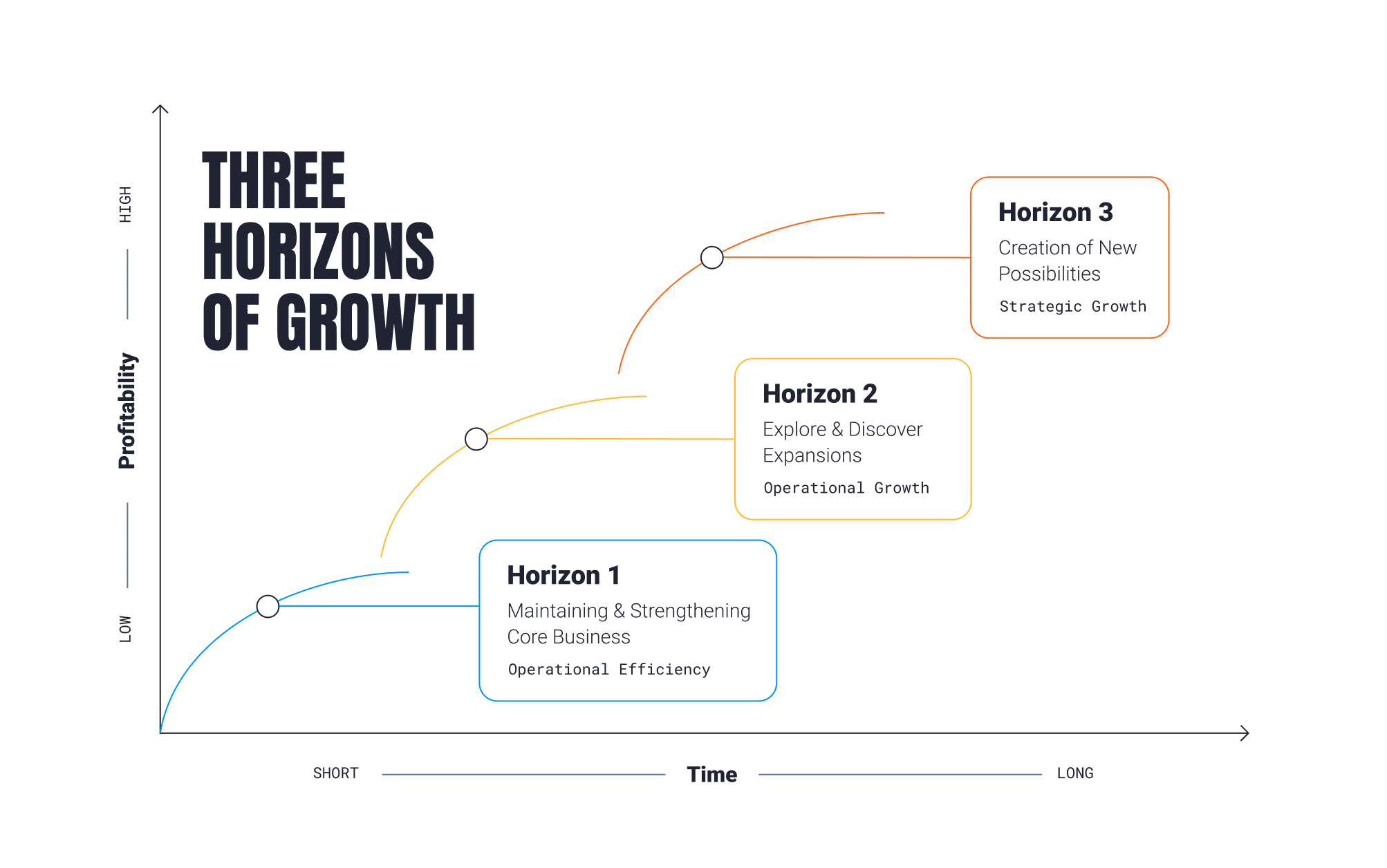
When it comes to adopting productized service offerings, we turn to Mckinsey’s Three Horizons of Growth. The strategic framework is used to help business plan for growth while balancing attention between current and future opportunities. Let’s define each horizon and their functions.
Horizon 1: Maintaining and strengthening core business – Operational efficiency
This horizon focuses on perfecting the services that are the profit center of your business. The goal is to create operational efficiency within these services to ensure stable deliverability and profitability in the organization. Productizing these core services can help to reach that goal so you can also focus attention on growth opportunities.
Now that you’ve created operational efficiency around your core services, what are you doing to expand on them? The focus in this horizon is on discovering and exploring new opportunities. These expansion opportunities usually come with a bit more risk; however, they bring the potential for additional revenue and new offerings to your clients.
Horizon 3: Creation of new possibilities – Strategic Growth
Here is where you can really start to drill into the strategic evolution of what you can offer your clients. Horizon three is all about the “blue-sky” innovation – creating new capabilities and models that transform the company or even the industry.
Implementing productized services using Mckinsey’s Three Horizons of Growth framework allow for the continuous cycle of creating growth opportunities and turning them into core profit centers of the business.
Creating a routine in your service offerings turn what used to be a reactive approach to client projects, into clockwork for all teams involved. In doing so leaves you room to focus on the strategic development of your agency.
Disrupt Reactive Operational Habits
At Parallax, we’re all about giving you the tools you need to create operational efficiency and plan for the future. When paired with a productized service strategy, Parallax offers agencies the tools needed to strategically allocate resources across projects, determine project health, and forecast capacity based on in-pipeline opportunities.
Have questions about how you can use Parallax to support your service offering strategy? Book a demo.
The Clockwork team focused on three primary factors when adopting Parallax and implementing project margin and forecasting best practices:
Technology: Clockwork first made sure their business-critical data integrated with Parallax, such as their time tracking software Harvest and CRM platform Hubspot, to create a central hub of trusted data that everyone worked from. The team coordinated with Parallax to understand the platform’s best practices and proven strategies and utilized them as a blueprint for their operations.
Process: Then, Clockwork started to dig into the projects that were consistently maintained at a good margin and identified where they kept having moments of complexity. With these insights, they better understood which types of projects to prioritize and which to avoid, and they developed standard operating procedures (SOPs) for their service offerings to guide teams on how to approach each type of project and what to watch for. Creating SOPs also allows Clockwork’s teams to use their brain power for the more innovative, custom work that requires their energy and creativity.
“We wanted to be a little bit more standardized in the way that we were solving problems, so we documented our processes so that they’re relatively repeatable and efficient,” said Jenny Holman, president, Clockwork. “Then, the bespoke part of what we do can be where we spend more of our time — plus, that’s the fun stuff we like to dig into as a company.”
People: They also had to communicate to the broader Clockwork team the value of forecasting and the importance of more closely tracking project margins via Parallax. “While project margin is one success metric, the bigger picture is about delivering the best client experience,” said Holman. “We made sure to cover the “what’s in it for me?” in a way that people could connect to – if we have a strong forecast, we know how we’re going to do the work, how everything will line up, and what enhancements or changes we can or need to make.”
The Value of Directionally Accurate Forecasting
Forecasting is essentially well-informed estimating. Your numbers won’t be exact, as it’s not a precise exercise. But when done consistently with the right data, you should gain a directionally accurate picture of the business so you can make proactive decisions.
“The data from Parallax allows us to learn each and every time what’s working and what’s not,” said Holman. “Let’s take a step back and think: do we need to estimate this differently? Did we miss a critical opportunity to have a conversation with the client? Are we not right-sizing the solution to the available budget? You have to give people the space to understand that it’s not them failing, but rather a chance for all of us to understand how we can do things better or differently.”
Clockwork utilizes its forecasting insights from Parallax in a few ways to shape a better, more profitable future for the business:
Client relationship insights: Clockwork looks across their client portfolio – not just individual projects – to understand which relationships are profitable and which aren’t, and then they answer the ‘why.’ They’re intentional with their collected learnings and apply them as quickly as they can. “We lean into that curiosity and ask, ‘what is happening here? What are we working with exactly, and how do we apply that information to our future estimations?,” said Holman.
Service offering insights: Clockwork tracks the services they offer to understand where they’re profitable and regularly course correcting, using Parallax data as an early indicator when something might be going off the rails on a project.
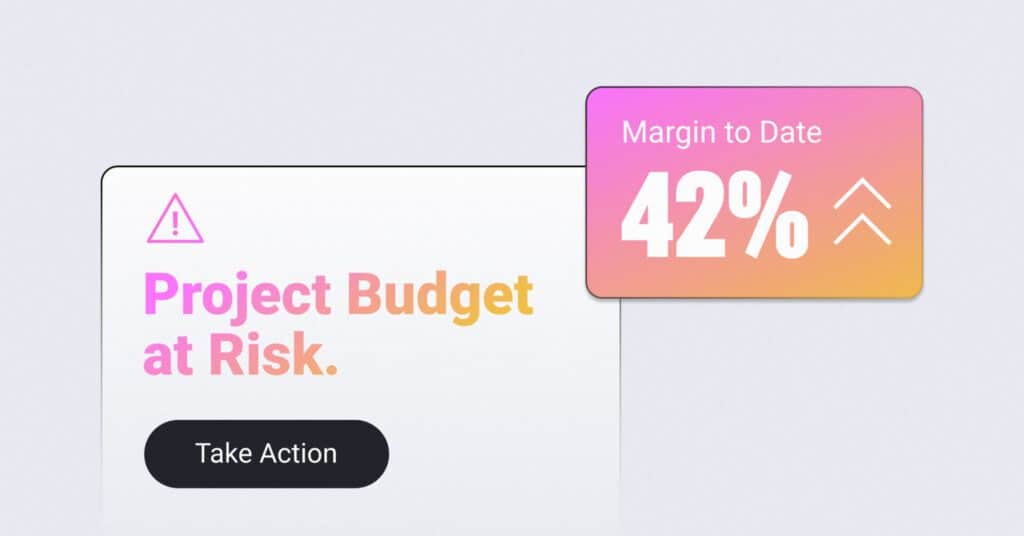
“I regularly use the margin report and project health report within Parallax — you can sort by lowest margin to highest, so it’s really easy for me to flag where I should take a closer look and ask some questions to make sure the team has their eye on the prize,” said Courtney Miner, director of client success, Clockwork. “Is it something we can address internally? Do we need to have a conversation with the client? These reports provide a trigger for real-time discussions.”
Capacity and utilization insights: Accurate forecasting also helps improve capacity and utilization. “If you think about the hours that we have in the day for our people to do the brilliant work that they do, and if we don’t fill that capacity today, it’s gone tomorrow,” said Holman. “Thinking about utilization and forecasting and keeping our people at a sustainable capacity but also helps hit those margins is something that we’re always looking at. The utilization increase that we’ve had because of our visibility and ability to be proactive has driven our margin higher.”
Real-time is the Best Time
“Parallax enables conversations to happen at the right time – as soon as possible – because that’s the best time for them to happen,” said Miner.
Have questions about tracking and managing project margin? Interested in adopting best practices that improve your revenue? Ready to have more accurate forecasting? The Parallax team looks forward to connecting with you.
Figuring out the best time tracking software for your digital service organization is surprisingly quite straight-forward – it’s the one your team is currently using for time entry, the one your finance team is comfortable invoicing from, and the one you’ve invested years integrating into your workflows.
Yup, that’s right — despite the myriad of options out there promising revolutionary changes, we advocate for the value and familiarity of the systems your organization has already put its trust in.
The Unpopular Reality of Time Entry
Let’s be honest… no one enjoys doing their timesheets. It’s a mundane task that’s often seen as a necessary evil and, frankly, it’s a bit of a drag. But here’s the thing: timesheets, while tactical, are crucial for operational success. They are the pulse by which many businesses bill, pay, and measure productivity.
That said, the disdain for time entry doesn’t mean your organization should leap for a new time tracking software at the first sign of discontent or inefficiency. Switching to a new system might seem like an opportunity to improve operations in your digital services business, but it’s important that you ask yourself what outcome you hope to see following the change: is giving your billable people a better user interface for entering time going to drive strategic change in the business?
An “easier” interface or a “single source of truth” often tempts leadership into believing it will unlock new levels of efficiency or employee satisfaction, but this overlooks a fundamental truth:
the real strategic value lies not in the tool used for time tracking but in how effectively a company plans resources, forecasts demand, and manages project finances.
The Cost of Unnecessary Change
Embracing a new time tracking software doesn’t just involve learning a new interface or tweaking a few processes. It’s a substantial change that impacts invoicing, payroll, task management, and, most crucially, the daily routines of every individual contributor in your organization. This kind of change is not only disruptive but also expensive – both in terms of direct costs and the indirect toll it takes on productivity and morale.
On top of all that, it’s very likely people aren’t going to like the new time tracking software. At best, they might dislike it a little less than the old one – so why bother?
Leveraging Existing Infrastructure for Strategic Advantage
By enhancing your existing processes with cutting-edge resource management, capacity planning, and project accounting features, your business can adopt best practices for strategic planning without the unnecessary friction and upheaval of replacing foundational systems.
That’s where Parallax comes in. Our founders spent dozens of years growing digital services companies and specifically built the tool to focus on strategic operations over tactical things like time tracking.
Parallax has demonstrated through rigorous analysis and real-world outcomes that mastering strategic resource planning, accurate forecasting, and proactive project accounting are the true catalysts for enhancing billable utilization, boosting project margins, and driving revenue growth. These are the areas where strategic value is created and sustained, far beyond the superficial ease of new time tracking software.
Parallax shines by integrating seamlessly into the CRM and time tracking software systems you already use, focusing on elevating your strategic capabilities rather than overhauling or disrupting your tactical tools. This approach helps digital service organizations achieve significant gains in billable utilization, project margins, and revenue growth and advocates for smarter use of current investments to elevate strategic effectiveness.
Keep Your Focus on Strategic Value
The quest for the best time tracking software might be a red herring in the pursuit of operational excellence. Instead, the key to unlocking significant improvements in billable utilization, project margin, and revenue growth lies in refining your approach to strategic resource planning, forecasting, and project accounting.
Parallax is designed to empower your team to achieve these goals using the tools you’ve already mastered, reaffirming that, sometimes, the best change is no change at all.
If you have questions about the software and systems you currently use and whether they can integrate with Parallax, we’re ready to chat when you are.
Start 2026 with a plan your team can rally around.
Planning for 2026 doesn’t have to be complicated. This guide walks you through how to prep for a productive planning process, set clear priorities, and communicate, measure, and manage your strategic plan so it actually works.
Build focus, alignment, and momentum to start the year strong — and stay that way.
To have an effective capacity planning approach, you need a system that allows you to make strategic, confident, and future-forward decisions. That being said, finding the right solution can feel daunting—so stick around! We outline key factors to consider when assessing capacity planning software below.
Understanding Capacity Planning for Digital Agencies
When we talk about “capacity planning”, we know this could have a number of different meanings and associations. So, let’s first align on what capacity planning really is and why it matters.
Capacity planning helps agencies understand what kind of services and products their customers and prospects want now. It helps predict future needs so agency leaders can plan and invest in the right resources with confidence. In it’s simplest form, capacity planning is about knowing supply and demand, both now and in the future.
Gaining a clear picture of supply and demand comes with phenomenal perks that both leaders and their teams benefit from.
What are the Benefits of Capacity Planning?
Improved Resource Management: Resource management focuses on assigning the right talent to keep projects moving forward, and capacity planning focuses on forecasting future needs—but these two practices should lean on each other. When you hit your stride with capacity planning, for example, you’ll be able to better, more effectively manage resources for current projects AND avoid overcommitting to future projects if the right resources aren’t available.
“What If?” Planning: Capacity planning provides the ability to create what-if scenarios to help leaders truly think through and plan for everything so no one is caught off guard. It’s “if this, then that”-type of planning that helps avoid last-minute scrambles and ease the rollercoaster of too much work/not enough people (or vice versa).
Proactive Decision-making: Capacity planning helps leaders identify potential resource constraints early on in the project lifecycle so they can take steps to address them before they become a bigger problem. This can help businesses avoid delays and ensure the successful delivery of projects.
The services industry will constantly be evolving, and there will always be economically challenging times that leaders will have to navigate. Given that capacity planning helps organizations navigate with more confidence and greater ease, you need to ensure your approach to capacity planning is effective and scalable.
Factors to Consider When Choosing Capacity Planning Software
How should you go about choosing the right system? We know there’s a lot of noise in the market, and navigating all the different options can be overwhelming. So, let’s break it down…
Consider discussing the following capabilities and characteristics with the solution partners you connect with:
Ease of Use: How easy is it to use?
It’s a simple question, but you’d be surprised how many systems aren’t easy to use today. Your software should be easy to use once onboarded onto the platform. If it needs training during the product implementation process, be sure to keep an eye out for unexpected fees. This is especially important for digital agencies that may have multiple team members and various roles using the software. The software should include easy-to-follow instructions, tutorials, and customer support to assist users in using it.
Integration with Existing Tools:Does it integrate with other tools?
Another crucial factor to consider when choosing capacity planning software is its compatibility with other tools. The software should work well with tools you already use, like your CRM and project management tools. This helps provide you and your teams with a central, cohesive home-base for everything.
Scalability:Can it scale?
Your capacity planning software should be scalable and able to handle a growing number of projects, users, and resources. As your business grows, it’s essential to have a software solution that can handle current needs and keep up with the increasing and evolving demands.
Reporting and Analytics: What reporting and analytics features does it offer?
The solution you use should provide detailed reporting and analytics, helping you and your team make informed, strategic decisions about your capacity and resources now and for future. It also should offer real-time visibility into the resources being utilized so you can easily identify trends, patterns, and areas for improvement, which can help build confidence, enable strategic forecasting, and drive profitability.
Budget and Pricing: How much does it cost?
Of course, you need to consider the budget and pricing of capacity planning solutions. Ideally, the software should drive both immediate and long-lasting value, so it’s important to consider not only the upfront costs of the software but also any ongoing maintenance or support and training fees (don’t forget to inquire about add-on fees!). Make sure to also consider any potential cost savings or efficiencies that the software may provide in the long run.
How to Start Capacity Planning
At Parallax, we work with companies spanning every stage of the operational maturity curve to drive the behaviors that will lead to strategic forecasting and capacity planning. Unlike legacy PSA solutions, which take between 12-18 months to roll out and adopt, Parallax has you up and running in 90 days with minimal disruption to your broader team.
We also understand the importance of maintaining business continuity, which is why our software is designed to integrate seamlessly with your existing toolset, ensuring a smooth transition and minimizing the learning curve for your team. By leveraging the tools you already know and love, Parallax can help you streamline your capacity planning processes, optimize your resources, and achieve greater efficiency and profitability without causing any major disruptions to your existing workflows.
Ultimately, we’re here to help you sustain your business, grow your business AND keep your talent happy and fulfilled. All it takes is implementing capacity planning best practices and unlocking true, strategic forecasting—and that’s exactly what we do.
Resource management is like a well-choreographed dance for digital services shops and agencies. It’s the weekly hustle where leaders juggle and allocate people’s time to projects—and yes, we know it can feel like a tactical headache, but it’s incredibly important to get right (or close to right!).
Resource management and resource planning for professional services businesses don’t need to be stressful. With a fresh perspective and a different approach, it can be a fun, strategic process that can help take your business to the next level. Yup, we said fun.
No more guessing games or last-minute scrambles. With our tips below, you’ll gain control over resource management and resource planning and be better equipped to lead your team with finesse and confidence.
Picture this: a surprise spike in demand hits you out of nowhere. Maybe it’s an urgent request from an existing client or a new client in crisis mode needing your help. It could even be a last-minute new business pitch that one of your key team members is pulled in on.
These unexpected spikes in demand can catch teams off guard, and they can definitely mess with resourcing plans, often leaving leaders to navigate what feels like an always-on scramble. In other words, being in a constant reactive state with resource management can be a real game-changer—and not in a good way.
If you’re constantly making decisions on the fly and relying on the same go-to people to handle new work, it can quickly spiral into a resourcing nightmare. Teams are always playing catch-up, leaders are putting out fires, and everyone is struggling to keep up with the ever-changing demands. It can lead to overburdened team members, missed deadlines, and even burnout.
Operating in a reactive state also prevents leaders from having a clear strategic vision when it comes to capacity planning and resource allocation. It hampers the ability to plan ahead, anticipate potential challenges, and make informed decisions based on data and insights.
How can you avoid this? First, know that trying to cram all resourcing decisions into just one or two weeks is too short-sighted. It’s a “robbing Peter to pay Paul” situation just to survive the week. This type of approach will most certainly erode confidence in the organization’s future. There’s a better way to tackle resource management. It requires taking a strategic, long-term approach, looking beyond the week at hand, and planning for the future. This is how you can break free from the vicious resourcing cycle and start to build confidence in your organization.
The Solution Starts with Services Resource Planning
It only takes a small shift in your approach to resource management – leveling it up to services resource planning – to gain more confidence, better forecasting, and improved performance.
To ensure we’re on the same page, here’s what we mean when we talk about resource planning vs. resource management – and how both are slightly different from resource forecasting:
Resource forecasting (also called capacity planning) involves leaders predicting where they should invest in resources to meet changing needs and future goals (i.e., new services, market expansion, company growth), using current workloads and sales pipeline data to inform their predictions.
Resource planning involves leveraging the forecast to develop an actionable plan, assigning specific people and resources to specific projects.
Resource management is the process of monitoring the progress of projects against resources, ensuring everything is on time and on budget + making real-time adjustments as needed.
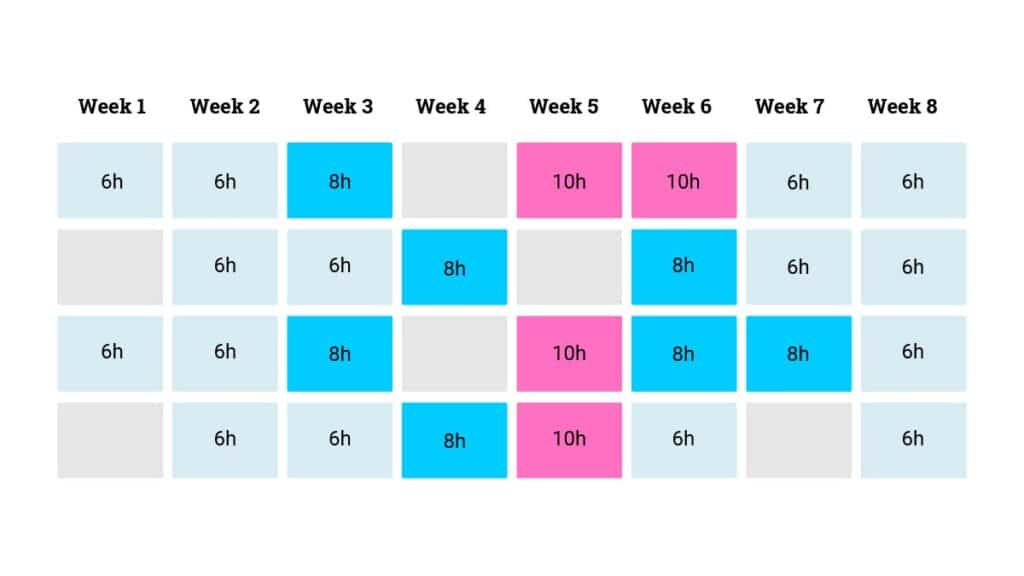
Now, here’s how we recommend evolving your resourcing strategy: keep your weekly resource management meetings, but instead of only planning 1-2 weeks ahead, try allocating hours 6-8 weeks out based on the information you have on hand (the forecasted data won’t be all-encompassing, but it’s a great starting point).
We know planning 6-8 weeks out might feel intimidating, but it doesn’t require a big lift to start experiencing the benefits—and the business outcomes will be notable. Again, these elongated plans do not need to be super precise. They need to be directionally correct using larger increments for allocation (i.e., 25% of a role). You’ll then refine and add more precision to the resource plans closer to each week. These directionally-correct plans will give you a CONSISTENT sense of what’s to come, which is likely more than you have today. And of course, over time, your ability to improve precision further out will get better and easier.
Still unsure about what it takes to improve your resource planning approach? Not sure you have the right tools to make it happen?
We’re here to make your life easier. The Parallax platform is a powerful force multiplier for the valuable tools you already use, allowing you to say goodbye to clunky, homegrown spreadsheets that just patch the gaps between different functions in your services business.
With Parallax, services companies get reliable data and actionable insights all in one place. Our resourcing and planning engine curates critical resourcing and forecasting data, providing you with a shared source of truth on how your business is performing. This means leaders can make smart, data-driven resourcing decisions that are future-forward and based on data rather than gut instinct.
No more guesswork. No more spreadsheets. No more outdated information.
Parallax empowers services companies to elevate their resource and capacity planning game and unlock the full potential of their data for better business performance. ✨When you’re ready to shift your perspective on resourcing being a complicated puzzle to a well-thought-out strategy that sets you up for sustainable success, let’s connect.
Parallax, a leading provider of predictive forecasting and capacity planning software, announced today the successful completion of its Series B funding round. The funding round was led by Baird Capital, a global private equity and venture capital firm specializing in technology innovation. Parallax plans to utilize the new capital to further accelerate product development, expand its market presence, and strengthen its position as a pioneer in the digital services space.
The Series B funding round generated a total investment of $12M from a combination of existing and new investors, demonstrating a strong vote of confidence in Parallax’s growth potential. In addition to Baird Capital, other notable participants include Rally Ventures and Grotech . The successful completion of this round brings Parallax’s total funding to date to $24.5M, positioning the company for an exciting future.
“We’re excited to partner with Baird Capital, to accelerate our vision to revolutionize resource planning and forecasting in the professional services industry with our predictive analytics platform. This investment will further refine our user-centered product and fast track the expansion of AI and prescriptive analytics built into our platform. As we chart our course for the next three years, we’re more committed than ever to our mission: transforming businesses by unlocking the potential of people. We are grateful for Baird Capital’s confidence in our vision,” said Tom O’Neill, CEO and co-founder of Parallax.
“Through our own investments in professional services businesses across the Baird Capital portfolio, we’ve witnessed firsthand the importance of effective resource management and its impact on workforce utilization and profitability,” said Jim Pavlik, Partner with Baird Capital’s Venture team and newly appointed Board member at Parallax. “We’ve been extremely impressed with Parallax’s cloud-based platform and its ability to optimize resource planning and forecasting for its clients and are very excited to partner with the Parallax team and support their continued investments in growing the business.”
The Series B funding will primarily be utilized to fuel Parallax’s product innovation initiatives, expand its teams, and further scale its operations to meet the growing demand for its solutions. In addition, the company plans to invest in sales and marketing efforts to broaden its market reach and strengthen customer relationships.
About Parallax
Parallax is a strategic, predictive capacity and resource planning solution built for digital service organizations. Centered around the most critical agency operational pillars – capacity planning, resource management, project financials, and operations intelligence – Parallax helps maximize efficiency of resources, ensure utilization goals are met, and track and improve project margin.
About Baird Capital
Baird Capital manages two investment platforms: Global Private Equity and U.S. Venture Capital and makes investments in B2B technology & services-focused companies around the world. Having invested in 339 companies over its history, Baird Capital provides operational support to its portfolio companies through teams on the ground in the United States, Europe and Asia. Baird Capital is the direct private investment arm of Robert W. Baird & Co.
Financial reporting is everyone’s favorite topic, right? ….right?
Financial reporting can feel overwhelming for some agency leaders and team members, so we’re here to help. We break down why financial reporting tools are important and how they’re used. There’s also a list of financial reporting software tools to consider for your agency below. Don’t worry: we detail how the Parallax platform fits into the financial reporting equation, too. Let’s dive in!
In the simplest terms, financial reporting software is a tool that enables digital agency leaders to track, manage, and analyze their financial data. It’s meant to help agencies monitor their financial health and performance, make informed business decisions, and plan for the future.
It’s typically used by agency owners, finance teams, and other key decision-makers to gain insights into their financial data and make strategic decisions. When implemented and leveraged properly, financial reporting software helps to streamline financial processes, reduce errors, and gain deeper insights into financial performance, enabling leaders to make better business decisions.
Financial Reporting Software Use Cases
There are a variety of different use cases for financial reporting software for digital agencies, including analyzing profitability by client or project, tracking employee productivity, forecasting cash flow, and generating financial statements and reports for stakeholders.
Here’s what we usually see these solutions leveraged for:
Budgeting and Forecasting: Financial reporting software can help digital agencies create budgets and financial forecasts. This can be done by analyzing historical data and predicting future trends, which can help leaders plan their resources and investments. It can also help identify potential cash flow problems before they occur, allowing leaders to take proactive measures to address them.
Client Billing and Invoicing: Digital agencies often work with multiple clients, and financial reporting software can streamline the billing and invoicing process. This includes generating invoices based on agreed-upon billing rates, tracking time and expenses against projects, and reconciling payments received against outstanding invoices.
Performance Tracking and Reporting: Leaders need to track various performance metrics to understand the effectiveness of their marketing campaigns and to optimize strategies as needed. Financial reporting software can be used to measure key performance indicators (KPIs) such as revenue, profit margins, client acquisition costs, and project profitability. This information can then be used to make informed decisions about resource allocation, client acquisition, and marketing strategies.
Why Digital Agencies Need Financial Reporting Tools
Financial reporting tools help digital agencies improve financial control, make better business decisions, and stay compliant with regulatory requirements. Here’s how:
Financial Control: Financial reporting software helps digital shops and agencies maintain better control over their financial data, track expenses, and monitor revenue. These tools can provide insights into the profitability of individual projects, identify cost savings opportunities, and improve cash flow management.
Business Decision-Making: Financial reporting tools provide leaders with the data they need to make informed business decisions. By tracking KPIs such as revenue growth, profit margins, and customer acquisition costs, leaders can make more strategic decisions around staffing, pricing, and resource allocation.
Compliance: Agencies need to comply with various regulatory and tax requirements, and financial reporting tools can help automate many of these processes. By streamlining compliance tasks such as tax reporting, invoicing, and payroll, agencies can save time and reduce the risk of errors.
How Parallax Fits Into the Financial Reporting Equation
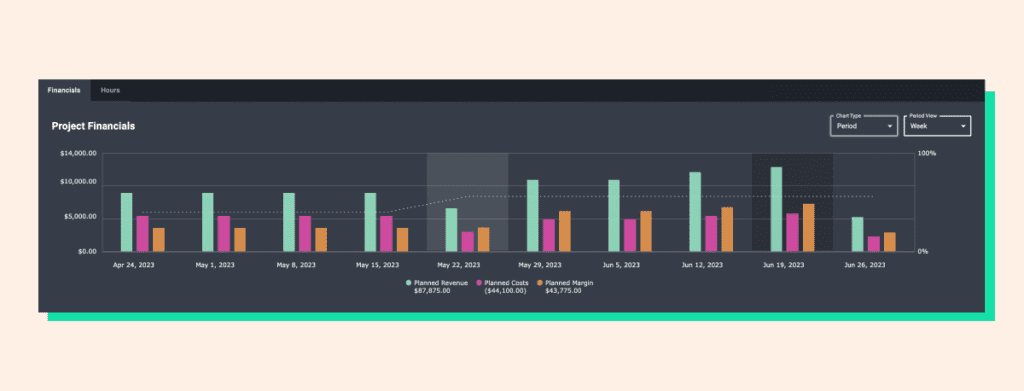
Is Parallax a financial reporting software solution? Nope! It’s an integrated resource planning, capacity planning, and active forecasting tool that gives project managers and leadership a real-time view into project financial performance and projections (think: sold vs. actuals and project margin). Parallax integrates with other valuable tools like CRMs and project management and time-tracking solutions, allowing performance and forecasting data to be exported and used alongside financial reporting systems to help provide strategic insights for optimizing performance today and planning for tomorrow.
Drilling down to the project level, Parallax monitors revenue and margin against set plans and provides real-time insights to help teams understand performance in real-time. It also supports multiple billing models (i.e., time and materials, fixed fee, or retainer) and tracks team performance and costs throughout a project to reduce surprises and overages.
On the resourcing and capacity planning front, Parallax makes managing a team across several different projects easier by tracking hours and costs with consistency. In addition, it connects data between sales and resource teams to help sales attach directionally accurate resource plans to deals as early as possible to avoid any resourcing (or financial!) hiccups.
Ultimately, by making real-time performance and forecasting data available alongside financial reporting software insights, the Parallax platform arms digital agency leaders with the information they need to make smart decisions and to keep their people focused on doing their best work.
5 Key Features of Financial Reporting Software
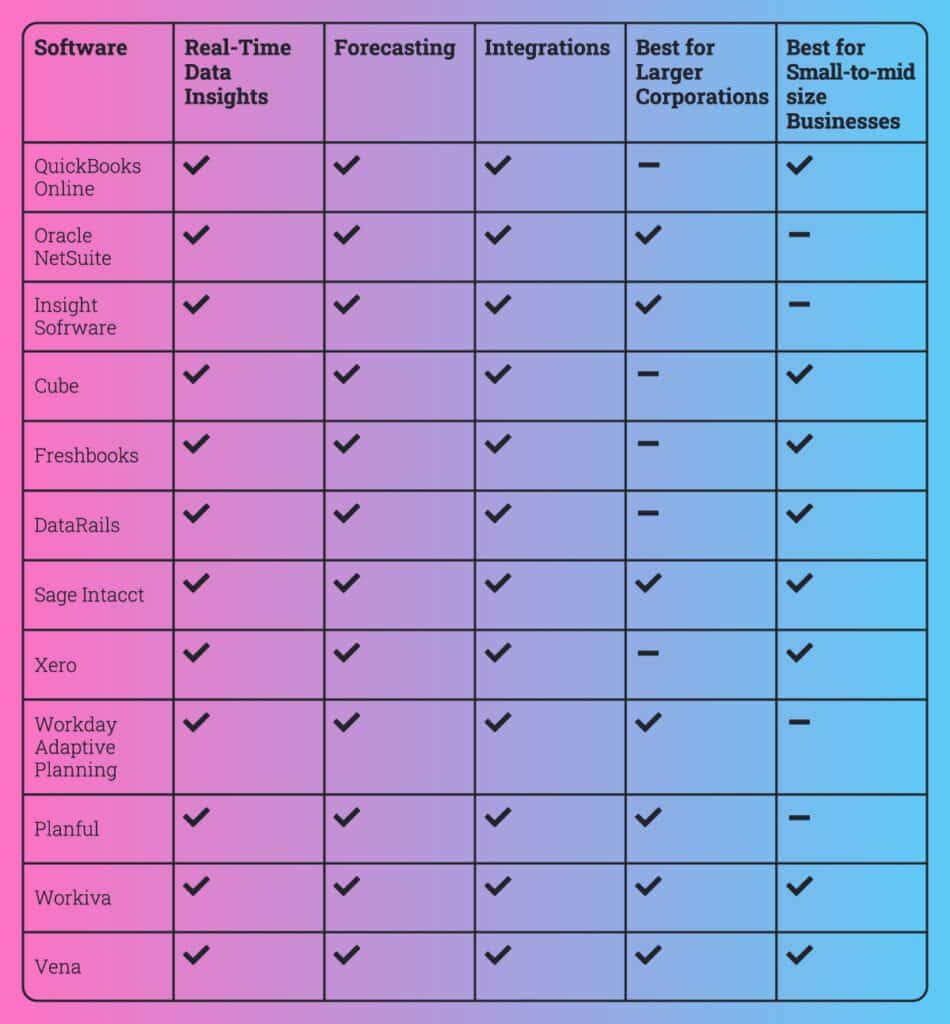
#1. Real-Time Data Insights
Digital agency leaders need financial insights (income and expense tracking, invoice and payment tracking, tax reporting, etc.) from their financial reporting software to make informed business decisions promptly. These insights give them a clear understanding of their company’s financial performance at any given time and help them identify potential issues before they become significant problems.
#2. Forecasting
Without financial forecasting capabilities, leaders would have a limited understanding of their business’s future financial performances. With forecasting capabilities, they’re able to see beyond the current financial period and plan for long-term success. Look for financial reporting software that helps to identify potential opportunities and risks that may affect the business and shows where and how leaders could make adjustments to their operations based on the forecasted financial outcomes.
#3. Integrations
When financial reporting software integrates with other important solutions and tools, agencies experience streamlined operations and greater efficiencies across the business. Take integrations with project management (PM) tools, for example: when financial reporting software connects with PM tools, team leaders and project managers can more easily track project expenses, manage budgets, and track the profitability of each project. There’s also key benefits of integrating financial reporting software with payment processing solutions, CRM systems, payroll systems, inventory management tools, and more.
#4. Best for Larger Corporations
For larger corporations, financial reporting software solutions typically offer more advanced features such as multi-entity management, multi-currency support, and more in-depth reporting capabilities. These organizations often have more complex financial needs and require software that can handle the volume of data and transactions they generate. They also typically have larger budgets to invest in more expensive software solutions.
#5. Best for Small-to-midsize Businesses
Small-to-midsize businesses may not require the same level of complexity and features as larger corporations. They usually have simpler financial reporting needs and tend to require more affordable software solutions. They also may not have the same resources and technical expertise to manage more complex software solutions, so the team may benefit from software solutions that offer more user-friendly interfaces and ease of use.
Best Financial Reporting Software for Digital Agencies
There are a lot of tools on the market to consider and demo to understand which solution may work best for your unique needs. Here’s a starter list to consider:
#1. QuickBooks Online
QuickBooks Online is a robust financial reporting and accounting software solution that offers automation, customization, and integrations that can help digital agency leaders manage their finances more effectively. One standout feature of QuickBooks Online is its ability to automate many financial tasks, such as invoicing, payment processing, and expense tracking. Another unique feature is its customizable reporting capabilities. Users can create custom reports that provide insights into key financial metrics, such as revenue, profit, and cash flow.
#2. Oracle NetSuite
Oracle NetSuite is a cloud-based financial management system that provides end-to-end accounting and financial management capabilities. It offers features such as real-time financial reporting, order and billing management, revenue recognition, and inventory management as well as customizable dashboards and reporting tools. Its multi-currency and multi-language capabilities make it ideal for global operations. Additionally, NetSuite offers robust integration capabilities, allowing for seamless integration with third-party applications and systems.
#3. Insight Software
Insight Software is a financial reporting and business intelligence solution designed for midsize to large businesses that need robust financial reporting and analysis capabilities. It offers features such as real-time data integration from multiple sources, customized dashboards, and ad-hoc reporting capabilities, and it provides financial consolidation, budgeting, forecasting, and planning tools to help businesses make informed financial decisions. It offers a user-friendly interface and intuitive reporting tools to help users quickly analyze and visualize their data.
#4. Cube
Cube offers features such as customizable dashboards, ad-hoc reporting, and drill-down capabilities to help users quickly analyze their data. Cube provides forecasting and budgeting tools to help businesses make informed financial decisions, and it integrates with other financial and accounting software, such as QuickBooks, Sage, and Xero, to consolidate financial data and streamline reporting processes. It’s designed for small to medium-sized businesses that need real-time financial insights to make data-driven decisions.
#5. Freshbooks
Freshbooks is a cloud-based accounting and invoicing software designed for small businesses and freelancers. It offers a user-friendly interface and easy-to-use features such as time tracking, project management, and automatic billing. One of its unique features is the ability to accept online payments directly from invoices. Freshbooks also offers a variety of customizable templates for invoices, estimates, and proposals. Its mobile app allows users to track expenses and manage invoices on-the-go. Additionally, Freshbooks integrates with a variety of third-party apps such as PayPal, Stripe, and G Suite to streamline business processes.
#6. DataRails
DataRails is a financial reporting solution that is designed to automate spreadsheet management and enhance data accuracy. Its unique feature is the ability to provide a unified view of financial data from multiple sources, including ERP systems, CRMs, and other financial applications. The software also uses machine learning to identify patterns and errors in financial data, improving the accuracy of financial reporting. With DataRails, users can easily collaborate on spreadsheets in real-time, track changes, and manage access permissions. The solution provides users with a dashboard that displays key metrics and KPIs, and allows users to drill down into financial data to gain insights.
#7. Sage Intacct
Sage Intacct is designed to streamline accounting processes and enable businesses to make better financial decisions. Its unique features include advanced automation, multi-entity consolidation, real-time dashboards, and built-in compliance tools. It offers comprehensive financial management tools such as accounts payable and receivable, general ledger, and cash management. Sage Intacct integrates with other business systems to provide a complete financial management solution, and its flexible platform can scale to meet the needs of growing businesses, making it a popular choice for mid-sized companies.
#8. Xero
Xero helps small-to-medium-sized businesses manage their finances with ease. Its unique features include automatic bank feeds, easy invoicing and payment processing, expense tracking, and financial reporting. Xero allows users to create custom reports and dashboards, and offers an ecosystem of third-party apps and integrations for added functionality. Its mobile app provides real-time access to financial data, and its multi-currency support makes it ideal for businesses operating internationally.
#9. Workday Adaptive Planning
Workday Adaptive Planning enables businesses to create financial forecasts and models. With its intuitive interface and flexible modeling capabilities, it allows users to build custom models, set financial goals and budgets, and track progress against those goals. It also offers advanced analytics and scenario planning tools that allow businesses to anticipate changes in the market and plan accordingly. Additionally, the software integrates with a wide range of ERP systems and other applications, making it easy to share data and streamline workflows.
#10. Planful
Planful is a cloud-based financial planning and analysis (FP&A) platform that provides various features such as budgeting, forecasting, reporting, consolidations, and analytics. With Planful, companies can create and manage complex financial models, visualize their data, and generate insightful reports. Its automation capabilities can help reduce the manual workload and increase accuracy in financial planning and analysis. Planful’s open API allows integration with various systems, including ERPs, CRMs, and HR systems, to provide a complete view of the organization’s performance.
#11. Workiva
Workiva provides a single platform to manage and automate reporting processes. It enables users to seamlessly collaborate on reports with colleagues, reviewers, and auditors in real-time, and its real-time data monitoring capabilities allow users to track changes, flag issues, and drill down into details, providing a comprehensive view of financial performance. Users can also integrate with external data sources, such as ERP systems and other financial applications, to automate data input and streamline reporting processes. Additionally, Workiva provides various compliance and regulatory features that ensure data accuracy, consistency, and completeness, making it an ideal solution for companies of all sizes, particularly those with complex financial reporting needs.
#12. Vena
Vena is designed to help businesses automate budgeting, planning, and forecasting processes. Its unique features include the ability to automate complex financial processes such as consolidation, data validation, and currency translation. It also offers a centralized data repository that allows users to easily manage and access financial data from multiple sources. Overall, Vena is an ideal solution for businesses looking to streamline their financial processes, improve their forecasting accuracy, and gain valuable insights into their financial performance.
Connect with Parallax
Interested in learning how Parallax works alongside financial reporting solutions? We’re more than happy to talk through any questions you have. So, when you’re ready to chat, we’re ready to chat.