Working in the services industry means dealing with fast-paced everything. People are often tasked with finding and sharing information with both colleagues and clients at the drop of a hat – so getting trapped in workflows that require never-ending clicks to get to the information they need can quickly turn into a nightmare.
We understand the annoyance of constant clicking until you land on a view or report that works for you. Whether you’re an ops lead, account lead, or project manager, there are details that will only be relevant to you and your role, and sorting through everyone else’s information just slows you down. We get it. And we want to help. Now, within Parallax, users have new features available to them that bring a more personalized experience to how they use our solution. Take a look at what’s new:
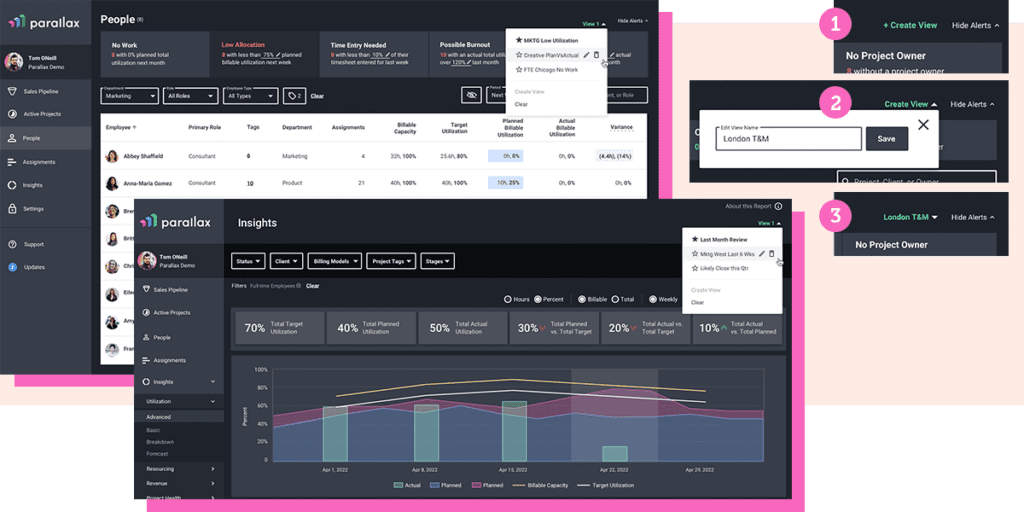
Saved Views
Saved Views: This feature allows users to personalize their default views so they can quickly access the information that’s most important to them and their role. They can save and name each view as well so they know exactly what they’re accessing, removing any guesswork. A project manager of a specific practice area, for example, can save a view of each individual project they’re owning rather than sorting through everyone’s projects across all practice areas each time they jump on the platform.
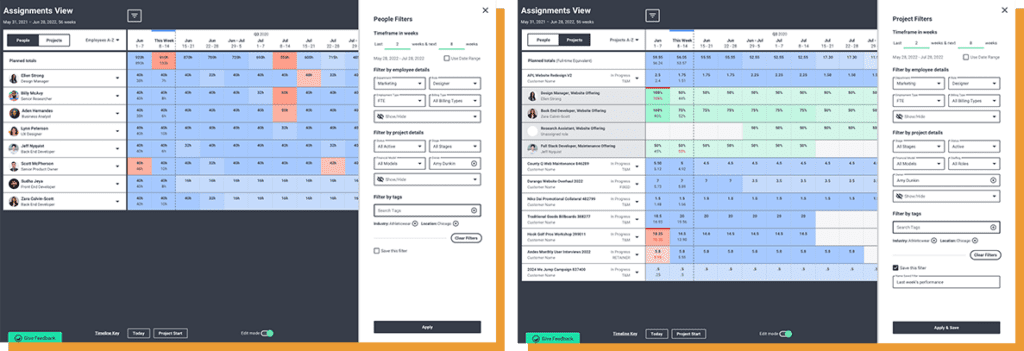
Assignments View Filtering
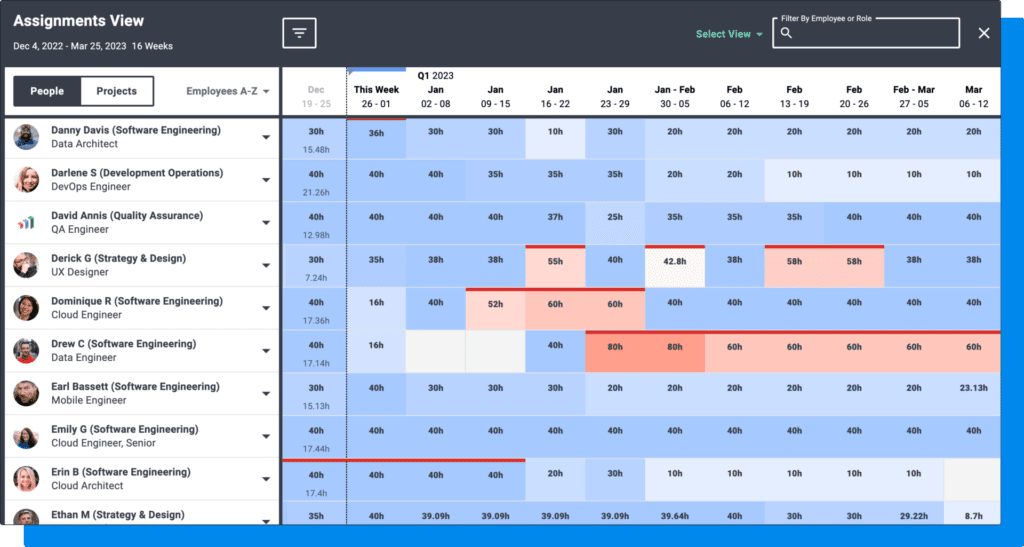
Assignments View Filtering: Within Assignments View, users can filter by employee type, department, project status, etc. They can filter these views through different deal stages in the pipeline, too, giving resource managers and delivery leads a great head start on planning for incoming work that’s likely to close. This future-forward view allows teams to plan ahead and better prepare both teams and resources, avoiding any last-minute scrambles.
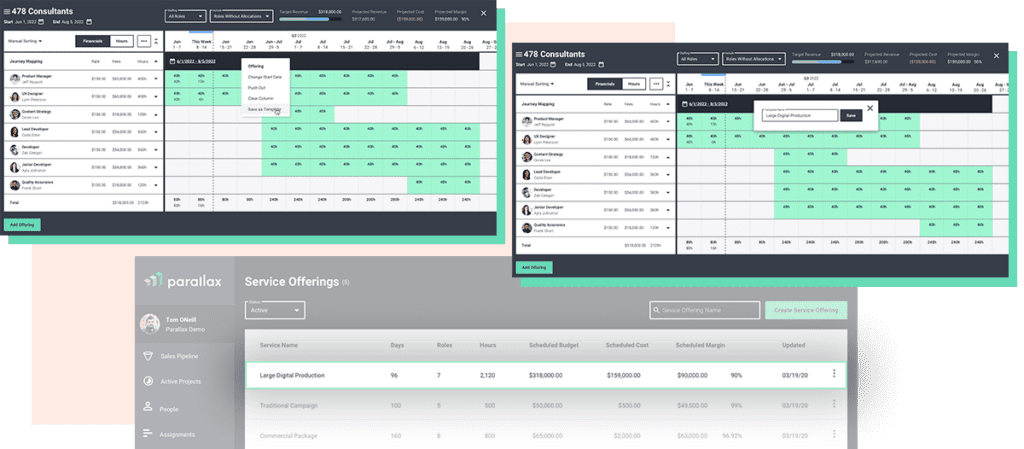
Save as a Template
Save as a Template: Users now have the ability to convert any project offering shape into a template for other projects. Rather than recreating something new every time, an account lead can save the three different offerings they regularly use for their role as templates, saving them time and streamlining their daily workflow. So if a team creates a perfect project, they can save it and use it again!
Expand/Collapse Offerings
Expand/Collapse Offerings: We all covet more screen real estate, so we made it easy to expand and collapse information within the service offering view in Project Shaper. Users can filter out irrelevant information – say details from the discovery phase that’s now complete – so they can only see and focus on what matters at that moment.
A platform that works with you, and for you
We’ve lived in your world. We know the pressure you experience on a daily basis to move fast and move smart. That’s why Parallax is designed to work with you and for you, no matter what your role is. These new features and capabilities make it possible to weed out excess information and zero in on the details that make it easier to do your job, all with fewer clicks and way, way less hassle.
Don’t hesitate to reach out if you have any questions or if you need help learning the ropes with these new features in Parallax. We’re always game to hang.
It’s a familiar story: A couple of founders leave an agency or consultancy. They band together to deliver innovative work for cool clients. These leaders figured they could do better work on their own, so they developed unique methods and processes – great work started flowing. The first few years in business were busy, exciting, and fulfilling. The team gained a solid reputation, and the company grew organically from word-of-mouth referrals. This new team is at the top of their game.
Nothing is permanent, though. As the industry evolves (or catches up) that innovative work from the early days isn’t all that innovative anymore. With more commoditization and competition, profitability plateaus and profit margins shrink.
Read on to discover how McKinsey’s Three Horizon’s framework can prevent this all-too-common growth problem.
What is the Three Horizons Model
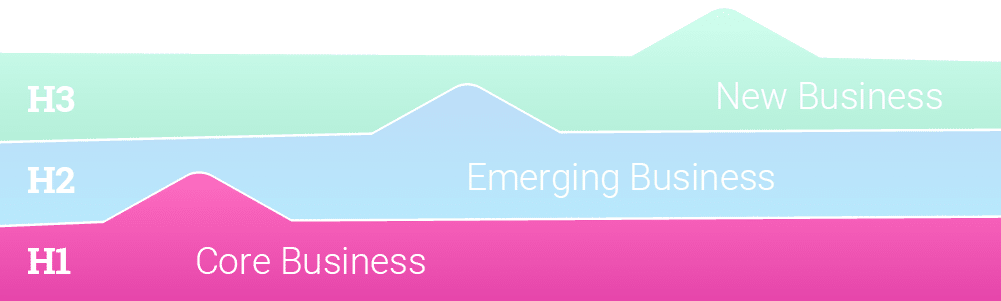
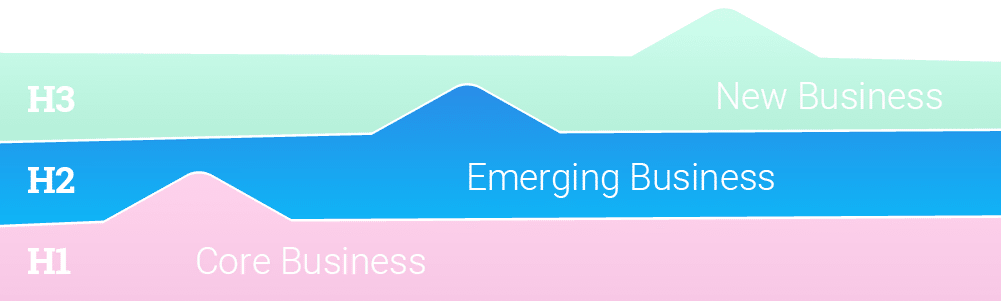
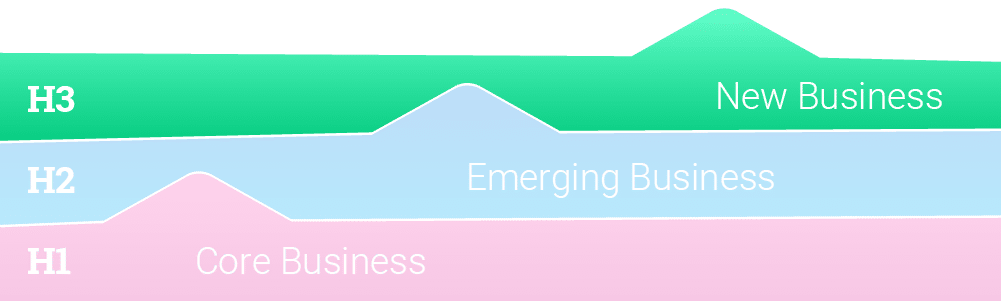
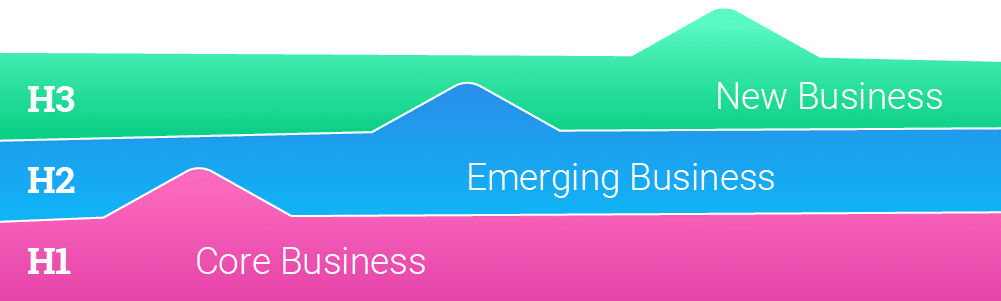
McKinsey’s ‘Three Horizons of Growth’ framework helps businesses manage their current performance while maximizing future opportunities for growth. At Parallax, we’re big fans of this concept – it becomes a set of guiding principles to do good (and profitable) work today, while dedicating time to focus on the innovations and opportunities of tomorrow.
Here’s an introduction to the Three Horizons Framework and how it might apply to you:
Horizon Model – Step 1: The work that pays the bills
Horizon 1 is your company’s bread and butter work that pays your bills. It’s the kind of work that you know how to do well on a repeatable basis. You know how to market it, deliver it, and staff it. The goal of Horizon 1 is about profitability. You want to make this work as profitable as possible and extend the life of the work as long as possible.
Just like in the story above, Horizon 1 work eventually plateaus in value because it becomes commoditized. The cost of doing the work goes up (e.g., your staff needs raises), but, at some point, clients won’t be willing to pay more for it. Think about the impact that the rise of services like Squarespace and Shopify had on your ability to charge more for simple CMS or eCommerce websites. These services aren’t innovative anymore because so many people can do them well and quickly. To compete, companies need to sell these services based on their ability to do them faster and cheaper versus providing differentiated value.
The profitability of Horizon 1 work will always erode, but that’s okay. This is a natural business cycle, which is why investing in Horizon 2 work is equally important.
Horizon Model – Step 2: The work that keeps you relevant
Horizon 2 is the innovative work your company develops as it predicts what services clients will want in the future. It’s less important for Horizon 2 work to be profitable. Instead, it must be growing in demand. Are more and more clients asking for this work? Is it a service you can sell on your value versus price because of your unique approach and experience? Does it set you apart from competitors?
Horizon 2 challenges you to constantly think about innovation. As leaders see profit from bread and butter Horizon 1 work, they also need to predict what will be valuable to customers next and invest in developing the team’s capabilities to support Horizon 2 work.
Eventually, the work you develop and identify in Horizon 2 will become Horizon 1 work. This continuous cycle means companies must routinelyassess how profitable and innovative its work portfolio is — and keep taking action to stay well-funded and relevant.
Horizon Model – Step 3: The futuristic trend-setting work
Horizon 3 work identifies future industry and macro trends — and considers how the business will be ready to address them. It’s an important consideration for many types of business, like global manufacturers and med device companies. But the reality is that most companies don’t have the luxury of thinking about Horizon 3 work. Most don’t and can’t think that far out, so this Horizon isn’t likely to drive any real behavior for services companies. While mastering Horizon 1 and 2 levels of work – continually evaluating how each type of work is performing – is key, having an overall vision for where the industry is headed is important to consider at some level, too.
How the Three Horizon Framework supports your growth
Adopting the Horizon Model helps you balance profitability and innovation — both of which are needed to keep you competitive and thriving today and for years to come. Identifying your Horizon 1 and 2 work also supports your business because it:
1. Encourages standardized services
Many services companies fall into the trap of treating every project as custom and making employees feel like only the new, innovative work is cool and exciting. This mindset can be dangerous for the business because it downplays the importance of standardized services and the bread and butter work that pays your bills and keeps your staff employed.
Standardizing this bread and butter work (Horizon 1) with repeatable processes, pricing, and delivery helps you deliver it as efficiently and profitably as possible. If you’re really good at standardized delivery, other things in your business will also be true. Your bid-to-sale ratio will be higher, project delivery will be on-time more often, and your project margin will be higher because you don’t waste time and energy reinventing the wheel.
Plus, you need this profitable work to fund the innovative work (Horizon 2) that keeps you in business in the future.
2. Informs hiring decisions and resource allocation
Not all employees are cut out for dreaming up innovative new services. Others aren’t cut out to extend the life and profitability of bread and butter work. It’s critical to recognize that different employees have different professional pursuits and skill sets. This can help you match employees to the Horizon that they can best support.
Horizon 1 work is often best for the employees we call Builders and Teachers. Builders like the challenge of figuring out how to do good work smarter and more efficiently. They also are effective bridge-builders between Horizon 1 and Horizon 2 work because they excel at finding concrete ways to create value for the business (i.e., making the innovative work profitable). Teachers are inspired by helping others succeed through training, coaching, and mentorship. Horizon 1 work is great work for Teachers to use as a training ground for new employees to learn the business.
Horizon 2 work is best for Explorers. These employees are future-focused, entrepreneurial, and creative. While Builders and Teachers focus on ensuring profitability for the company, Explorers can identify new customer demand trends and build innovative services to address them and support future growth.
Knowing which employees support which Horizon best can help your company allocate existing resources effectively and better hire the types of employees it needs.
3. Keeps your eye on the future
It’s easy to get bogged down in the day-to-day operations of services business. The Horizons model encourages leaders to continuously think about the sustainability, profitability, and longevity of the work they deliver.
How sustainable the work we’re doing today? Will it continue growing? Is profitability eroding? Has it plateaued already? The Horizons Model encourages you to get ahead of declining profitability to inform proactive, strategic, and innovative business decisions. It supports growth by maximizing the services of today while preparing for the demands of tomorrow.
Parallax is purpose built to support both Horizon 1 and Horizon 2 work for digital agencies and software development companies. It can help standardize services using repeatable project templates and resources plans we call “project shapes.” These shapes make it easier for teams to sell, deliver, and track Horizon 1 projects. It also gives employees more visibility into what’s happening across the business to spot concerning trends in metrics like project margin and profit. Keeping an eye on these metrics helps you stay on top of growth so you can innovate toward the second horizon.
Conclusion
A common challenge with growth – especially for services business – is that once-innovative work becomes commoditized and profitability lags. By embracing the Three Horizon’s Framework, organizations can optimize their delivery for great results today, while also making room for future innovation and growth tomorrow. Parallax is built to support this important cycle. We help you optimize performance, improve profitability, and standardize your core offerings, while also providing data and insight into new, innovative work on the next horizon. Want to see Parallax in action and learn more? Reach out to book a demo today.
This article discusses how digital services companies and tech consultancies can achieve a 100% productive utilization rate by pairing their billable utilization targets of 75-85% with productive utilization targets. The article defines the difference between billable utilization and productive utilization, why it matters, and how to achieve it. The article also suggests that companies should set aside time for innovation, cross-training, and investing in their employees’ professional development.
The key takeaways are:
The difference between billable and productive utilization.
Why it is essential to focus on both billable and productive utilization targets.
The benefits of dedicating the remaining non-billable time to innovation and development.
Tips on setting aside time for innovation and cross-training.
The importance of investing in professional development to retain top talent.
How to pair billable & productive utilization targets
High-performing digital services companies and tech consultancies regularly achieve billable utilization rates of 75-85%. If you consistently hit this target, you’re doing pretty darn well. However, what really sets high-utilization businesses apart from one another is how they dedicate the remaining 15-25% of their employees’ time.
Digital services companies that proactively plan how their employees spend their non-billable time can more effectively innovate to stay competitive and build a culture that attracts and retains the best talent. It’s time digital services companies and consultancies pair their billable utilization targets of 75-85% with productive utilization targets of 100%.
Billable utilization vs. productive utilization
First, let’s define how we think of the difference between billable utilization and productive utilization. We’ll approach this with a 40-hour work week in mind.
Billable utilization is the number of hours employees bill (invoice) to clients divided by the number of hours they’re available (capacity). If your employees bill 32 hours of a 40-hour work week, their billable utilization rate is 80%. Most digital services companies will segment utilization rates by employee type because individual contributors will typically bill more to clients than managers or leaders who spend more non-billable time on people development and managing the business.
On the other hand, productive utilization is the percentage of time employees charge time to clients plus other budgeted value-added initiatives that are also important but don’t contribute to immediate revenue. Building a new service offering or other intellectual property (IP), doing pro bono work for a client, or deploying new internal tools (like Parallax to improve your services’ KPIs ) are all examples of work that is “productive.” Filling out timesheets, attending internal meetings, and admin activities are examples of true non-billable, non-value-added time that tend to bloat services firms as they start to grow (but are usually still necessary to get done).
Why the difference matters: Billable & productive utilization
Of course, if there’s more work in the backlog, you can fill some or all of your employees’ time with more client work. There’s nothing wrong with billable utilization rates exceeding your target, as long as employees aren’t consistently and regularly billing 100% of their time.
Tip: You don’t want billable utilization to hit 100% regularly. Maxing out billable utilization means employees don’t get time for professional development or to support the development of new service offerings. Plus, 100% billable utilization can lead to burnt-out employees, which isn’t good for you or them.
Billable utilization targets of 75-85% make sense, but your agency should also have a productive utilization target, and it should always be 100%.
In reality, you might rarely hit this 100% productive utilization target because your team still needs some time for non-billable admin work, like timesheets and updating the CRM. But striving for 100% productive utilization means you’re proactively planning for how your employees spend all of their time — even the time you can’t bill clients.
This prevents valuable time from going to waste and encourages you to strategically put this time to good use. The best agencies put this “extra” time toward smart investments into their futures.
The best digital services companies plan time for innovation and development
Digital services companies that proactively plan how employees spend all of their time can proactively set aside time to develop new service offerings, cross-train employees, and better invest in their people to create a healthier and happier culture. Here’s how.
Set aside time for innovation. To survive and remain relevant, every company needs to innovate. To innovate, companies must set aside time to evaluate which of their services:
Are growing in demand (and which are declining)
They can sell on their unique approach and experience (and not solely on price)
Set them apart from competitors
This innovation work only happens when companies schedule time for it. Otherwise, day-to-day client needs take priority, and innovation falls to the backburner.
Assign your employees time to think about recent client projects and needs. Challenge them to identify needs that emerged during those projects that the company could build, sharpen, or expand their service offering around.
How can the company start taking steps to create these new or refreshed service offerings? Think beyond billable utilization to fully utilize your employees’ time to support company innovation and strategic growth.
Tip: Not all employees are cut out for innovation work. It’s important to understand the different roles different employees play at your agency. Consider each employee’s unique talents when determining how best to utilize their time fully. Check out our Explorers, Builders, and Teachers framework for one way to think about this.
Invest in your people. If you’re doing innovation work correctly, your teams will likely identify skill gaps at your agency. Your team will always need to be learning to deliver the next big strategy, methodology, or technology to clients. Investing in professional development is important not only to ensure your business has the talent it needs to succeed in the future but also because, without it, employees will likely become bored and disengaged. Today’s employees expect their employers to invest in their learning and growth.
Allocating time for managers to dedicate to the development of their people and for individual contributors to dedicate to training and courses, will help your business acquire the skill sets it needs for the future while keeping employees happy, growing, and engaged.
Factor professional development into your utilization plans and ensure the training and education you support aligns your people’s goals with the skills your business will need in the future.
When digital services companies allocate time to innovation and employee development, their business strategy is stronger, and they have a more talented workforce. These things support a better company that can attract more of the good work that everyone wants to be a part of — the work that supports the company’s strategic direction and is more rewarding for employees to work on.
It’s a positive, rewarding cycle that gives everyone a reason to celebrate: Invest in your business and your people, and attract and retain better employees and clients. Attract and retain better employees and clients, earn even better work. Your company can more intentionally create strategic growth when you strive for 100% productive utilization.
Utilization pitfalls to avoid
Before you rethink your approach to utilization, be mindful of the pitfalls many digital services companies fall into. Avoid these common mistakes to ensure you’re not using the metric in the wrong ways or for the wrong reasons
1. Getting carried away with non-billable projects
Sometimes when companies first start allocating their employees’ time to non-billable projects, they end up with too many or the wrong kind of projects. If they don’t pay attention, they can soon find themselves with numerous committees meeting to discuss initiatives that don’t have much impact on the business or employees (company picnic, anyone?).
This misalignment of priorities can lead to the backlog piling up and employees not billing enough of their time. Billable utilization and revenue targets get missed, and the company can’t invest in its future or its people as much as it needs to. Non-billable projects should always align with the company’s business strategy to support and elevate the company and its employees.
2. Using utilization as a lagging indicator
If you review your actual billable utilization weekly and then react to low numbers by pushing employees to bill more or work harder, you’re reacting too late. You’ll stress out employees and hurt your culture, but you won’t do much to improve utilization.
Instead, visibility into the sales pipeline can help your company proactively:
Understand what work is coming.
Assess whether the projected work is enough to hit billable utilization targets.
Determine if you have enough people staffed to complete the work.
If your forecasted billable utilization is too low, you may need to step up marketing and business development efforts to win more work. If your projected billable utilization is too high, you may need to revisit your resourcing model and bring on more people to get the work done. Either way, you’ll know early enough to take an action that will make an appreciable difference.
3. Increasing billable utilization by stuffing meetings
One of the worst mistakes digital services companies make is increasing their billable utilization by sending employees to meetings they don’t need to participate in. They do this so they can charge more (and increase their employees’ billable utilization).
This practice isn’t good for anyone. Clients pay for time that didn’t generate any value. Employees are bored and annoyed because they’re in meetings they don’t need to be in. The company wastes valuable time it could instead allocate to identifying opportunities for company innovation or investing in employee skill development. Avoid this utilization pitfall at all costs and instead determine the root cause for low billable utilization — and fix it.
It’s time for digital services companies to plan how they will fully and productively utilize their employees to better support their professional development and the business’s growth. Companies that make good use of their employees’ non-billable time will stay relevant and competitive and create a work culture that attracts the best employees.
Use software that helps calculate utilization rate
Becoming a high-performing digital services company or consultancy doesn’t happen overnight. There will be inherent challenges tied to utilization targets, especially as your business scales. That’s expected. The savviest organizations, however, understand the nuanced nature of billable vs. productive utilization rates and plan for how employees spend all their time. This is how happy, healthy cultures are established and nurtured, no matter the stage of the business. Book a demo to learn how Parallax can not only help you avoid common utilization pitfalls but take control back when it comes to reaching your targets.
Objectives and Key Results, what most people call “OKRs,” is more than a buzzy acronym used across the tech community.
This article explains the power of Objectives and Key Results (OKRs) for professional services companies. It provides an overview of OKRs and explains how they can be used to set ambitious goals and track performance. The article also outlines how companies can use OKRs to improve communication, alignment, and engagement among employees.
The key takeaways from the article are:
OKRs are a framework that helps companies set ambitious goals and track performance.
OKRs can be used to improve communication, alignment, and engagement among employees.
Companies typically set OKRs using a similar structure to the org chart, with company-level, department-level, and individual employee OKRs.
OKRs can be especially useful for digital services companies, as they allow for more qualitative objectives with quantitative and measurable key results.
There are many examples of OKRs for different levels of a digital services company, which can help companies align to their goals and improve their workplace culture.
OKRs are a framework that helps companies set ambitious goals (objectives) and track how they’re performing against them (key results).
Former Intel CEO, Andy Grove, created the idea for OKRs by bringing it to Intel. In his book, High Output Management, Grove wrote that there are two essential questions companies need to answer to use a framework like OKRs:
Where do I want to go? — This gives you the objective.
How will I pace myself to see if I am getting there? — This gives you the key results.
Typically, companies set OKRs using a similar structure to the org chart. There’s a high-level company OKR, supported by department OKRs, and individual employee OKRs. Here’s an example of a company-level OKR (see digital agency OKR examples further down in the article!):
Objective: Be regarded as the industry leader in our market
Key result #1: Be sought out for speaking or writing in three industry events or publications
Key result #2: Secure the industry-leader spot on the G2 grid in our category
OKRs for marketing agencies have also gained popularity. The framework encourages leadership teams to write down and formalize what they’re trying to achieve and make it visible across the organization.
This exercise aligns employees on what the company is working toward, makes it easier for digital agencies to only say yes to the type of work that jives with where they’re trying to go, and improves communication through clarity and transparency. OKRs give structure to ambitious growth goals, giving digital agencies a path forward to achieve those goals.
Matthew Zehner , Founder & CEO of The Stable, a full-service digital agency specializing in eCommerce (and a Parallax customer), recently implemented OKRs. An unexpected benefit for his agency was that “the process of brainstorming OKRs across teams got employees out of their day-to-day work and thinking about where The Stable wants to go and how they fit into that. It inspired creative thinking and got people excited about the future.” – Matthew Zehner, Founder & CEO of The Stable
We’re a little biased since we use OKRs ourselves. But like Matthew, we think it’s a pretty cool framework. Here’s what we like best about OKRs for digital agencies:
It allows agencies or software development firms to focus on Objectives that can be more qualitative in nature (e.g., “Win more work with the type of clients we like best.”), while still being quantitative and measurable with the supporting Key Results (e.g., “Win three new deals with companies disrupting the healthcare industry.”)
Having different OKRs at each level of the company (high-level company objective, department objective, and individual employee objectives) helps employees see how they contribute to the firm’s success, increasing motivation and engagement.
It makes the company’s direction and expectations of its employees crystal-clear, which companies often struggle with no matter how much they communicate.
While the OKR framework is simple, actually implementing and writing your objectives and key results can be tricky. You can find tons of advice about how to implement OKRs (including from Google, Hacker Noon, and Sachin Rekhi). When it comes to writing yours, don’t reinvent the wheel and waste your strategic energy. A lot of people (including us!) have already put in the work to craft OKR examples based on industry standards and best practices for what to measure.
To make this process simpler for you, we wrote OKR examples for all levels of a digital services company. These OKRs will help you align your company to its goals, create a workplace that wins the best clients, and attract and retain the best employees.
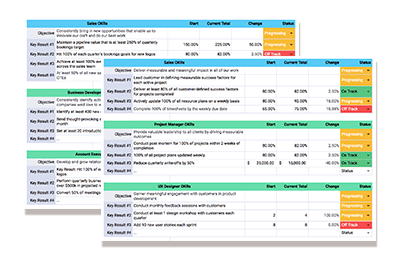
See a few of the OKR examples below or download our editable template for the complete list.
Objective: Significantly increase the enterprise value of the business
Key Result: Increase annual revenue by 40%
Key Result: Maintain at least an 80% repeat purchase rate
Key Result: Maintain a net positive employee growth & self actualization rate
Department-level OKR
OKR example for marketing
Objective: Build a brand that’s recognized as an industry leader in the craft
Key Result: Secure five earned media placements per quarter
Key Result: Publish or launch at least 5 forms of new content per month (e.g., thought leadership blog posts, white papers, events, or downloadable assets)
Key Result: Increase the number of marketing qualified leads by15% month-over-month
Key Result: Grow LinkedIn engagement by 200%
OKR example for sales
Objective: Consistently bring in new opportunities that enable us to innovate our craft and do our best work
Key Result: Maintain a pipeline value that is at least 250% of quarterly bookings target
Key Result: Hit 100% of each quarter’s bookings goals for new logos
Key Result: Achieve at least 100% average on-target earnings (OTE) across the sales team
Key Result: At least 50% of all new sales reps meet or exceed first-year on-target earnings (OTE)
OKR example for project management
Objective: Deliver measurable and meaningful impact in all of our work
Key Result: Lead customer in defining measurable success factors for each active project
Key Result: Deliver at least 80% of all customer-defined success factors for projects completed
Key Result: Actively update 100% of all resource plans on a weekly basis
Key Result: Complete 100% of timesheets by the weekly due date
OKR example for human resources
Objective: Support an environment where every employee has a chance to realize their potential
Key Result: Set objectives and key results that track to department goals for 100% active employees
Key Result: Check in with 100% of active employees each month on their performance to OKR goals
Key Result: Document career goals and development plan for 100% of active employees, including prioritized list of skills, capabilities, and experiences the employee aspires to develop
Key Result: Develop recruiting pipeline for top five in-demand roles
OKR example for finance
Objective: Profitably enable growth in revenue and continuous improvement in all aspects of the business
Key Result: 100% of active projects in backlog mapped to revenue forecast and measured to benchmark
Key Result: 100% of qualified deals in CRM mapped to revenue forecast and measured to benchmark
Key Result: Maintain revenue, costs, and cash flow forecast with 100% coverage of pipeline and backlog
Key Result: Maintain governance and data reporting for 100% of pipeline, backlog, and planned expenses
OKRs + Parallax = a winning combination
Goal-setting frameworks, including OKRs, are only as good as how well you can measure against them. If you don’t know what to measure — or how — the framework is useless. Once you know what to measure, your metrics are only useful if they’re based on accurate data. This is the downfall of most services companies when trying to implement OKRs. They think the framework sounds good in theory, but when it comes down to actually tracking the data needed to evaluate whether they’ve met their key results, they don’t know where to start.
It’s easy to see why this happens. Before Parallax, the tools for OKRs that digital agencies or software studios had available to them to measure and get visibility into data across the entire business (from the sales pipeline through project delivery) were old school and clunky. They didn’t work how these services companies needed them to.
Parallax was built to enable visibility, alignment, and accountability across the business. It supports the adoption of agency best practices and allows teams to track against agency benchmarks for metrics like utilization, project margin, and revenue. Like OKRs, Parallax fosters better and clearer communication between leadership and teams because it offers a level of transparency that’s otherwise difficult to achieve. Parallax is the measurement and resource planning tool that can sit on top of OKRs — helping everyone make smarter decisions that enable the company to grow.
Nearly all decisions that leaders of digital service companies make rely on accurate insights and forecasts — but to gather those insights and create those forecasts, they need the right people, the right processes, and (definitely) the right tools in place to bring it all together.
Today’s modern, strategic solutions can enable smooth, streamlined project management, resource planning, and forecasting for services organizations, allowing them to step away from their old school, often tedious approaches for collecting and monitoring business-critical insights. With the right tools in place, leaders can more easily elevate core practices and strategically drive the business forward by creating a cohesive, forward-looking view into how they operate.
So, where to turn? How can you know which solution is best for you?
There’s a lot of hype over platforms like Mavenlink (Kantata), a professional services automation (PSA) solution that centralizes operations and tools into one place to help services organizations optimize their project management and resource planning — but, in truth, every business will have a unique set of requirements and objectives that dictate which platform is right for them.
We dive into the different PSA platforms and other alternatives available today – some that may be even better than Mavenlink (Kantata) – so stick around and scroll down to learn more.
Table of Contents: Top Mavenlink (Kantata) Alternatives & Competitors
Why do you need an alternative to Mavenlink (Kantata)?
You need simple, straightforward pricing
If you’re a services company looking for sustainable growth, you should look for simple, straightforward pricing from your platform that doesn’t come with any surprises. When comparing solutions, ask how their pricing works. It’s not uncommon for all-in-one solutions, for example, to lead with one price to get folks in the door but then, to get their real value, it requires additional features, custom insights, and LOTS of training, which usually comes with additional, significant costs. There are platforms today that have fixed pricing for the duration of the project, access to all features, AND tied to billable resources where ROI is actually realized.
You need better planning capabilities
Some platforms have dashboards that don’t always enable the transparency and collaboration that teams want and need today. Services companies are looking for advanced resource planning and capacity forecasting capabilities that provide one source of truth by connecting to the CRM (sales pipeline) and Backlog (active projects). This provides a forward-looking shared view of performance and forecasts—because that’s how you plan. It’s all about less reactive planning and more proactive planning with a complete picture of the data, accessible in the right ways for all team members.
You need more integration options
Whenever possible, digital services companies want to avoid disruption to daily operations, that includes avoiding the need to rip and replace the tools and technologies their people have come to love and rely on. Many leaders today are seeking integration-first resource planning engines that can curate data from across the business for smarter decisions. Being able to leverage the tools you already have is certainly less disruptive, but it also costs less (even just considering hours) than adopting all new tools and allows for speed to value because you don’t need to learn a completely new toolset. Talk about a win-win-WIN!
You want more customization
Getting trapped in workflows that require never-ending clicks to get to the information needed can quickly turn into a nightmare for people trying to make real-time decisions. Being able to personalize and customize workflows to create a view that works for you, no matter your role, not only makes these solutions more enjoyable to use but an incredibly valuable time saver.
Key Features For A Strong Mavenlink (Kantata) Alternative
Integration-first
Digital services companies want a platform that connects and leverages the tools their teams are already using such as CRM and timesheet tools. A platform that integrates with top CRM platforms like Salesforce and HubSpot, for example, means sales team members get the same experience they’re used to, but their deal and project data will flow directly into the platform for better visibility for resource planning, which helps improve utilization, project margin, and growth.
Approachable, predictable pricing
Leaders need to have an understanding of a platform’s pricing structure straight away; they want tools without any hidden fees and that don’t charge for freelancers or non-billable users to use the tool. They want approachable, predictable pricing.
Rapid adoption and implementation
The implementation and adoption timelines for all-in-one tools can create massive disruptions to workflows and take months, even years, to get right. There are other tools that drive adoption and implementation in 90 days or less so that services organizations can unlock value from their investment quickly. (Yes, we’re talking about Parallax. )
Designed specifically for digital agencies and software development shops
Some platforms are designed for any type of company, while other platforms are designed specifically for digital agencies and software development shops. These businesses have different needs, unique workflows, and they move fast—and their tools need to do the same.
Top 5 Mavenlink (Kantata) Alternatives
1. Parallax
Parallax takes a different approach than monolithic, all-in-one PSA tools on the market. A purpose-built platform for digital services companies, specifically agencies and software development studios, Parallax leverages native integrations for the best-in-class tools that are already in use, all to deliver a forward-looking view into the business that enables better resource management, tighter operations, and stronger performance.
Parallax is a team of industry experts dedicated to removing friction points and solving business challenges for services companies, and the platform proves it — it provides shared visibility across the business, creating centralized insights to inform conversations on hiring, resource allocation, and much more. And the outcome? Everyone will be empowered to make more strategic decisions that can positively impact performance and forecasting and, ultimately, drive measurable growth.
5 reasons why Parallax is the best Mavenlink (Kantata) alternative
Rapid adoption: Parallax is committed to driving adoption and implementation in 90 days or less.
Additive to existing tech stack: Parallax works with your existing tools and technology and doesn’t disrupt any current workflows.
Automatic integrations: Parallax provides automatic integration of sales pipeline data to enable deeper scenario planning for leaders.
Predictable pricing: Parallax delivers a sense of pricing from the very first conversations, and there are no hidden fees for consulting or integrations. In other words, pricing is locked.
Ongoing consulting: Parallax keeps its champions connected to customers as often as they want, ensuring everyone is getting as much value as possible from the platform.
2. Wrike
Source: wrike.com/vy
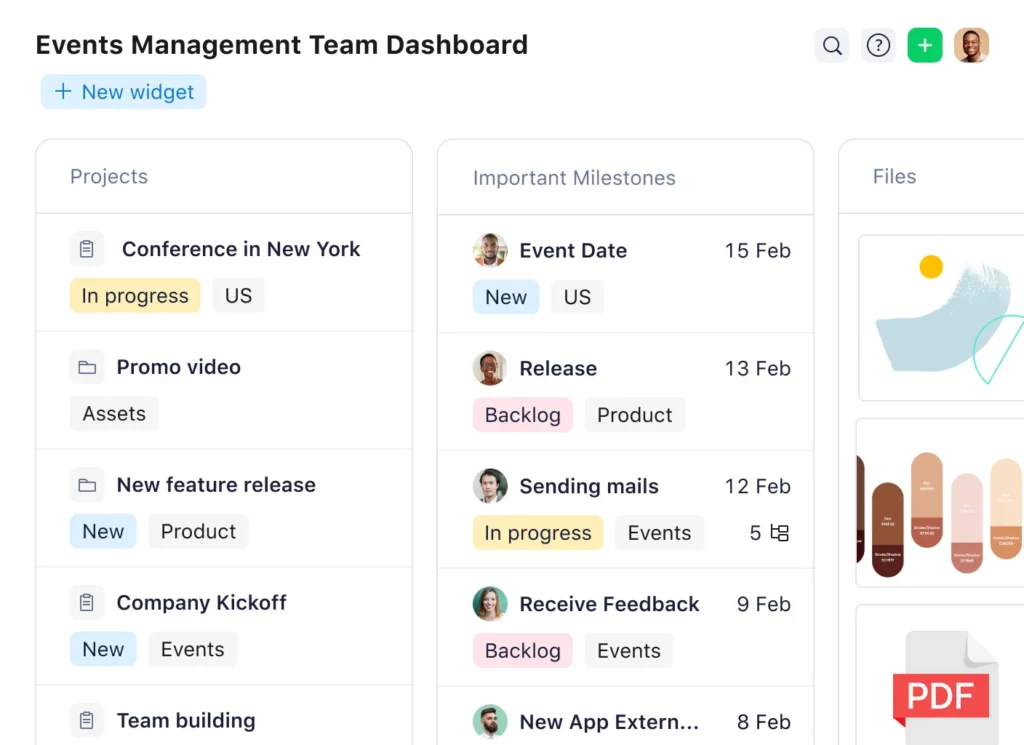
An easy-to-use tool, Wrike streamlines the internal project management and collaboration processes across teams. The platform focuses on the accomplishment of tasks rather than entire projects, offering workflow customization for companies to make processes more company- or industry-specific. It’s built to streamline proofing and reporting for marketing campaigns, to more easily develop creative assets and have them routed through approvals quickly, and to support project managers more easily track deadlines and deliver results. Wrike offers various plans with different pricing structures depending on the company’s needs.
3. monday.com
Source: monday.com
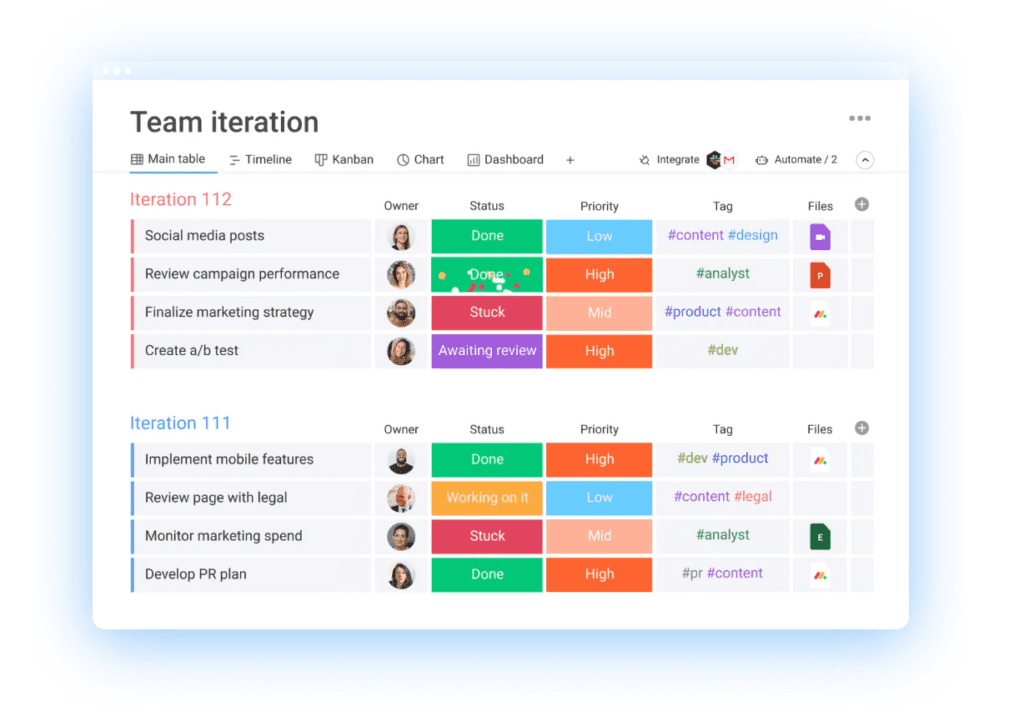
Monday is a comprehensive platform that’s designed to help teams manage their entire workflow within a single digital workspace. It’s a project management software that helps to increase transparency and visibility within day-to-day operations—it automates repetitive tasks, enhances team collaboration, and creates visibility in workflows. Teams can use the platform to manage all projects, but they can also use it as a CRM, to manage ad campaigns, or even to manage video production. Monday has various plans available depending on the company’s needs.
4. OpenAir
Source: openair.com/Resource-Management
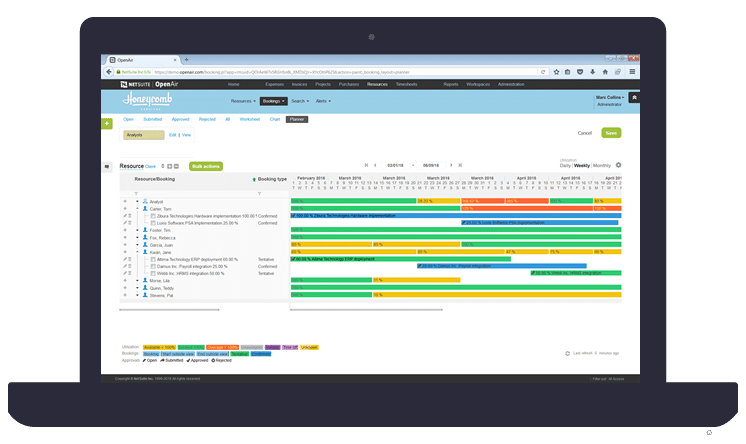
An extension of Oracle’s NetSuite ERP, OpenAir is an all-in-one cloud-based professional services automation platform for a wide array of services businesses. The platform provides integrated time tracking, project management, resource management, expense tracking, and invoicing – offering a single platform to run a services organization. OpenAir’s global customers all use the same version and codebase, with options for configurability and customization. Migration and adoption of this all-in-one ERP platform can often take 6-12 months to fully implement.
5. Teamwork
Source: teamwork.com
Teamwork is a project management tool focused on collaboration by providing key features such as instant chat. It makes resource management simple by providing a view of everything in one place for the team, clients, and freelancers. Teamwork has advanced features for time tracking, budgeting, and resource allocation. It integrates with companies’ other project applications, such as the CRM platform, and automates repetitive tasks with straightforward workflows.
Which Mavenlink (Kantata) Alternative will work best for you?
There’s a long list of stand-out applications and next-generation tools available today for digital services organizations, and choosing the one that’s best for your business can feel overwhelming. What’s important to remember in your search is that your project management and resource planning solution should be just as dynamic as your business. Your platform should grow as you grow, and it should work for you and with you, not against you—because thoughtful, strategic growth is hard enough.
Parallax was built specifically for digital services companies and informed by top industry leaders. We’re a driven team that’s ready to solve operational challenges and deliver better insights for purposeful growth… so, if you have questions, know that we’re here to help.
We’re always happy to chat and share more about the Parallax approach and help you decide whether it’s the right tool for you and your business.
Digital services shops are often guilty of a costly and frustrating mistake: overestimating peoples’ availability. Especially when it comes to holidays and time off, which have traditionally been tough to track in resource plans. Managers inadvertently overbook their teams with projects that their schedules can’t accommodate — or reporting looks skewed because people are taking (well-deserved) time off .
At Parallax, we understand the pressure resource planners and managers are under to create achievable plans aligned to available resources, and we know accurate data is required to get it right. And now, within our platform, users can improve their resource planning process with access to a more accurate, more intuitive capacity and utilization view that automatically accounts for holidays and paid time off. Take a look at what’s new:
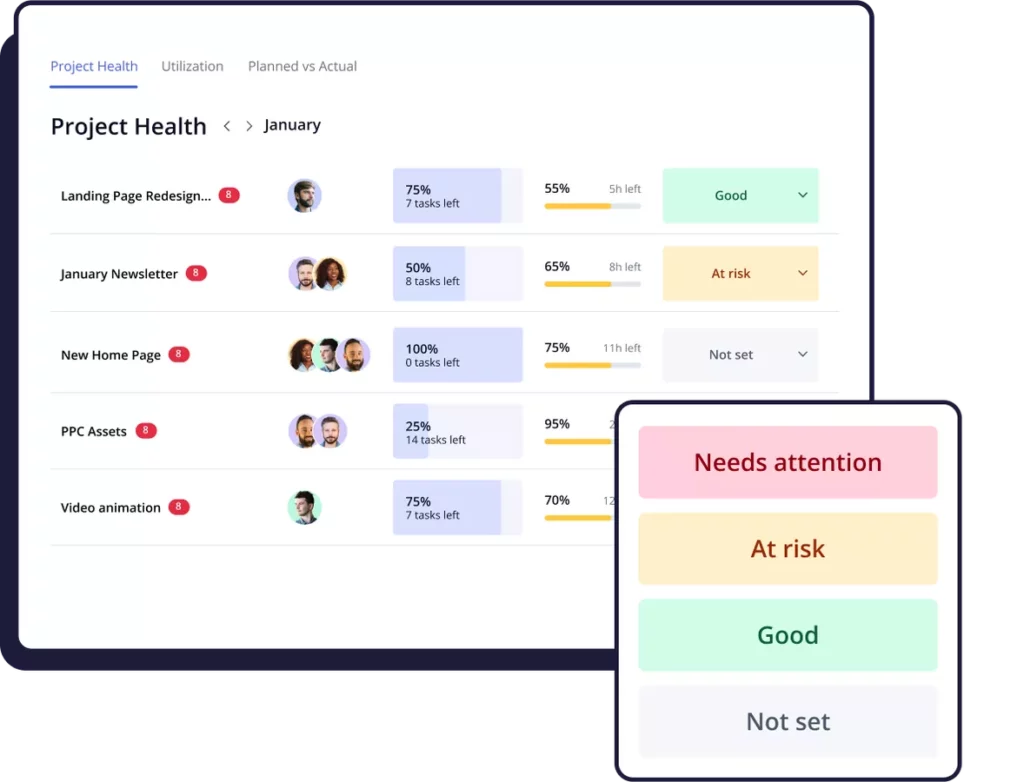
Better time off visibility: The Parallax resource planning tool (project shaper) allows for direct editing of time off in employee scheduling. Users can now improve their resource planning process with a complete view of employee schedules and available capacity.
Improved capacity forecasting: Parallax users can improve their capacity forecasting with a more accurate view of schedules and availability – including for part-time and non-traditional work schedules.
Updated alerts: Employee availability in the Parallax schedules is now calculated by subtracting time off and holidays from the base schedule, and alert thresholds have been updated to reflect the total available billable capacity. This will allow resource managers to keep billable capacity in line with project assignments and to see potential conflicts ahead of time.
So what? Why capability and utilization planning matters
Resource planners and project managers don’t always have full visibility into what an employee’s schedule is – and therefore, what their capacity and availability is to take on new (or more) work. It’s a missing link that makes planning peoples’ time a pretty tough exercise. Two of the biggest factors commonly missed from this view are time off and variable schedules. Managers are left to manually calculate these hours out, which is a tedious process and prone to human error.
New views in Parallax show a more accurate view into an individual’s capacity and utilization targets so that managers can 1) ensure they have the right staff in place to execute the work 2) hit their milestones for the project and 3) not burnout any team members. It’s a big win-win for both resource planners and billable team members and a solution to a long-standing issue in digital services and resource planning. Learn more about capacity and utilization by visiting support.getparallax.com.
Questions? Let’s chat
We love best practices around capacity planning and utilization reporting at Parallax, and we want to make it as easy and accurate as possible for our customers, too. When schedules are always influx and teams are constantly changing, having the right information in hand to better support your teams and better plan for your projects is a huge help. Don’t hesitate to reach out if you want help reviewing this new capacity planning in Parallax or if you have questions on how we approach capacity and utilization planning.
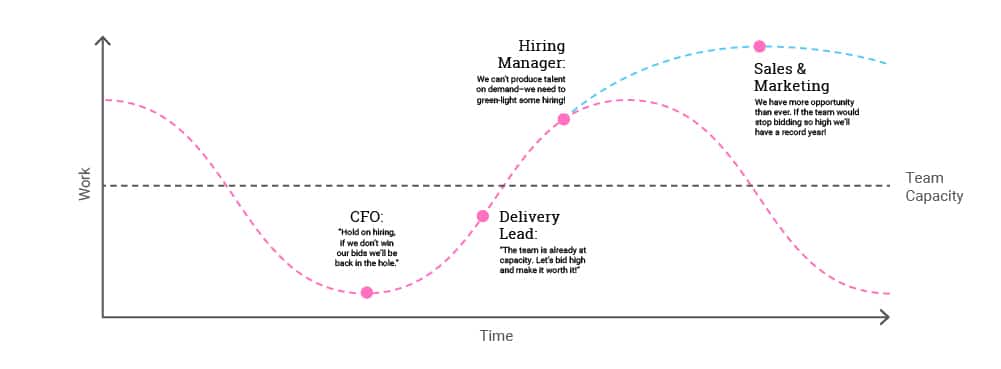
Every digital services company has basic operations in place to track their people, projects, sales, and revenue. What and how they’re tracking the various functions of the business is incredibly important, as that data helps to shape important strategic decisions. Too many companies today, however, have a disconnected array of tools that makes it time consuming to see across the business. Plus, separate tools and data streams lead to misaligned points of view on the state of the business – especially when it comes to managing resources. Decisions become reactive and rife with emotion and friction. People feel like they’re on a roller coaster of too much or not enough work – or too many or too few people to do that work!
To break this pattern, leaders need to remove the gut feelings related to strategic decision making and instead curate a shared perspective based on reliable data.
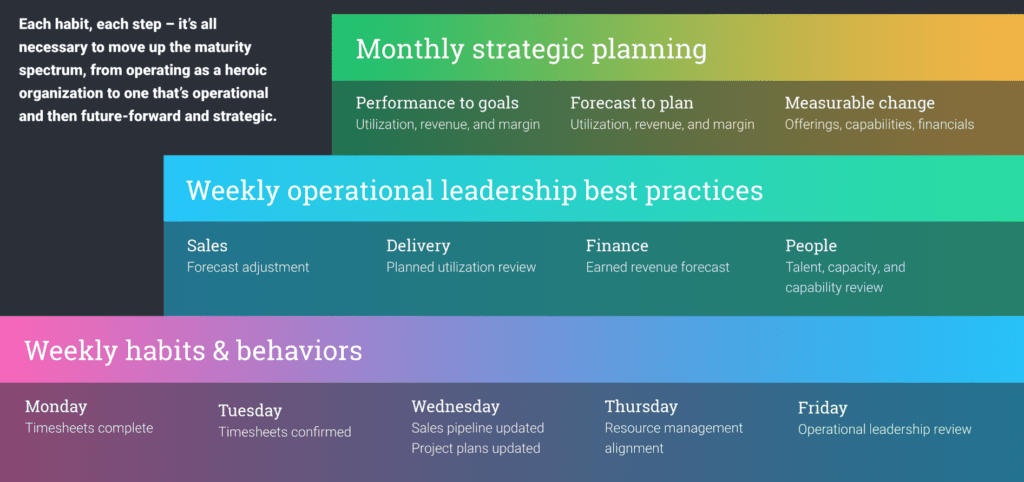
To drive that shared perspective, they need a measured and consistent cadence of inputs from the sales pipeline and project backlog, otherwise known as an operational cadence. By getting into an agreed-upon routine and cadence of reviewing and validating data across timekeeping, active project backlog, and sales pipeline systems, for example, organizations set themselves up for greater visibility into business performance – and we all know that greater visibility leads to happier, healthier, and more strategic operations.
Three operational cadence best practices
The good news is that it takes everyone to get onboard with only three foundational weekly habits: timesheets need to be completed by everyone, project plans need to be updated by the delivery teams, and the sales pipeline needs to be updated by the sales team:
Timesheet review and validation: Time-tracking accountability is the only opportunity digital services companies have to measure how good of a job they did in their last round of future prediction. The variances between what they thought would happen and what actually happened is only possible if they have accurate timesheets. That’s why, every week, everyone needs to have their timesheets completed and then those timesheets need to be reviewed and approved. We get it. Timesheets are a bummer, but don’t let perfection get in the way of progress! Even directionally accurate and regular entry is better than chasing people down for timesheets weeks or months after the work was completed!
Active project backlog review and validation: This habit represents the organization assessing what it thinks the future holds. It measures prior variances, makes adjustments accordingly, and has the best possible picture of what it thinks future capacity looks like. Then, teams can better communicate what resourcing needs they might have.
Sales pipeline review and grooming: This final habit requires the sales team to do essentially the same thing that the project teams are doing: providing insights as to what projects are going to close and the resulting impact to capacity by closing those projects. This allows the organization to more confidently forecast where it might need to be hiring.
Quick Wins Deliver Big Impact
Adopting a new process often comes with fears of change management, poor adoption, and too much effort, but it doesn’t have to be that way! Starting small and addressing basic operational outputs is a great way to find early wins and see immediate impact. And it doesn’t require months or years of high-effort, highly disruptive change that forces teams to adopt new tools or platforms.
At Parallax, we believe that small steps will lead to more mature operations around resource planning and forecasting. By simply introducing a rhythm to review timesheet and sales pipeline data – regularly and consistently – organizations will quickly discover ways to drive utilization, margin, and revenue.
Strategic growth starts with consistent operations
The best part? You’re not alone. At Parallax, we have tools and experts ready, willing, and able to help your organization embrace that next stage of growth. We’re here to guide you in establishing an operations cadence that works best for your business. And we’re here to support your pursuit of more value and insights out of the systems you already have by integrating them with our platform to create new insights that power innovative growth.
Digital services organizations have a mountain of priorities, from delivering projects to winning new business and growing the team. One critical component to doing all of this successfully is understanding the organization’s utilization benchmark, and planning the business to consistently hit that target.
Utilization – one of the two key metrics that matter most – is a measurement of a team member’s total time spent on billable projects versus the total billable time available. High utilization indicates that an organization is efficiently using the capacity of its team, meaning team members are meeting or exceeding their billability targets. Low utilization means team members aren’t meeting their billability targets and have available time to dedicate to projects.
Every organization is tasked with optimizing and stabilizing utilization. While pushing utilization higher and higher may seem great from a financial perspective, it is likely to result in team burnout and isn’t sustainable over time. When utilization drops too low, it means the team is losing out on additional revenue opportunity, which limits organizations from maximizing their financial potential. Having a clear view of utilization is important – in fact, it’s critical – to moving up the maturity model from a heroic organization to a strategic business.
Utilization 101: Let’s cover the basics
One big, consistent challenge for delivery leads is managing performance expectations from sales and leadership without overworking their teams or losing resources to attrition. They need to get ahead of issues like low or high utilization, and having a confident sense of current and future utilization is a key metric they need to watch. To do so, they need the right toolset and operations cadence to effectively track utilization and easily report across the organization. This is a tall order, especially if the business is unclear on its utilization benchmark.
When we say utilization benchmark, we’re talking about that “sweet spot.” Every organization will be different – and every role will be different – but generally, you should aim to be as close to 100% without burning people out. This typically translates to a target benchmark of around 75–85%, leaving room for team members to complete admin work, jump in on new or quick-turn projects as they arise, or support company-specific initiatives while still allocating the majority of their time to billable projects.
Importantly, leaders need to be careful not to put too much emphasis on utilization on a daily or weekly basis, as employees can become disengaged, dissatisfied, and resentful if leaders focus on just that. Team leads should encourage employees to focus on how best to deliver value while promoting the benefits of healthy utilization at all levels of the organization.
How to identify the root causes of utilization challenges
We already covered how to identify the root causes of poor margin performance (i.e., sales oversight, resourcing misalignment, unrealistic project expectations), now let’s do the same for utilization! Challenges with utilization can be attributed to one (or both) of two root causes:
Poor capacity planning and resource forecasting
Misalignment between resource management and delivery
Read on to dive further into the attributes of each root cause and how to successfully address them.
Root challenge #1: There’s a capacity planning and resource forecasting problem.
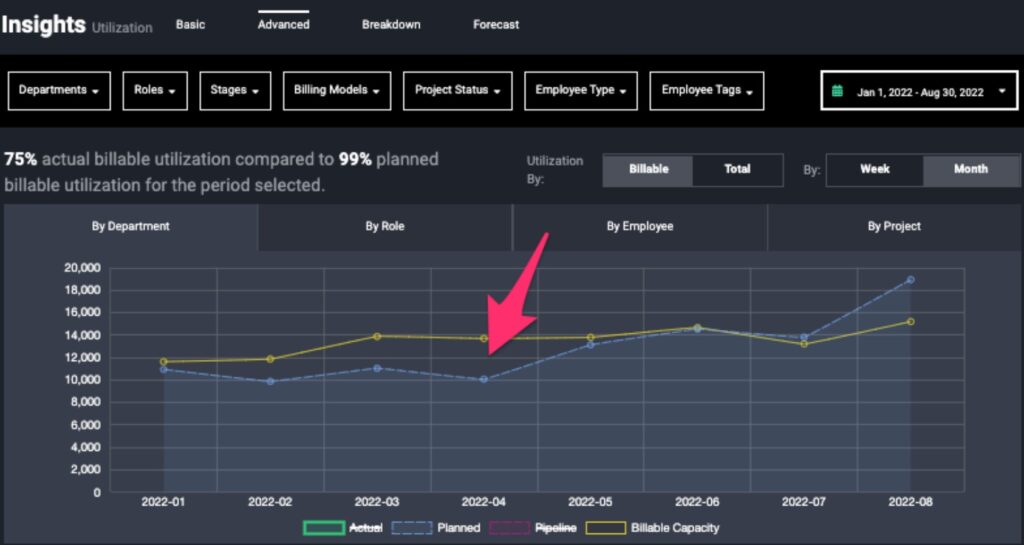
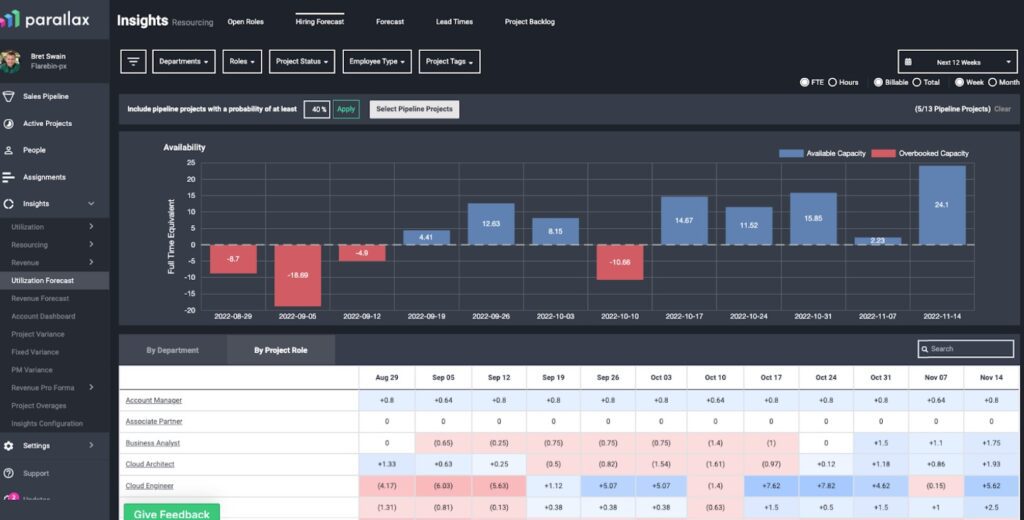
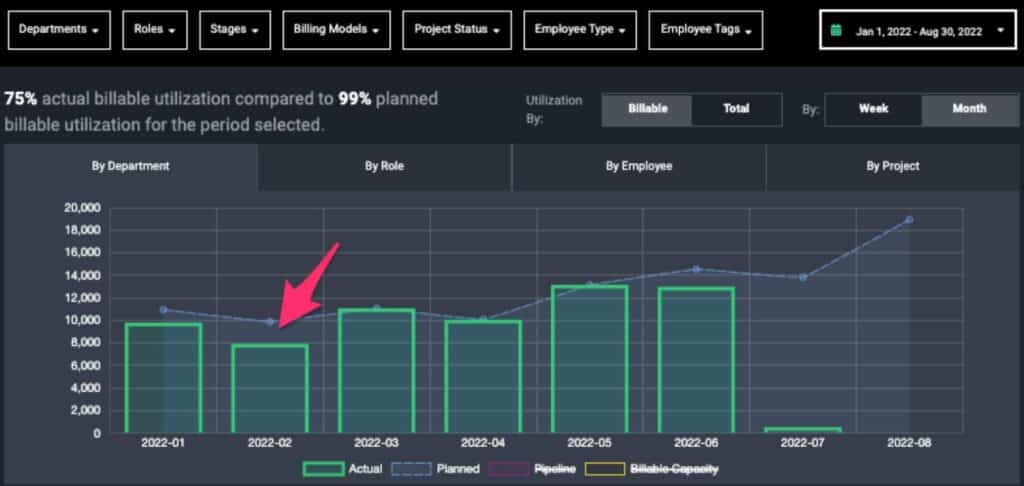
If your utilization rates are off, your supply versus demand forecasting process might be broken. In Parallax, this would appear in utilization reporting as such: If utilization is too low, you will have more billable capacity than you have work to deliver (blue line), and if it’s too high, you’ll have more work to deliver than billable capacity. This discrepancy will show up in analysis that compares total planned hours (blue line) versus total billable capacity (yellow line).
If digital services companies are consistently missing their utilization benchmark, one of these capacity and resource forecasting challenges could be the culprit:
The team closed less new business than expected (less demand).
Challenge: How can you get more precise with sales forecasting so that you can more accurately predict the demand for resources being generated by your pipeline? Are you losing deals because your prices are too high compared to your competitors? (This would likely show up in your performance metrics as high project margin % and low utilization.)
Solution: Sell more work to new customers. This is the most obvious fix if you have more capacity than you do work. When you bring in more projects, you’re going to increase demand for your team members, and your supply and demand will naturally start to more closely align.
The team forecasted less work with your existing customers than you expected (less demand).
Challenge: Forecasting business with your existing customers is just as important as it is for new business. You need a clear understanding of both to inform your resourcing plan and help balance utilization rates.
Solution: Proactively forecast work for your existing customers. By better forecasting work with your current customers, you’ll find a clearer picture of team capacity in the coming months.
Growing the team too quickly (too much supply).
Challenge: Maybe you have exactly as much business as you expected and you’re still experiencing lower than expected Utilization. Have you hired new team members recently? You may have hired additional team members too soon and inflated your capacity when you did not have the work forecasted to meet that capacity.
Solution: Use data-driven methodologies to facilitate conversations around growing the team. Within Parallax, you can easily access the data required to determine when and for which roles you need to hire.
Root challenge #2: The delivery team is delivering less work than was scoped and planned.
Alternatively, if there is no discrepancy between planned hours for the team and their total billable capacity, the issue likely might be that your delivery team is actualizing fewer hours than what was originally scoped and/or planned. Things like revenue leakage or even over-efficient delivery can cause utilization dips. This is what that looks like in Parallax:
And here are some reasons that could happen:
Revenue leakage.
Challenge: The team billed fewer hours than what was budgeted for a time and materials (T&M) project. In this scenario, the team is leaving money on the table, and utilization (as well as revenue) will suffer as a result.
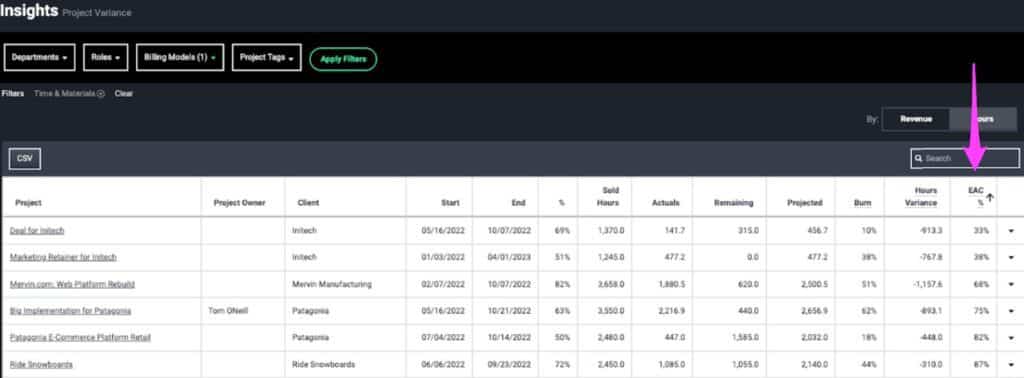
Solution: Burn Against Budget Projections, often referred to as “Estimate at Complete” (EAC), should be used to understand where the team is expected to land in terms of burn against budget for a project. For T&M projects, a low EAC means that the team is forecasted to burn fewer hours than expected and miss the opportunity to bill for pre-budgeted hours.
Efficient delivery (i.e., fixed-fee projects).
Challenge: The team is delivering fixed-fee projects more efficiently than expected, which is great! However, this is causing gaps in utilization that need to be addressed.
Solution: Keep the fixed-fee rates the same if the service is selling well, and decrease your hour estimates for those projects to reflect the effort that’s truly required. The team would then be able to spend that saved time working on other billable work and generating more revenue for the business.
Delayed delivery.
Challenge: Delayed projects prevented the team from working on the projects that they had originally planned to be working on.
Solution: Easier said than done … BUT, proactively identifying and mitigating project risks that might prevent your team from working on billable work during the expected time period can solve this challenge. Additionally, when this does happen and can’t be avoided, scan the rest of your projects to understand if those team members could instead bill to other projects during the project delay.
Closing the gap
Simply understanding the delta between planned work and total billable capacity gives confidence and power back to delivery team leads who are tasked with hitting this benchmark. Luckily, the right resourcing tool can make this entire process seamless and stress-free.
Before, with disparate spreadsheets and tracking processes, delivery leads could be left pulling utilization and capacity data from all over the place, which becomes a very manual, time-consuming process – and worse yet, it’s a reactive activity… if it’s done at all. With Parallax, tracking utilization becomes a proactive process as all necessary data already lives within the platform, thanks to our integration capabilities. Reporting becomes automated, and with just a few clicks, our customers can view real-time utilization metrics and forecasted utilization from one central source, and proactively address any expected speed bumps.
Let’s chat
We understand that there’s a lot that goes into tracking both utilization and project margin, and when economic uncertainty continues to rear its head, it can feel overwhelming. Not to worry, though—we’re here to help.
What’s key to remember is that you shouldn’t hyper-fixate on just one of these metrics, otherwise the other one will suffer. If you want to scale your business in a healthy way, we highly recommend prioritizing utilization AND project margin together, as they naturally fuel scalable revenue growth. It’s the flywheel for success with digital services organizations.
Reach out to learn more about how Parallax can empower you and your teams with the insights you need to navigate whatever comes your way.
Want to learn more about utilization? Check out our Founder and CEO Tom O’Neill’s previous blog! He covers best practices for tracking utilization metrics effectively, how forecasting can help better predict utilization and more.
Stop me if you’ve heard this one: Digital services companies like agencies and software development firms are constantly on the roller coaster of too much work or not enough – or too many people or too few to actually do that work! The common question becomes, “Should we just buy pizza and beg everyone to stay late for the next couple of weeks or pull the trigger and hire more help?!”
It’s a tough balancing act to bring in enough new business to hit targets, have just the right amount of talent on staff to deliver great results, and keep teams happy and engaged. And oscillating between the ebbs and flows of selling – and profitably delivering – digital services can become tense and messy when people are the product. It leads to reactive decision-making driven by emotion and instinct. We get it, and it’s a tension we see in services companies every day.
But it doesn’t have to be like this! And we believe data is the one ingredient necessary to reduce this volatility. The right data – visible across the organization – can remove emotion and bring more confidence in decision-making and forecasting. Because without accurate data, companies will continue to struggle to get a clear picture of what’s happening across the business, what’s coming down the pipeline, and what they need to do to balance the needs of the business with the needs of their people. Data informs better forecasting, which drives performance and stronger operations.
Here’s how to use data and accurate forecasting to exit the roller coaster.
1. Get visibility into the sales pipeline
Accurate forecasting all starts with visibility into the sales pipeline. Without visibility, there’s no way to know what’s being sold, whether those opportunities are enough to hit financial and operational targets (revenue, margin, utilization), and if you have the right people available to do the work. Sales pipeline data is necessary for all types of business planning, including sales forecasting, revenue forecasting, and resource management for digital services companies.
Unfortunately, most have sales pipeline data locked in the CRM, and it’s not easily shared or visible to operations and delivery teams. And if they don’t have visibility into key data points from the pipeline, they won’t have the necessary context for effective resource planning. They’ll struggle to predict whether they have enough or just the right number of people, in the right roles, to successfully deliver projects.
Plus, new opportunities rarely match resource availability. A lack of visibility often leads to a chaotic and reactive scramble of trying to get the work done with whoever is available at the time — regardless of whether those people are the best fit for the job. Shared sales pipeline data is the first step to creating forecasts that improve business performance.
2. Don’t let precision get in the way of accuracy (or at least consistency)
If sales pipeline visibility is fundamental to business forecasting, keeping the pipeline’s data up-to-date is critical for accurate forecasts. This is understandably challenging for most companies, because data management often falls behind other sales priorities, such as generating new business, serving existing clients well, and making sure the business development team is healthy.
The good news is that salespeople don’t need to put together detailed project or resource plans right away, but they can provide directionally correct data early on and add higher fidelity along the way. More insight is always more valuable than nothing at all. Enforcing data governance can feel like too strict of a requirement and a waste of time, but in reality, regularly updating CRM data will create accurate forecasts that will improve your business performance, making it easier to win good work, serve clients well, and promote positive communication and collaboration between teams.
We recommend adopting these sales operations best practices to keep CRM data current. Without accurate and up-to-date data, forecasts are, at best, inaccurate and useless; at worst, they could lead to the wrong decisions.
3. Implement professional services automation that enables smarter forecasting
Are you piecing together disparate data sources into spreadsheets and trying (but struggling) to use them for sales forecasting, resource planning, and revenue forecasting? One of the main reasons we built Parallax is because we know the pain of outgrowing homegrown tools and processes. If your spreadsheets or custom-built tools have become too clunky, cumbersome, and easily prone to breaking, it’s likely because you’ve reached a growth point where you can’t just wing it and count on your team’s gut instinct and brilliance. You need visibility into real-time data and up-to-date forecasts. But big, clunky tools and ERPs involve too much change and adoption.
Parallax brings your tools and data into one place, so you can create a shared perspective on performance, drive better operations, and leverage data for strategic decision-making. Our integrations-first philosophy means less disruption for sales and delivery teams. They can keep using best-in-class CRM or project management tools. But Parallax augments these great platforms with reporting and insights built specifically to help services companies drive smarter operations, unlock better forecasting, and improve business performance.
4. Forecast against targets and compare to benchmarks
Once your data is in one place and you’ve adopted the habits needed to keep everything accurate and reliable, you can unlock the power of real-time forecasts. These forecasts help leaders make smart, impactful decisions in support of their business and people. Use the software you chose for real-time forecasting and resource planning (we’re completely unbiased about which one)to see how you’re performing on a variety of financial and operational metrics. Compare your performance against industry benchmarks and adopt the best practices necessary to optimize performance.
5. Make informed decisions that optimize operations and drive business performance
Now that your teams have access to accurate, real-time forecasts, it’s time to use that information to make decisions driven by data rather than emotion. Accurate and reliable forecasts allow for more proactive decision-making, giving your team time to staff projects in a way that allows for growth opportunities for employees and healthy resource management.
You might want to build forecasts that help you:
Inform resource planning, making it easier to decide when it makes sense to hire (and who to hire) to ensure project success.
Identify dips in the sales pipeline so you can act accordingly to generate new opportunities.
Adjust in-progress project plans based on how you’re performing on key metrics.
When you have confidence in your forecasts, your team can make more confident decisions and investments in the future — avoiding the chaotic scramble of the “too much work, not enough work” roller coaster.
Scale the magic that makes you great
You’ve reached a point where accurate data and forecasting are vital to future growth when you can no longer rely on gut instinct to make decisions. It’s a bittersweet problem, but adopting best practices related to resource planning, forecasting, and data governance gives everyone more time to focus on their craft and scale the magic that makes your company great.
At this growth point, your teams must break free from siloed thinking and create a shared perspective. When your team leads can get quick access to accurate forecasting, they can make strategic decisions supporting the business and its people. To learn more about how Parallax brings together data from across the business for better planning and forecasting, get in touch for an assessment of where you’re at and where you want to be.