
A lot of operational frustration in agencies is not caused by bad tools.
It is caused by good tools being asked to do work they were never designed to do.
That is when you see teams forcing a project tool to behave like a planning system.
Or forcing a CRM to answer delivery questions.
Or forcing finance reporting to become a forecasting process.
The tool is fine. The job is wrong.
This post is a practical way to spot those mismatches, understand why they keep happening, and fix them without turning your stack into a bigger mess.
Quick takeaways
- Tool frustration often means a role is trying to make decisions without the right kind of visibility.
- Execution tools track work. They do not reliably forecast tradeoffs across projects.
- CRM tracks deals. It does not know delivery capacity or timing constraints.
- Finance reporting explains what happened. It does not steer what happens next.
- If you name the job clearly, you can choose the right system behavior, often without replacing everything.
Definitions
Execution or Delivery tool
A tool designed to manage work already in motion, tasks, owners, due dates, and delivery coordination.
Planning tool or planning layer
A system built for forward-looking decisions that connect demand, capacity, timing, and tradeoffs.
System of record
The source you trust as the official answer for a specific category of truth, pipeline, time, billing, staffing, delivery status.
Decision layer
The cross-functional view leaders need to make commitments without guessing.
The mismatch pattern
Here is the pattern that shows up over and over.
A team needs to answer a question.
The existing system does not answer it in a clean way.
So someone builds a workaround.
The workaround becomes a new process.
The process becomes a dependency.
Then the tool gets blamed for not being flexible enough.
This is not a team failure. It is a category mismatch.
Check out Why Spreadsheets Keep Showing Up in Tech Stacks
Four common examples in agencies
1) Using project management for resource forecasting
What the team is trying to do
Predict whether the agency can take on work, staff upcoming projects, and avoid double booking.
Why the tool feels like it should work
It already contains projects, tasks, and a schedule.
Why it usually breaks
Project tools are designed around what is planned inside a project.
Resource forecasting is designed around what is possible across all projects, plus pipeline, plus real-life volatility.
The tool can show a schedule, but it struggles to answer:
- What happens if we move this start date?
- Which roles are constrained six weeks out?
- If we accept this deal, what is the tradeoff?
- Where is double booking hiding across multiple teams?
The symptom
Spreadsheets appear to connect the dots.
2) Using CRM for delivery commitments
What the team is trying to do
Use pipeline and stages to predict start dates, staffing needs, and revenue timing.
Why the tool feels like it should work
Deals and dates live there.
Why it usually breaks
CRM is optimistic by design. That is not a criticism. It’s the job.
But delivery reality has constraints.
- Roles are limited
- People are already committed
- Timelines shift
- Scope changes
The CRM can tell you the sales story. It cannot tell you whether that story is compatible with capacity.
The symptom
Start dates get promised and then renegotiated after the deal closes.
3) Using finance reporting as a forecasting process
What the team is trying to do
Understand margin risk and profitability early enough to act.
Why the tool feels like it should work
Finance reports show margin, revenue, costs.
Why it usually breaks
Finance reporting is historical.
It answers what happened. Leaders need to know what is about to happen.
Forecasting margin risk requires:
- current actuals that are close enough to trust
- staffing plans for the next six to twelve weeks
- scope and timeline shifts
- change request volume
The symptom
Margin surprises show up when it is too late to change the plan.
4) Using a PSA as the only decision system
What the team is trying to do
Use one system to manage staffing, time, billing, and forecasting.
Why it feels like it should work
It touches many parts of the business.
Why it usually breaks
Many PSAs do parts of this well, but decision-making still requires cross-team alignment.
Even when the data exists, the workflow for making tradeoffs is often missing.
The symptom
The PSA becomes a reporting tool, while planning decisions happen elsewhere.
How to diagnose mismatches quickly
Here is the fastest way to spot when a good tool is being used for the wrong job.
Step 1) Start with the questions
List the recurring questions that create stress.
Examples
- Can we take this work without breaking delivery?
- Who is overloaded in the next six weeks?
- What work is at margin risk and why?
- When should we hire versus contract?
- What is the tradeoff if we pull forward a start date?
Step 2) Identify the tool being used to answer each question
Often, the same tool gets forced into answering multiple unrelated categories.
Step 3) Look for mismatch symptoms
Mismatch symptoms include
- manual exports and copy-paste
- multiple versions of truth
- heavy reliance on one person to reconcile data
- long meetings that end with no decisions
- changes made in conversation but not reflected in the plan
If you see these patterns, the tool is not the problem.
What you are asking it to do is wrong.
What to do about it
This does not require a rebuild of your whole stack.
It requires naming the jobs and making sure the right systems own each one.
Here is the simplest approach.
1) Declare systems of record
This reduces arguments.
Examples
- CRM owns pipeline truth
- Project tool owns work status
- PSA or time tool owns actuals
- Finance owns invoicing and financial truth
Then you identify what is missing
The decision layer.
2) Add or build a planning layer
The planning layer connects the dots leaders need.
It is designed to answer
- demand by confidence
- capacity by role
- timing and tradeoffs
- what happens if we shift dates
- where margin risk is building
This layer can be a dedicated system or a structured process backed by the right views.
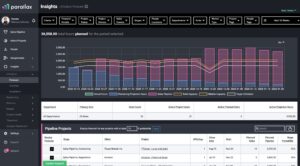
The point is that it must be forward-looking and resilient to change.
3) Create a weekly decision cadence
Even the best system fails without a cadence.
A weekly rhythm with clear inputs and decision rules turns planning into an operating habit.
📕 Check out the Resource Management Best Practices guide for meeting cadence and agenda templates.
4) Reduce side door work
Most tool mismatch pain is amplified by uncontrolled change requests.
If work changes scope, timing, or staffing, it needs one intake path and an explicit tradeoff.
Copy and paste templates
Tool mismatch worksheet
Question we need to answer
Who asks it and why?
What tool we use today?
What breaks or feels painful?
Workarounds we rely on?
What job this question really belongs to?
What system should own it?
What cadence should support it?
Phrase that keeps it calm
We are using a good tool for a job it was not designed to do. Let’s name the job, then decide what should own it.
Checklist: Signs you are in tool mismatch mode
- The tool works fine for its core job, but feels terrible for planning
- People keep asking for custom fields, reports, or views to force it into a new role
- Spreadsheets keep appearing as glue
- Meetings are long because the data is not aligned
- Decisions are made but the source of truth is never updated
- Ops depends on heroic upkeep to keep plans current
If you checked more than two, you are likely dealing with job mismatch, not tool failure.
FAQ
Does this mean we chose the wrong tools?
Not necessarily. Most stacks cover execution and financial reporting well. The gap is usually a planning and decision layer.
Why does this show up more as agencies grow?
Because volatility increases. More projects, more roles, more overlap, more change requests. The cracks show up faster.
What is the fastest first move?
List the recurring questions leadership needs answered weekly, then map them to systems of record. The gaps will be obvious.
Do we need to replace our CRM or project tool?
Usually no. Most teams keep those and add a planning layer that connects the dots.
Next step
If you want a practical operating rhythm that reduces mismatch pain, start with the Resource Management Best Practices guide.
That guide lays out the weekly cadence, forecasting approach, and decision routines that keep planning decisions grounded in reality.
Callum Broaderick
Vice President
Parallax